

ProgressMagic
Fcode Labs · Productivity · Marketing
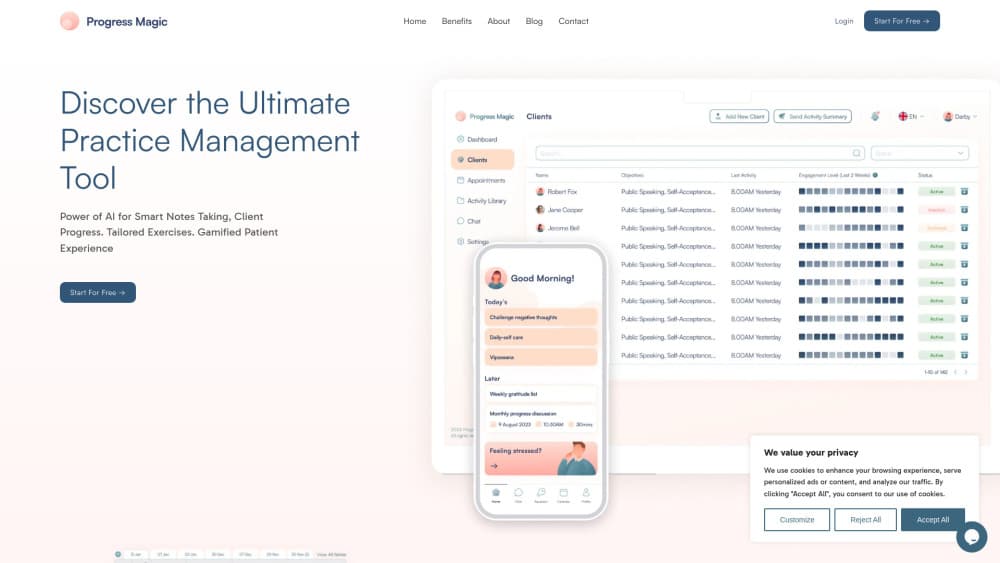
ProgressMagic is AI practice management software for therapists and coaches. It writes session notes, builds client homework and goals, and tracks progress through a gamified client app.
About ProgressMagic
What Is ProgressMagic
ProgressMagic is a web and mobile platform from Fcode Labs that bundles the admin side of a therapy or coaching practice with AI tools for the clinical side. Scheduling, payments, client records and a practice website sit in one place. Session notes, treatment goals and between-session exercises come out of the same client history.
The product targets independent therapists, life coaches and small clinics that don't have an assistant. The appeal is straightforward: less time on paperwork, more follow-through from clients. The company says the platform is built for HIPAA, GDPR and PDPA compliance, which matters if you see clients in the US, Europe or Singapore.
Limits are worth knowing up front. ProgressMagic is a small vendor next to established EHR suites, its integration surface is thin, and the AI output still needs a clinician's review before it goes into a record.
Getting Started
- Create an account at app.progressmagic.com and pick the free tier to test the workflow.
- Add your practice details, then set your services, session length and rates.
- Invite a client or two and connect them to the mobile app so they can see homework and appointments.
- Run a session with AI note capture on, review the draft, and adjust the generated goals before you save them.
- Turn on online booking and payments once the notes and homework flow feels right.
Product Information
A quick look at ProgressMagic's pricing, supported platforms, and performance.
Best for
The users, tasks, and scenarios where this tool fits best.
Users
- Solo therapists
- Life and business coaches
- Small clinics
Tasks
- Writing session notes
- Assigning homework
- Reviewing progress
- Handling scheduling and billing
Scenarios
- A private practice with no front desk, where the therapist is also the administrator.
- A coaching business that needs a marketing site and online booking without a separate web developer.
- A clinic moving off paper notes and spreadsheets, where one tool has to cover records, payments and client follow-up.
Key features
AI Session Notes
ProgressMagic records a session and turns the conversation into a structured note you can edit. The point is to keep your attention on the client instead of the keyboard. You still check the draft for accuracy before it becomes part of the record.
AI Goal and Homework Builder
The platform suggests treatment goals and between-session exercises based on what came up in the session. You can edit the wording, set a due date and push the task to the client's app. Homework lands next to the note that inspired it, which makes the next session easier to pick up.
Progress Tracking and Reports
Session data rolls into charts on attendance, mood and homework completion. Reports give you something concrete to discuss at a check-in, and they help spot a client who is drifting before a crisis. This progress tracking app view is the part clients see most often.
Gamified Client App
Clients get a mobile app with points, streaks and reminders for the exercises you assign. The client homework app is designed to make follow-through feel less like a chore. Engagement data flows back to your dashboard, so you can tell who is actually doing the work.
Scheduling, Payments and Billing
Clients book, reschedule and pay through a portal, and the calendar stays in sync with your session list. It works like most therapist scheduling software, with a shareable booking link and automatic reminders. Invoices and payment records sit beside the client file, which cuts down on month-end chasing. Automated reminders help reduce no-shows without extra admin time.
Custom Practice Website
Every plan includes a customizable marketing site for your practice, built to be found in search results. You pick the layout and copy, publish, and connect bookings to the same calendar. It saves a separate web project for coaches who are just getting online.
Pros and cons
Pros
- Every feature is available on every plan, and the lifetime free tier for three active users is no exception.
- Notes, goals and homework share one client record, so you don't retype the same context in three tools.
- The client app gives homework a visible scoreboard, which helps with accountability between sessions.
- Scheduling, payments and records live in one therapy practice management dashboard.
- The company states HIPAA, GDPR and PDPA compliance, which covers common cross-border practices.
Cons
- An active client counts anyone onboarded, booked or active in the app that month, so occasional clients still eat into your plan limit.
- No public API is documented, which rules out custom integrations with an existing EHR or data warehouse.
- AI notes and goals need a clinician's review, so the time saving is real but not hands-off.
- Third-party reviews and training material are thin compared with older practice management suites.
Frequently asked questions
It handles the admin and follow-up side of a therapy or coaching practice: AI session notes, client homework, progress reports, scheduling, payments and a practice website. The client app carries the between-session work.
Related content
Explore related tools, skills, and articles for ProgressMagic.
ProgressMagic Alternatives

Base Code
Base44 (Wix) · Coding · ProductivityBase Code is a shared cloud development environment from Base44. Teammates describe changes to an existing GitHub codebase in chat, preview them live and send them back as pull requests.

Knocket
Knocket (Tencent RTC team) · Productivity · Business · ChatbotKnocket is a free live chat and contact page tool that lets visitors message you from your website, app, or a shareable link, with every reply handled from Telegram or one inbox.

FloorGen
Vinit Kumar (FloorGen) · Productivity · China AIFloorGen is a browser-based floor plan maker that turns a sentence or a sketch into an editable 2D plan and a 3D walkthrough. Export to PDF, DXF or video, and draw without an account.