
Prompt Builder - Promptogy
Promptogy · Image
Promptogy is a free browser based AI prompt generator for image models. It turns a short idea into a detailed Midjourney or Stable Diffusion prompt and keeps every result in a prompt library.
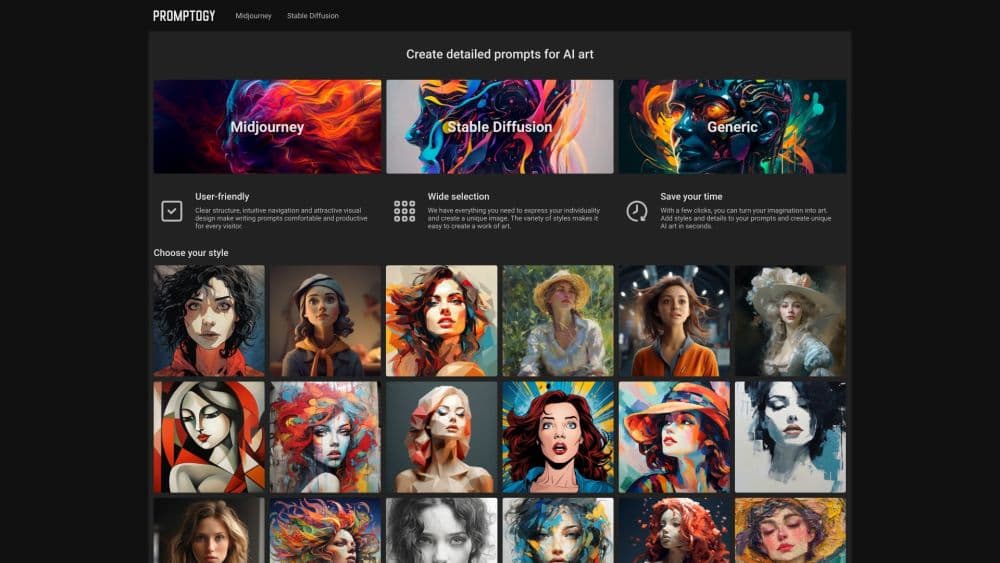
About Prompt Builder - Promptogy
What Is Promptogy
Promptogy is a prompt builder for people who already generate images and are tired of retyping the same wording. You describe the subject, pick a look, and the tool assembles a full prompt string in the syntax that Midjourney or Stable Diffusion expects. It doesn't render anything itself. The output is text you paste into Discord or a local install.
The problem it solves is memory, not creativity. Most people find one good style combination and then lose it somewhere in a Discord history or a text file called prompts_final.txt. Promptogy treats each prompt as a saved object you can name, edit and pull up later. That turns past luck into a repeatable setup.
The limits are worth knowing up front. It focuses on image prompts, so it won't help with ChatGPT or Claude instructions. There's no API, no team workspace and no built in image generation. It's a single player tool for one job.
Getting Started
- Open promptogy.com in any modern browser. The basic builders work without an account.
- Pick the model you're generating with, either Midjourney or Stable Diffusion.
- Type the subject first, then add lighting, camera angle and style details from the grid.
- Copy the assembled prompt into Discord or your local interface and run it.
- Save the prompt to your library with a short name before you start the next one.
Product Information
A quick look at Prompt Builder - Promptogy's pricing, supported platforms, and performance.
Best for
The users, tasks, and scenarios where this tool fits best.
Users
- People new to AI art
- Bloggers and social media marketers
- Hobbyists who test styles constantly
- Students learning prompt structure
Tasks
- Writing a Midjourney prompt from a rough idea
- Moving a look from Midjourney to Stable Diffusion
- Keeping a reusable set of AI art prompts
- Comparing style keywords
Scenarios
- Producing daily images for a blog or a shop listing
- Recreating a look from six weeks ago
- Learning what a model responds to
Key features
A Visual Style Grid Instead of Keyword Guessing
The home screen is a grid of thumbnails, each tied to a style such as pencil drawing, low poly or plein air. Clicking one adds the matching keywords to your prompt. For anyone who knows the vibe but not the term, this removes the hardest part of writing an AI image prompt tool entry from scratch.
Separate Builders for Midjourney and Stable Diffusion
Midjourney and Stable Diffusion expect different syntax, different weight notation and different parameter flags. Promptogy runs a Midjourney prompt generator and a Stable Diffusion builder side by side, so a Stable Diffusion prompt doesn't carry Midjourney flags that the model ignores. This is the detail that separates it from a plain text box.
A Prompt Library You Can Search and Reuse
Every saved prompt gets a name, and you can filter the list later. The value shows up weeks in, when a client asks for the same moody portrait look and you can pull the exact wording instead of approximating it. It's the closest thing here to a proper prompt manager.
Editing and Remixing a Saved Prompt
Saved entries stay editable. You change the subject, keep the style block, and copy out a fresh prompt. That one habit replaces most of the trial and error people do when they start from a blank field.
Copy Ready Output With the Right Syntax
The builder returns a single string with the commas, weights and parameters already in place. You copy once and paste once. No stitching together fragments from three tabs.
No Account Wall on the Basic Builders
You can open a builder and start without signing up. Saving prompts needs a login, which is reasonable since the library is tied to a person. The free tier covers the whole tool, so there's no paid gate to test first.
Pros and cons
Pros
- Free to use, with no subscription and no credit limit on prompt building.
- The style grid shortens the gap between an idea and usable AI art prompts.
- Model specific builders handle the syntax differences most people get wrong.
- The library makes old prompts reusable, which saves more time than any single feature.
Cons
- Image prompts only. If you write instructions for text models, this tool has nothing for you.
- No API or team sharing, so agencies can't standardize prompts across a group.
- Preset styles can pull different subjects toward a similar look, which shows up in long portfolios.
Frequently asked questions
It builds and stores prompts for AI image generators. You describe a subject, add a style, and copy the finished prompt into Midjourney, Stable Diffusion or a similar model.
Related content
Explore related tools, skills, and articles for Prompt Builder - Promptogy.
Prompt Builder - Promptogy Alternatives

Google EmbeddingGemma 2
Google DeepMind · Writing · Image · CodingGoogle EmbeddingGemma 2 is a 740M-parameter open model that turns text, code, images, audio, and video frames into vectors in one 768-dimension space, running on phones and laptops.

Tractionwave
TractionWave · Image · MarketingTractionWave is an AI attention heatmap tool for static ads. Upload a PNG or JPG and it returns predicted attention, ranked hotspots, and fixes before you spend budget.

Imejis.io
Imejis.io · Image · MarketingImejis.io is an AI design studio for agents and marketing teams. Describe an image in plain words, and it writes the copy, builds the layout, reflows it to every size, then exports a finished file.