

PromptoMANIA
PromptoMANIA · Image · Prompts
PromptoMANIA is a free AI prompt builder for image, video, 3D and audio models. Pick a model, choose style, lighting and camera options, then copy the finished prompt.
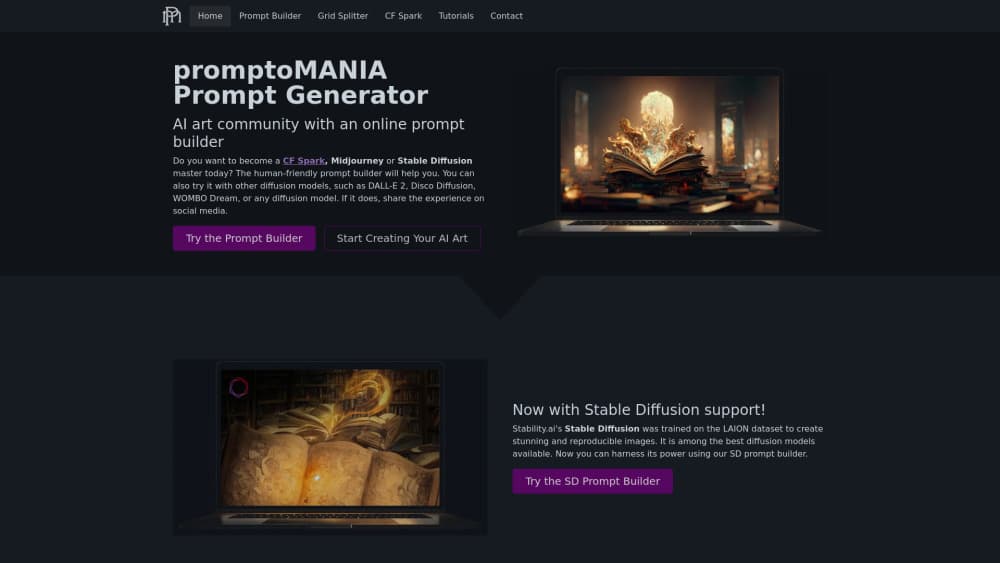
About PromptoMANIA
What Is PromptoMANIA
PromptoMANIA is a free AI prompt generator that writes prompts for you. You pick a model from a list that runs from Midjourney and DALL·E to FLUX, Stable Diffusion, Sora and Suno, then fill in the scene through menus instead of typing code. The builder stitches your choices into one prompt with the right syntax for that model. Copy it, share it as a link, or send it to Creative Fabrica Studio to generate straight away.
The tool grew out of a simple problem. Every model wants prompts written a different way. Midjourney takes parameters like --ar and --no, Stable Diffusion wants a separate negative field, and video models expect camera movement spelled out. Remembering all of that is a second job on top of the actual creative work. A prompt engineering tool that shows the options as buttons removes the memorizing, and a free prompt generator that explains itself teaches you the syntax along the way.
Three things you should know before relying on it. PromptoMANIA doesn't generate any images itself, so you still need an account on whichever model you pick. The model directory leans toward image work, with video, 3D and audio covered more thinly. And the site is free, which means no support contract and no guarantee that every model page tracks the newest release.
Getting Started
- Open promptomania.com in a browser. No account is needed to build a prompt.
- Pick a model in the prompt builder, for example Midjourney v6.1 for stylized art or FLUX 1.1 Pro for photorealism.
- Choose your options: subject, style, lighting, composition, mood, color palette and camera angle. Each click adds a phrase to the prompt.
- Read the assembled prompt, tweak any wording by hand, then copy it or share the URL with a teammate.
- Paste it into your model of choice, or hit Open Studio to run it inside Creative Fabrica Studio.
Product Information
A quick look at PromptoMANIA's pricing, supported platforms, and performance.
Best for
The users, tasks, and scenarios where this tool fits best.
Users
- Beginners writing their first AI image prompt
- Midjourney users tired of syntax errors
- Designers and marketers working to a brief
- Teachers and students explaining prompt structure
Tasks
- Building a reusable image prompt
- Porting one idea between models
- Writing a video prompt with camera directions
- Drafting audio and 3D prompts
Scenarios
- A small studio needs ten product shots in one visual style by Friday.
- A freelance designer has to hand a client a prompt file they can run themselves.
- A social media team keeps a shared library of prompts for recurring post formats.
Key features
Visual Prompt Builder
The core of the site. You select a model first, and the option set changes to match what that model understands. Image models get style, lighting, lens and composition controls. Video models get shot type and camera movement. Every selection is written into a single prompt string that you can copy in one click.
Model Specific Syntax
A prompt that sings in Midjourney can fall flat in Stable Diffusion. PromptoMANIA handles the difference. It writes Midjourney parameters, negative prompts and weight notation in each model's own format, so the same set of choices produces a prompt that runs without edits. That's the main reason to use a prompt generator instead of a text file of saved phrases.
Model Directory
The AI model directory groups models by maker, so you can jump from ChatGPT and Gemini to Midjourney, FLUX or Stable Diffusion and read what each one is good at. Entries note the modality, the typical use cases, and in some cases the model's known strengths like text rendering or prompt adherence. It's a browsing aid, not a benchmark.
Prompt Library by Category
Ready made prompts are sorted into logo, portrait, scenery and typography collections. Each one is a working example you can open in the builder and change. For anyone who has stared at a blank prompt field, starting from a filled one is faster than starting from nothing.
Share and Open in Studio
A finished prompt can be copied as text or shared as a URL that keeps all your settings. The Open Studio button hands the prompt to Creative Fabrica Studio, which runs the generation and sells its own subscription from $3.99 a month. PromptoMANIA itself stays free either way.
Guides and Model Notes
Short guides explain how parameters work, how to get photorealistic output, and how to fix common artifacts. They sit next to the tools rather than in a separate blog, so you can read the theory and try it without leaving the page.
Pros and cons
Pros
- No account, no payment, no generation credits needed to build a prompt.
- Model specific syntax is handled for you, which cuts the failed attempts in Discord and ComfyUI.
- Covers image, video, 3D and audio in one place, so a project that spans modalities doesn't need four different tools.
- Shareable prompt links make handoff to a client or teammate simple.
Cons
- It writes prompts and nothing else. You still pay for whichever model actually renders the image or clip.
- Video, 3D and audio builders are thinner than the image side, with fewer options per model.
- Model pages can lag behind new releases, so a prompt built for an older version may need manual updating.
- No public API, which rules out automating prompt generation inside your own pipeline.
Frequently asked questions
It builds AI prompts through a visual interface. Choose a model, click through options for subject, style, lighting and camera, and the site returns a finished prompt written in that model's syntax. It doesn't generate images itself.
Related content
Explore related tools, skills, and articles for PromptoMANIA.
PromptoMANIA Alternatives

Google EmbeddingGemma 2
Google DeepMind · Writing · Image · CodingGoogle EmbeddingGemma 2 is a 740M-parameter open model that turns text, code, images, audio, and video frames into vectors in one 768-dimension space, running on phones and laptops.

Tractionwave
TractionWave · Image · MarketingTractionWave is an AI attention heatmap tool for static ads. Upload a PNG or JPG and it returns predicted attention, ranked hotspots, and fixes before you spend budget.

Imejis.io
Imejis.io · Image · MarketingImejis.io is an AI design studio for agents and marketing teams. Describe an image in plain words, and it writes the copy, builds the layout, reflows it to every size, then exports a finished file.