

Prookie-AI Photo & Cartoon
Xianghe Interactive Limited · Image
Prookie-AI Photo & Cartoon is an iPhone AI photo editor for hairstyle try-on, hair color changes, face shape analysis, and cartoon filters.
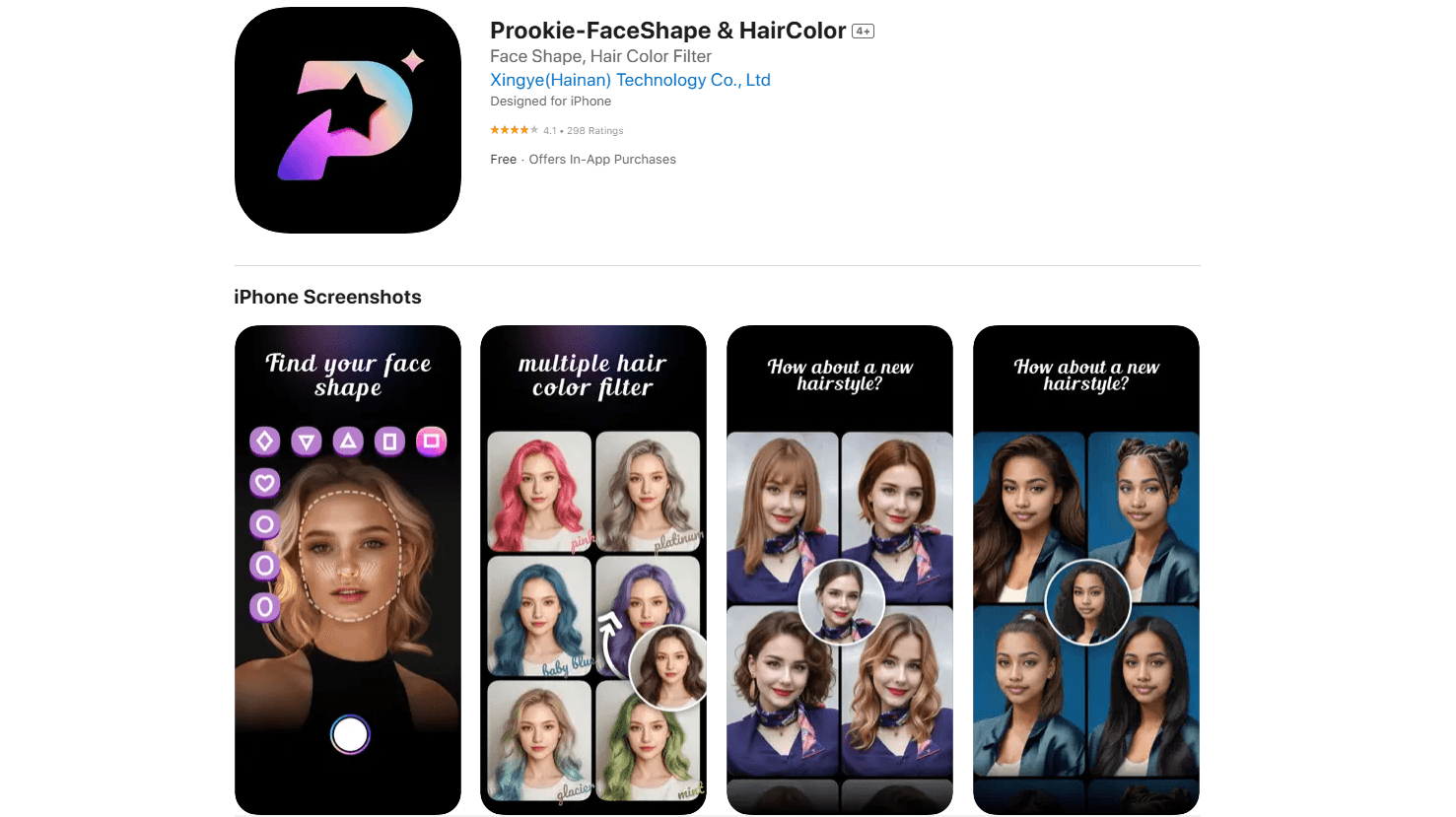
About Prookie-AI Photo & Cartoon
What Is Prookie-AI Photo & Cartoon
Prookie-AI Photo & Cartoon is an AI photo editor built for iPhone users who want to preview a new look before committing to it. The app leans on AI hair and face tools, so you can swap hairstyles, test hair colors, and read your face shape without sitting in a salon chair. It also doubles as a cartoon photo editor for playful selfies. As an iPhone photo app, it keeps everything inside one place.
The pitch is simple. Most people hesitate before a haircut or a color change because the result is a gamble. Prookie turns that gamble into a preview you can share in seconds. The trade-off? It lives on iOS only, with no Android version and no desktop app, so anyone on other platforms is out of luck.
Prookie has real limits worth flagging up front. The good hairstyles and cartoon filters sit behind a subscription, and the app relies on your own photos, so privacy matters more than it does with a simple filter app that never uploads anything. It's a styling toy more than a pro editing suite.
Getting Started
- Download Prookie-AI Photo & Cartoon from the App Store. It needs iOS 15.0 or later.
- Open the app and pick a mode: hair color changer, hairstyle try on, face shape finder, or cartoon filters.
- Upload or capture a selfie with your face clearly visible. Good lighting helps the AI read your features.
- Tap to generate the transformation and compare the result against your original photo.
- Save the image you like, or use Hair Snap to line up several looks side by side.
Product Information
A quick look at Prookie-AI Photo & Cartoon's pricing, supported platforms, and performance.
Best for
The users, tasks, and scenarios where this tool fits best.
Users
- Anyone considering a haircut or color change
- Casual selfie fans
- People curious about their face shape
Tasks
- Testing a new hairstyle before booking an appointment
- Checking a hair color on your own face
- Making cartoon or stylized portraits
Scenarios
- Deciding on a haircut the night before a salon visit
- Building a set of profile pictures for Instagram or TikTok
- Comparing transformations with friends
Key features
Hairstyle Try On
This is the core of Prookie. You upload a selfie and swap in long hair, short hair, curly, straight, or bangs, then see the result on your own face. It replaces the guesswork of flipping through salon magazines, since the preview uses your actual features instead of a model's, and the difference between seeing a style on a stranger and seeing it on yourself is the entire point.
Hair Color Changer
The hair color changer applies pink, brown, gradient, and other popular shades with a single tap. Run through a few options fast. Save the one that works. That beats squinting at a color swatch in a store.
Face Shape Finder
The face shape finder uses AI to analyze your bone structure, then pairs that with trending styles to suggest a look. It's aimed at people who don't know whether they have an oval, round, or square face, and the suggestions tie your features to specific cuts rather than leaving you to guess which of a dozen popular styles will actually work on you. You get styling advice that fits.
Cartoon and Max Art Filters
Prookie's cartoon photo editor converts selfies into sketch, oil painting, clay, ceramic, Disney-style cartoon, and American comic looks. The filter range is wide, with enough styles to find one for a profile picture instead of settling for a single preset, which matters when you're making a set of images for a social account and need some variety.
AI Photo Generator
Beyond hair, Prookie generates full themed portraits, including retro disco, sports, graduation, and wedding styles, plus an AI Yearbook mode for 90s-style American graduation photos. It's the fun, low-stakes side of the app.
Hair Snap and Challenges
Hair Snap lines up several of your transformations for an easy side-by-side comparison. The hair challenge feature turns styling into a game you can play with friends, and stacking your own before-and-after shots next to a friend's makes the whole thing feel less like an editing tool and more like something you'd do for fun on a weekend. That's a good reason to come back.
Pros and cons
Pros
- Fast hairstyle and hair color previews on your own face, no salon visit needed.
- Wide filter range, from cartoon sketch to oil painting and comic styles.
- Free tier lets you test the main features before paying.
- Face shape analysis gives styling suggestions, not just a filter.
- High user rating and a large review base on the App Store.
Cons
- iOS only, with no Android or desktop version, so non-Apple users can't use it.
- The best hairstyles and advanced cartoon filters require a subscription.
- You have to upload photos of yourself, and the app works best with clear, well-lit selfies.
Frequently asked questions
It's an AI photo editor for iPhone that previews hairstyles, changes hair color, analyzes your face shape, and applies cartoon filters. You upload a selfie and the app generates the transformation.
Related content
Explore related tools, skills, and articles for Prookie-AI Photo & Cartoon.
Prookie-AI Photo & Cartoon Alternatives

Google EmbeddingGemma 2
Google DeepMind · Writing · Image · CodingGoogle EmbeddingGemma 2 is a 740M-parameter open model that turns text, code, images, audio, and video frames into vectors in one 768-dimension space, running on phones and laptops.

Tractionwave
TractionWave · Image · MarketingTractionWave is an AI attention heatmap tool for static ads. Upload a PNG or JPG and it returns predicted attention, ranked hotspots, and fixes before you spend budget.

Imejis.io
Imejis.io · Image · MarketingImejis.io is an AI design studio for agents and marketing teams. Describe an image in plain words, and it writes the copy, builds the layout, reflows it to every size, then exports a finished file.