
PhotoStyleAI
PhotoStyleAI.com · Image · Video
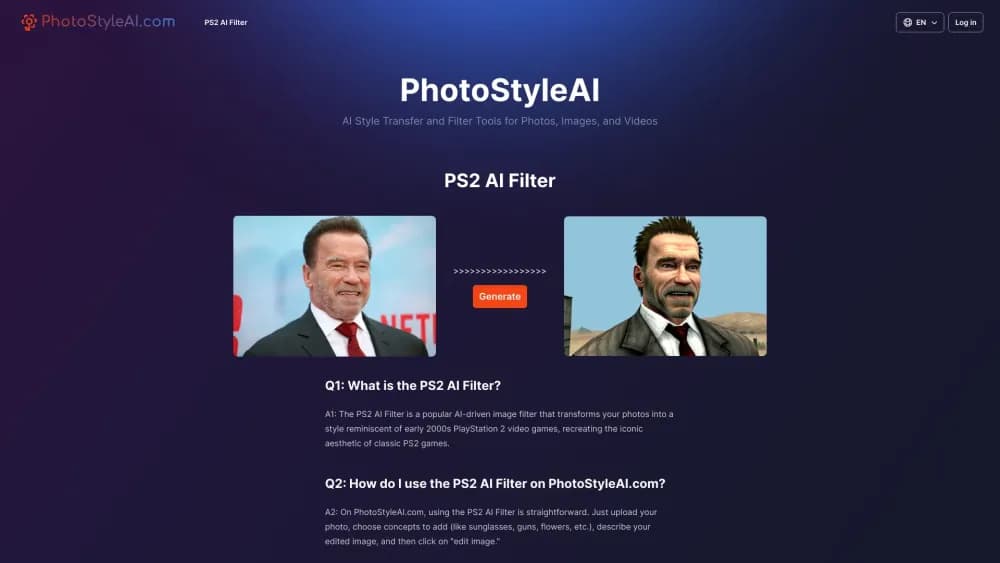
PhotoStyleAI is a browser based AI style transfer tool that turns a photo into PS2 game graphics, a Munch-style painting or ruby art, guided by a short text prompt.
About PhotoStyleAI
What Is PhotoStyleAI
PhotoStyleAI is a web tool for AI photo style transfer. You upload one image, add a sentence describing the result you want, and the service redraws the picture in one of three filters: the PS2 AI filter, which mimics early 2000s console graphics, a painting filter built around Edvard Munch, and a ruby filter that carves shapes out of red gems. Everything runs at photostyleai.com after a Google login, with no software to install.
The product solves a narrow problem well. It is an AI image generator for one job: give an ordinary shot a game-screen, painted or gemstone finish. People who want that look for a profile picture, a painted version of a vacation shot, or a ruby figure for a creative post can get one in about a minute. The niche earns its keep because the PS2 AI filter trend spread through TikTok and Instagram feeds, and the site rides that wave rather than pretending to be a general editor.
The restrictions are real. Output is generated rather than filtered pixel by pixel, so a strong text prompt matters as much as the source photo. There is no layer editing, no batch export and no published API, and paid runs use credits that come from one-time packs.
Getting Started
- Open photostyleai.com and sign in with a Google account to claim free starter credits.
- Pick PS2 AI Filter, Painting AI Filter or Ruby AI Filter from the menu.
- Upload a photo, or load one of the sample images, then write a short English prompt describing the scene you want.
- Leave Display public switched on if you want the result in the public gallery, then press Generate.
- Download the finished image from My Photo once the credit is spent and the job finishes.
Product Information
A quick look at PhotoStyleAI's pricing, supported platforms, and performance.
Best for
The users, tasks, and scenarios where this tool fits best.
Users
- Social media posters
- Creative hobbyists
- Small creators and art students
Tasks
- Turning a selfie into PS2 game graphics
- Making a Munch-style canvas
- Generating a ruby sculpture image
Scenarios
- Building a themed profile picture for a nostalgic account
- Testing ideas before a paid course or project
- Making quick art for a student slide or a small campaign
Key features
Three Dedicated Style Filters
The site splits its work into three pages: PS2 AI Filter, Painting AI Filter and Ruby AI Filter. Each page has its own prompt field and sample images, so switching styles means choosing a different tool rather than adjusting a dropdown. That separation keeps each filter focused on one look instead of watering down a single generic model.
Prompt-Guided Redrawing
All three filters accept a sentence describing the desired scene, such as "a person in a post apocalyptic war game," and the system redraws the image around it. Text decides props, mood and framing, and the source photo fixes the subject. Prompt quality changes the result more than any other setting on the page.
Google Login And Free Starter Credit
Signing in happens through Google, and a new account receives a free credit, according to the site. That single credit is enough for one full generation, which lets you test the PS2 AI filter on a real photo before any payment. No card is entered at signup.
Credit Packs Without A Subscription
Pricing runs on one-time purchases: 100 credits for $9.9, 300 credits for $19.9 and 600 credits for $29.9. The per-credit price falls from about ten cents to five cents as the pack grows. Paid users also get a priority queue and two or four jobs running at once, while the free plan waits in a shared queue.
Public Gallery And Private Results
Display public posts a finished image to the site's shared gallery, where other users browse examples for prompts and styles. Turning it off keeps the output in My Photo alone. Paid plans add the ability to keep results private, according to the pricing page.
Mobile Browser Support
The whole workflow runs in a phone browser: upload from the camera roll, type the prompt, generate and download. There is no app to install and no desktop requirement, which matters for a trend that grows through social feeds.
Pros and cons
Pros
- Three distinct looks from one account: game graphics, a Munch painting style and a ruby art filter
- Text prompts let you steer props and mood, not just swap a preset
- One-time credit packs, so nothing renews without your choice
- Free starter credit and a public gallery for trying before paying
- Runs in a mobile browser with Google login and no install
Cons
- Only three filters, so it can't replace a general photo editor
- Results vary with prompt wording and source quality, and weak photos land muddy
- No published API or bulk upload, which rules out automated workflows
- Credits are spent on every run, and failed generations still cost you time
- Commercial rights and refund terms are thin, so check them before client work
Frequently asked questions
It redraws a photo in one of three AI styles: PlayStation 2 game graphics, a painting inspired by Edvard Munch, or a ruby gemstone look. You upload an image, describe the scene you want, and the service generates a new picture. It creates art rather than applying a fixed filter, and that distinction shapes the results.
Related content
Explore related tools, skills, and articles for PhotoStyleAI.
PhotoStyleAI Alternatives

Google EmbeddingGemma 2
Google DeepMind · Writing · Image · CodingGoogle EmbeddingGemma 2 is a 740M-parameter open model that turns text, code, images, audio, and video frames into vectors in one 768-dimension space, running on phones and laptops.

Tractionwave
TractionWave · Image · MarketingTractionWave is an AI attention heatmap tool for static ads. Upload a PNG or JPG and it returns predicted attention, ranked hotspots, and fixes before you spend budget.

Imejis.io
Imejis.io · Image · MarketingImejis.io is an AI design studio for agents and marketing teams. Describe an image in plain words, and it writes the copy, builds the layout, reflows it to every size, then exports a finished file.