

qbrin
qbrin, Inc. · Productivity · Leaning
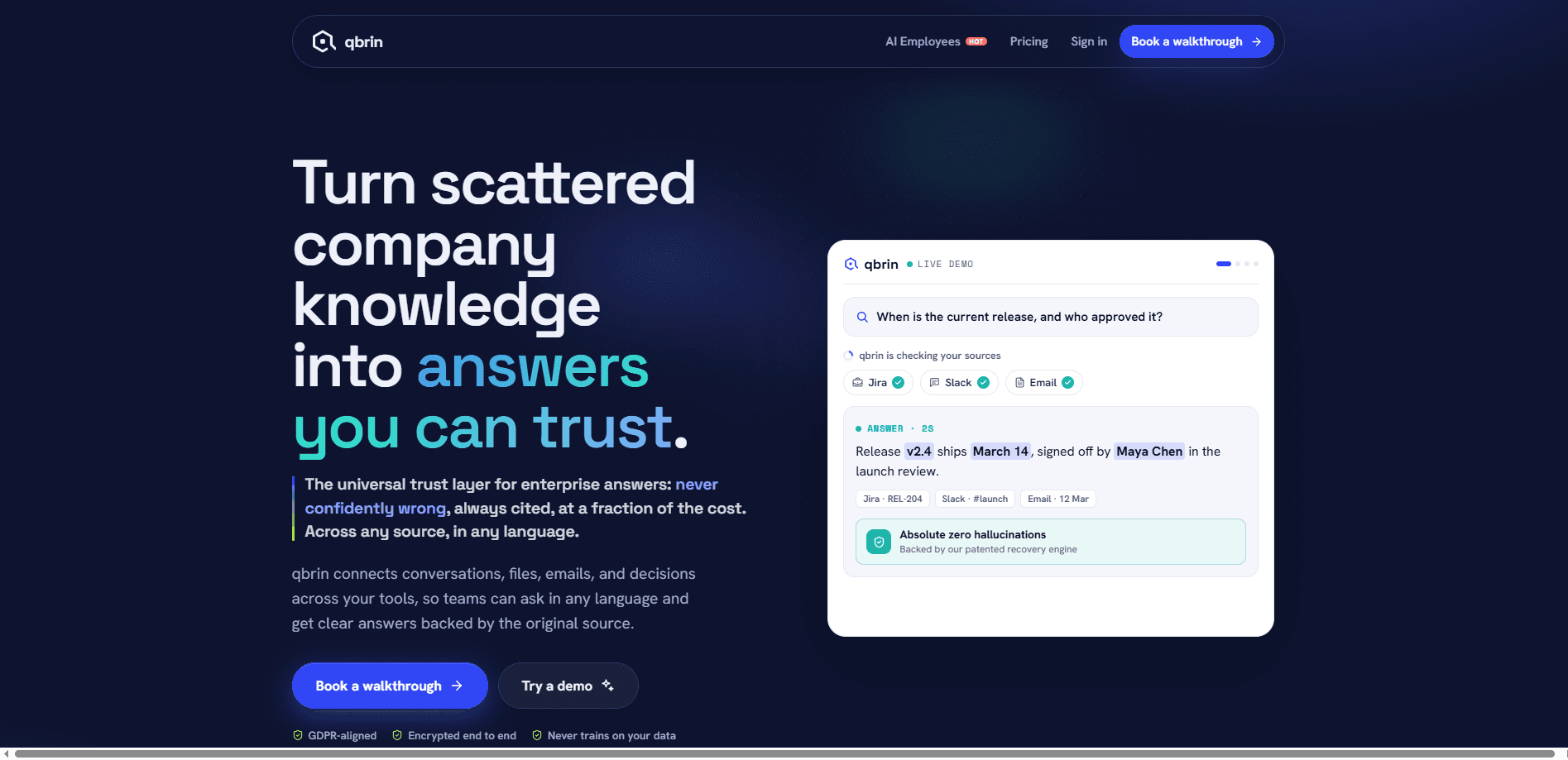
qbrin is an enterprise AI search and answer layer that connects the tools your company already runs on, from Slack and Drive to Jira and Salesforce, and turns them into one queryable knowledge base. Ask a question in plain language and it returns an answer grounded in your own files, chats, and emails, with a citation on every claim and a permission check on every source. When the evidence isn't there, it says so instead of inventing something. Plain and simple. The company also ships a separate authorization API that vets AI agent actions before they run.
About qbrin
What Is qbrin
qbrin is built for teams whose work is scattered across a dozen tools and whose questions never have a single obvious place to look. It reads your emails, chats, documents, and decisions, indexes them, and answers questions in plain English with the exact source linked underneath each claim. The pitch is simple: cited, or abstain. If qbrin can't find solid support for an answer, it keeps looking, then tells you what it could and couldn't find rather than guessing. That's the deal.
The company behind it, qbrin, Inc., was founded by Kate Sai Kishore, whose background is security engineering, including identity work at Okta. That heritage shows up in how the product treats trust. Every answer respects the access levels already set in your source tools, and the company states plainly that your data is never used to train anyone else's models. Connections are encrypted end to end and the controls are GDPR-aligned.
The main limitation is scope. qbrin isn't a general chatbot or a coding assistant. It answers from what your company actually knows, so the quality of its answers tracks the quality of your connectors. Teams with messy, half-connected tools will get messy results until gaps are filled. There's also an honest coverage trade: it abstains on roughly one in four answerable questions rather than risk a confident wrong answer, so if you want a system that always says something, this isn't it.
Getting Started
- Book a 20-minute walkthrough or start the free trial on the Starter plan, then sign in to your workspace.
- Connect a source read-only, such as Gmail, Drive, Calendar, Slack, or WhatsApp Business. Setup takes a few clicks.
- Let qbrin read in the connected knowledge; a newly added document starts answering with citations in under 30 seconds.
- Ask a real question in plain language and check the cited source under the answer.
- Hire an AI Employee, like a Policy Helper or Onboarding Buddy, to answer for a specific team.
Product Information
A quick look at qbrin's pricing, supported platforms, and performance.
Best for
The users, tasks, and scenarios where this tool fits best.
Users
- Operations and support teams that field the same questions weekly
- New hires ramping up
- Leadership wanting a pulse on decisions
Tasks
- Answering policy questions like "can I share this deck with a vendor?"
- Prepping for a renewal or account call
- Verifying what was actually agreed
Scenarios
- Businesses in regulated or high-stakes fields, such as finance, legal, or healthcare, where one wrong answer has real consequences.
- Companies already running a heavy retrieval pipeline and looking to cut the token cost of every answer.
- Teams building AI agents that need an authorization checkpoint before an agent executes a tool action.
Key features
Cited answers with source links
Every answer qbrin returns links back to the exact email, file, or message it came from, so you can open the source and read it yourself in one click. No black boxes. The company measures this directly: with its double-checking layer on, a cited source genuinely backs the answer 86% of the time, compared with 6% for raw keyword search.
Permission-aware retrieval
Answers mirror the access levels already set in your tools rather than flattening everything into one shared pool. These permission-aware answers respect who can already see what. People can't reach anything through qbrin that they couldn't reach directly in the source system, which matters when finance, sales, and security all share one workspace.
Cited-or-abstain behavior
When connected documents can't satisfy a request, qbrin says so instead of guessing. That's the whole point. On a set of 301 questions whose answers weren't in the data, it fabricated an answer only about 1% of the time with its full verification stack, against 18-20% for traditional retrieval systems. The trade is real: it abstains on roughly a quarter of answerable questions to keep that discipline.
Token-efficient answers
On decision questions, qbrin reads about 687 tokens per answer, a short briefing rather than a pile of documents, according to the company's own measurements. That's up to 20 times fewer tokens than a heavy multi-query pipeline. Fewer tokens means lower cost and faster responses, typically 2-4 seconds.
Connectors on demand
The platform links to Gmail, Drive, Slack, Notion, Jira, Salesforce, and dozens more, with new connectors arriving regularly. If a tool you rely on isn't supported, qbrin builds the connector for you on demand. No uploads. No copy-paste. Your knowledge base keeps growing with your stack.
AI Employees
You can assign governed AI teammates, such as an Onboarding Buddy, Policy Helper, or Account Brief, that answer only from your company's data. Each plan includes a set number at no extra cost. Adding more runs a flat $25 per employee per month. No per-query metering.
Action authorization API
Beyond search, qbrin offers an evidence-backed authorization API for AI agents. Before an agent takes an important action, qbrin checks whether it's justified by current evidence, permissions, and policy, then returns ALLOW, HOLD, or ESCALATE, with HMAC-SHA256 signed grant tokens. There's even a zero-auth public sandbox. Test it yourself.
Pros and cons
Pros
- Answers arrive with citable sources, so you can verify a claim in one click instead of trusting it.
- The abstain-when-unsure behavior lowers the risk of confidently wrong answers in regulated or high-stakes work.
- Permission mirroring keeps sensitive information with the people already cleared to see it.
- Flat per-seat pricing with no per-query bill makes budgeting predictable, and a free trial on Starter lowers the entry bar.
- The public benchmarks and method write-ups let you judge the claims rather than take them on faith.
Cons
- It abstains on roughly a quarter of answerable questions, which will frustrate anyone who expects an answer every time.
- Answer quality depends on which tools you connect, so gaps in your connectors become gaps in its knowledge. Garbage in, garbage out.
- Enterprise self-hosting and data-residency controls sit behind a sales conversation, not a public price.
- The retrieval trails on relational-graph traversal, so pure graph-style questions may do better elsewhere.
Frequently asked questions
qbrin reads your company's emails, chats, files, and decisions, then answers plain-language questions from that knowledge with the source linked under each claim. It's built around one rule: cite the source or admit there isn't one.
Related content
Explore related tools, skills, and articles for qbrin.
qbrin Alternatives

Base Code
Base44 (Wix) · Coding · ProductivityBase Code is a shared cloud development environment from Base44. Teammates describe changes to an existing GitHub codebase in chat, preview them live and send them back as pull requests.

Knocket
Knocket (Tencent RTC team) · Productivity · Business · ChatbotKnocket is a free live chat and contact page tool that lets visitors message you from your website, app, or a shareable link, with every reply handled from Telegram or one inbox.

FloorGen
Vinit Kumar (FloorGen) · Productivity · China AIFloorGen is a browser-based floor plan maker that turns a sentence or a sketch into an editable 2D plan and a 3D walkthrough. Export to PDF, DXF or video, and draw without an account.