

QRBTF - AI QR Code Generator
Latent Cat · Image
QRBTF is an AI and parametric QR code generator by Latent Cat. It hides a working link inside generated artwork, offering free parametric styles and an AI model for realistic scenes.
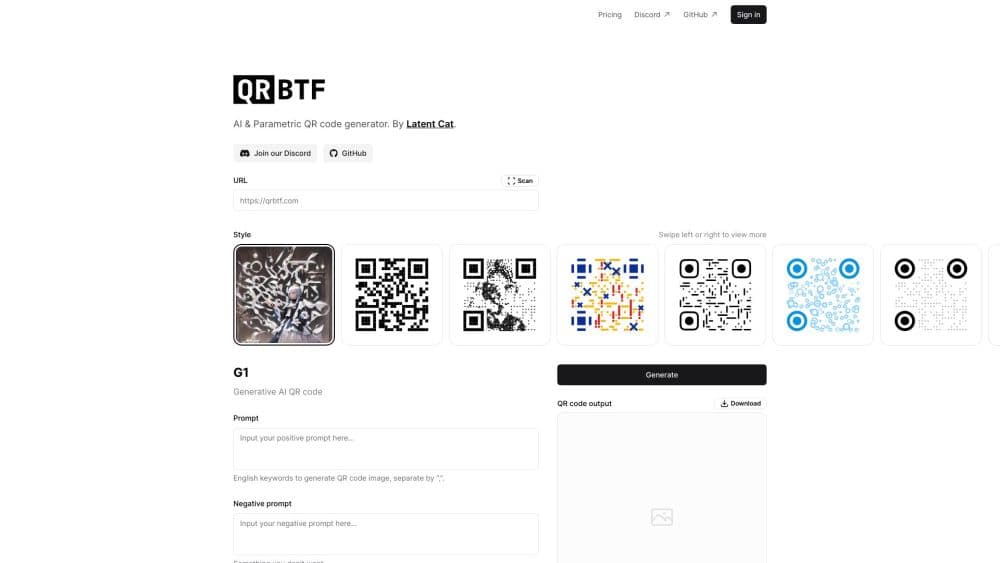
About QRBTF - AI QR Code Generator
What Is QRBTF
QRBTF is a web tool that makes QR codes look like something other than QR codes. Instead of a black-and-white grid, you get a picture: a mountain range, a cup of coffee, a city skyline. Scan it with a phone and the link still opens. The name is short for "QR Code Beautifier," and the project started as a university course experiment at the Communication University of China before it went open source.
The tool comes in two halves. One is parametric, meaning the patterns are generated by math rather than AI, and it stays free and open source. The other is generative AI, which paints the QR code into a photorealistic scene from a text prompt. Both live on the same site.
The catch is scannability. A prettier code is often a harder one to read. QRBTF lets you push the image toward "art" or toward "scannable," and you decide where the balance lands. There's no guarantee every output scans, so you verify with a real scanner before you print anything.
Getting Started
- Open qrbtf.com and paste the URL or text you want the code to point to.
- Pick a style. The parametric styles run instantly in your browser with no sign-in, while the AI style needs an account.
- Adjust the parameters. Turn control strength, restoration rate, and size until the image looks right without breaking the scan.
- Preview the result and test it with your phone camera or a scanner app.
- Download the file as a JPEG or SVG and use it wherever you need the code.
Product Information
A quick look at QRBTF - AI QR Code Generator's pricing, supported platforms, and performance.
Best for
The users, tasks, and scenarios where this tool fits best.
Users
- Small business owners
- Marketers and designers
- Developers and tinkerers
Tasks
- Turning a product or menu link into a poster
- Designing event or campaign visuals
- Embedding a code in a design system
- Testing whether an artistic code actually scans
Scenarios
- Printing a flyer or packaging where a plain QR block would look out of place
- Running a quick giveaway or event sign-up
- Building an internal tool or side project
Key features
AI QR Code Generation
The AI half uses models trained on large image sets to fold a QR code into a scene you describe. You type a prompt in any language, add a negative prompt for what you don't want, and set a seed to reproduce a result you liked. The output trades some visual polish for a code that still carries the data. It's the part most people come for, and it needs a signed-in account.
Parametric Styles
The parametric side generates codes from templates rather than AI, covering line, bubble, pixel, and geometric looks. It runs entirely in the browser with no backend, so it's fast and it works offline after the page loads. Every style exports as vector, which keeps edges crisp when you scale up to a billboard or shrink down to a business card. This half stays free and open source.
Scan Control Parameters
The settings that decide whether your code works are right on the page. Control strength sets how much the image leans toward the QR pattern: higher reads more easily but looks more like a code, lower looks more natural but risks a failed scan. Restoration rate sharpens fine detail in busy scenes, and correction level raises the tolerance for damage on longer links. You tune these against a live preview instead of guessing.
Anchor and Size Controls
Two more settings shape how a code sits in the final image. Anchor style chooses whether the three corner markers are square, circular, or minimized, so you can either make them obvious for reliable scanning or blend them into the artwork. Size and padding ratio control how much of the frame the code fills, which matters when you place the image next to text and need the proportions to line up.
Vector Export and Brand Fit
Every parametric style exports as SVG, so the result is a clean vector file you can recolor, resize, and edit in any design app. That makes QRBTF useful for more than one-off codes: you can match a brand palette, drop the code into a layout, and scale it without pixelation. Combined with the free licensing, it's a practical pick for teams that need codes in a design pipeline.
Open Source Project and Community
QRBTF is open source under the GNU GPL, with the front end on GitHub and a separate React component library for embedding codes in a web project. Development happens in public, with a Discord server for support and a changelog that tracks each major release. For anyone who wants to understand how an artistic QR code is built, the source is right there.
Pros and cons
Pros
- Makes a plain code into scannable QR code art, so it fits on packaging and posters where a plain grid wouldn't.
- The parametric styles are free, open source, and run without a backend, so there's no sign-in to try them.
- Vector SVG export keeps codes sharp at any size, from a business card to a wall print.
- Scan-control settings are visible and tunable, so you can trade image quality for reliability and test each result.
- The $20/mo Pro plan lifts the AI limit and adds Discord bot generation and direct support.
Cons
- Not every AI output scans. There's no guarantee, and you have to verify each code with a real scanner before using it.
- The AI style needs an account, and the free trial caps you at 10 AI codes before you pay.
- The current AI model leans toward landscapes and objects. Codes built around faces or the human body tend to break and need lower strength and higher resolution to fix.
- The AI half is closed source. Only the parametric side and the front end are public.
Frequently asked questions
QRBTF is an AI and parametric QR code generator by Latent Cat. It turns a URL or text into a QR code that looks like a picture, while keeping the data scannable. The name stands for "QR Code Beautifier."
Related content
Explore related tools, skills, and articles for QRBTF - AI QR Code Generator.
QRBTF - AI QR Code Generator Alternatives

Google EmbeddingGemma 2
Google DeepMind · Writing · Image · CodingGoogle EmbeddingGemma 2 is a 740M-parameter open model that turns text, code, images, audio, and video frames into vectors in one 768-dimension space, running on phones and laptops.

Tractionwave
TractionWave · Image · MarketingTractionWave is an AI attention heatmap tool for static ads. Upload a PNG or JPG and it returns predicted attention, ranked hotspots, and fixes before you spend budget.

Imejis.io
Imejis.io · Image · MarketingImejis.io is an AI design studio for agents and marketing teams. Describe an image in plain words, and it writes the copy, builds the layout, reflows it to every size, then exports a finished file.