

Query Memory
Query Memory · Productivity · Leaning
Query Memory is a unified workspace platform for parsing documents, managing data, and deploying AI agents through one API-first stack. It combines document parsing, knowledge indexing, agent endpoints, and web parsing behind a single API key, so teams can feed PDFs, spreadsheets, contracts, and emails to their applications without wiring dozens of separate tools. The target audience is developers and teams that want a central memory layer for their AI products, not just another chatbot.
About Query Memory
What Is Query Memory
Query Memory is an API-first platform that gives AI applications a memory layer. Instead of stitching together OCR services, vector databases, and separate agent runtimes, you connect one SDK and reach every capability from the same client. The pitch on its own site is blunt: parse documents, query databases, and scrape the web through one unified API.
The problem it solves is fragmentation. A typical AI feature needs file ingestion, chunking, retrieval, and a grounded response. Each of those steps usually means a different vendor and a different billing relationship. That adds up fast. Query Memory folds them into one workspace with usage tracking, API keys, and shared endpoints across services.
The clearest limitation is scale and pricing. The free tier is small, capping you at 25 document parses and 100 API requests a month, and real production traffic pushes you toward the $99/month Pro plan or a custom Enterprise deal. It's also a developer platform, so if you don't write code, there's not much here for you yet.
Getting Started
- Create a Query Memory account from the sign-up page and open the dashboard.
- Generate an API key, then initialize the SDK with your base URL and key.
- Upload documents to a knowledge base or send them to the parse endpoint for structured output.
- Query your indexed knowledge, call an agent endpoint, or run a web parsing request from the same client.
- Track usage, storage, and endpoint traffic from the account dashboard as volume grows.
Product Information
A quick look at Query Memory's pricing, supported platforms, and performance.
Best for
The users, tasks, and scenarios where this tool fits best.
Users
- Backend and AI developers who need document ingestion and retrieval without assembling multiple vendors.
- Product teams building grounded assistants that must cite source documents.
- Data and operations teams that want contracts, reports, and records searchable in one permissioned hub.
Tasks
- Parsing PDFs, DOCX files, spreadsheets, HTML, and images into clean structured elements.
- Indexing a document collection into a knowledge base and querying it with natural language.
- Deploying grounded agent endpoints that answer with source-linked responses.
- Running domain-scoped web extraction to pull live external context into an application.
Scenarios
- A fintech team that wants to ask questions across lease abstractions and underwriting files.
- A support product that needs to summarize claims and contract documents on demand.
- A research workflow that mixes uploaded papers with live web pages in a single query.
Key features
Unified API and SDK
One client covers knowledge, agents, and web parsing, so you initialize the SDK once and reuse the same API key everywhere. The company's own framing is that this replaces a stack of fragmented tools with a single endpoint. That matters most for teams that would otherwise maintain three integrations and three sets of credentials. Fewer moving parts. Fewer keys to rotate.
Document Parsing
Query Memory parses PDF, DOCX, sheets, HTML, images, and plain text into structured elements. The site claims its specialized multimodal models hit 98%+ accuracy on complex layouts, outperforming legacy OCR and generic LLMs. Treat that number as a vendor claim until you test it against your own documents.
Knowledge Indexing
Files connect into searchable knowledge bases that support fast semantic retrieval. Queries return ranked chunks and surrounding context, so you can feed grounded material to a model instead of dumping raw text, and every hub stays permissioned so sensitive documents stay scoped to the right users.
Agent Endpoints
You can deploy grounded AI agents with model controls, prompts, and source-aware responses. Agent queries run through the same SDK surface. That keeps integration shallow. For teams shipping assistants, it removes the need to host and scale a separate agent runtime.
Web Parsing
Web parsing runs domain-scoped extraction and ranked retrieval to pull live external context. It uses the same output formats as the document side. A web page and a PDF land in the same shape. That consistency is the practical win when you're merging internal and external sources.
Connectors and Integrations
The platform lists connectors to Microsoft SharePoint, Google Drive, Snowflake, Databricks, Oracle Cloud Infrastructure, and Dropbox, plus claims of 400 more. That coverage lets teams index data where it already lives rather than migrating everything first. Connector depth is worth verifying per source before you commit.
Usage and Operational Visibility
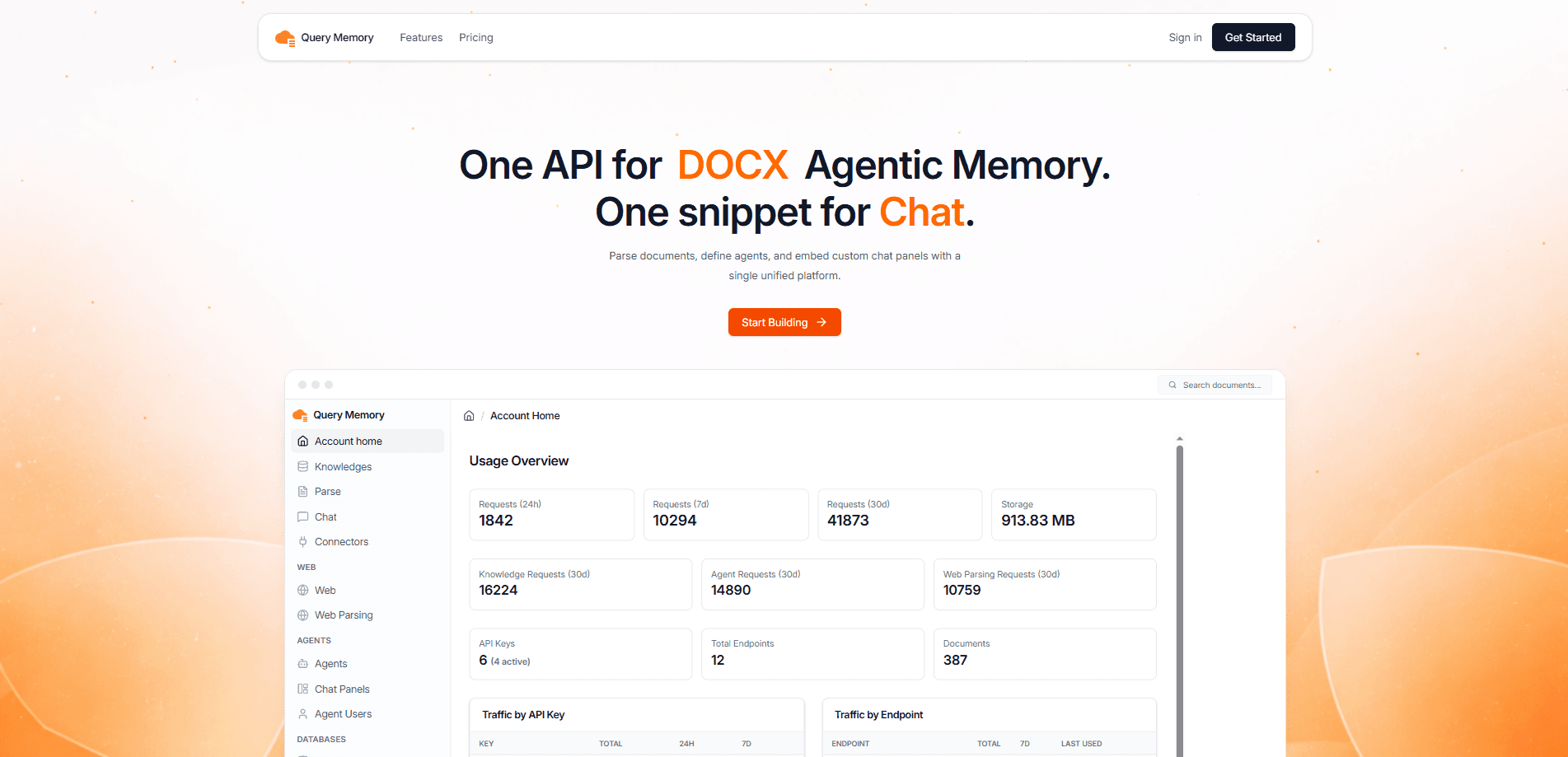
The dashboard shows requests over 24 hours, 7 days, and 30 days, storage used, traffic broken down by API key and endpoint, and recent service activity. For teams running this in production, that visibility answers a simple question. Which endpoint is spiking, and which key is doing it? It's not a full observability suite. It still covers the basics you need to see which service is actually costing you money.
Pros and cons
Pros
- A single API key and SDK cover parsing, knowledge, agents, and web queries, which cuts integration work.
- Structured output stays consistent across document types and web pages.
- Free tier lets you evaluate the document parsing API and knowledge base API before paying.
- Permissioned knowledge hubs keep sensitive records scoped.
- Connectors to SharePoint, Drive, Snowflake, and similar sources reduce data migration.
Cons
- The free tier is tight at 25 parses and 100 API requests per month, which won't survive real testing.
- Pro jumps to $99/month, and overages bill pay-as-you-go, so costs scale with heavy usage.
- It's a developer platform with no meaningful no-code path, so non-technical users are locked out.
- Pricing and accuracy claims come from the vendor, and independent benchmarks aren't published.
Frequently asked questions
It's a memory layer for AI applications. You send it documents, databases, and web sources, and it returns structured data, searchable knowledge, and grounded agent answers through one API.
Related content
Explore related tools, skills, and articles for Query Memory.
Query Memory Alternatives

Base Code
Base44 (Wix) · Coding · ProductivityBase Code is a shared cloud development environment from Base44. Teammates describe changes to an existing GitHub codebase in chat, preview them live and send them back as pull requests.

Knocket
Knocket (Tencent RTC team) · Productivity · Business · ChatbotKnocket is a free live chat and contact page tool that lets visitors message you from your website, app, or a shareable link, with every reply handled from Telegram or one inbox.

FloorGen
Vinit Kumar (FloorGen) · Productivity · China AIFloorGen is a browser-based floor plan maker that turns a sentence or a sketch into an editable 2D plan and a 3D walkthrough. Export to PDF, DXF or video, and draw without an account.