

Questgen - AI Powered Quiz Generator
QuestgenAI, Inc. · Leaning
Questgen is an AI quiz generator that turns text, PDFs, images, and video into MCQs, True/False, and fill-in-the-blank questions you can export to your LMS.
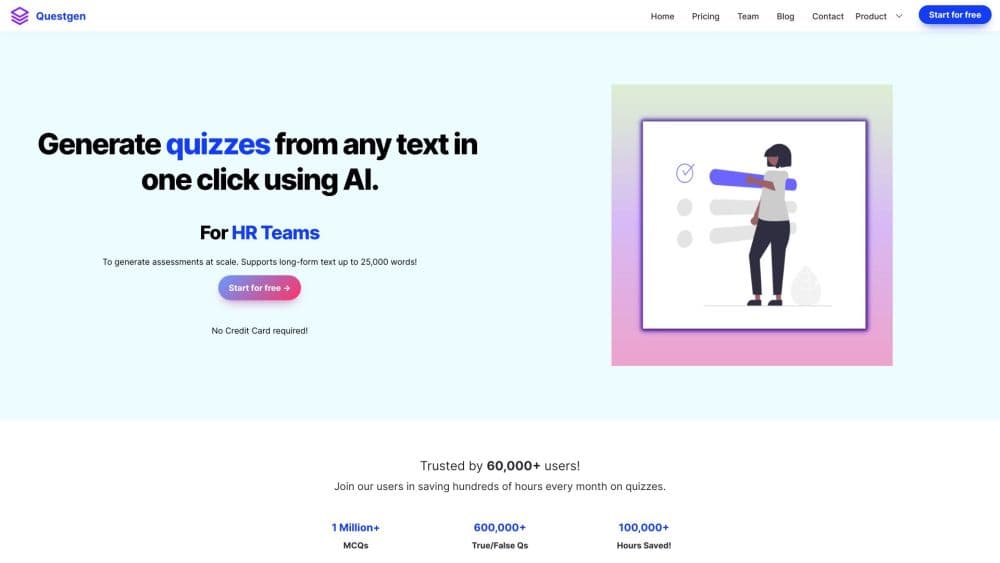
About Questgen - AI Powered Quiz Generator
What Is Questgen
Questgen is an AI quiz generator built for anyone who has to write test questions and would rather not do it by hand. You paste text, drop in a PDF or Word file, link a webpage, or upload a photo of a textbook page, and it returns a full set of questions in seconds. The tool covers the formats that show up most in classrooms and training rooms: multiple choice, multiple-answer multiple choice, a true or false quiz generator, fill-in-the-blank, short answer, and matching. Teachers use it to build worksheets, HR teams use it to quiz staff on updated policies, and publishers use it to produce assessment content without a large in-house team.
What separates Questgen from a plain paraphrasing bot is the editing and export layer. Every generated quiz stays editable, and you can push it out in the formats real courses run on, including Moodle XML, QTI 2.1, GIFT, and plain text for AIKEN and Respondus. That last part matters more than it sounds. A quiz maker that can't talk to your learning management system leaves you copying questions by hand, which defeats the point.
Two limits are worth knowing up front. The free tier caps you at 20 runs, so regular use means paying. And the quality of a generated quiz depends on the quality of what you feed it: thin source material yields thin questions, and every set is worth a quick human pass before it goes live.
Getting Started
- Sign up at questgen.ai and open the dashboard, no credit card needed for the free runs.
- Add your source material by typing or pasting text, uploading a PDF or DOCX, linking a URL, or uploading an image.
- Pick the question types you want, such as MCQ, True/False, fill-in-the-blank, or a Bloom's taxonomy set, and set how many you need.
- Review the generated questions in the editor and fix any wording or answer keys that need adjusting.
- Export the finished quiz in the format your platform expects, from PDF and CSV to Moodle XML and QTI.
Product Information
A quick look at Questgen - AI Powered Quiz Generator's pricing, supported platforms, and performance.
Best for
The users, tasks, and scenarios where this tool fits best.
Users
- Teachers and tutors
- HR and compliance teams
- Publishers and edtech teams
Tasks
- Building a class worksheet
- Making a practice quiz for students
- Turning a PDF or video into questions
- Creating questions one Bloom's level at a time
- Expanding a question bank
Scenarios
- Covering a substitute lesson at short notice
- Onboarding a new policy
- Preparing exam revisions
Key features
Text, PDF, Image, and Video to Quiz
Questgen takes more than typed text. You can point it at a webpage URL, drop in a PDF or DOCX, or upload an image of a page, and it pulls questions from whatever is in there. It also handles audio and video files, which is useful when the source is a recorded lecture or a training clip rather than a document. Text input runs up to 80,000 words per submission, so long chapters are not a problem.
Multiple Question Types and Bloom's Taxonomy
The generator covers MCQ, multiple-answer MCQ, True/False, fill-in-the-blank, FAQ, short answer, higher-order question and answer, and match-the-following. You choose the type before you generate, and every quiz stays editable afterward. A Bloom's taxonomy quiz mode lets you build questions aimed at a single level, from Remember up to Create, or spread one set across all six levels.
Export Formats for Real Platforms
A finished quiz exports to JSON, PDF, CSV, QTI 2.1, Moodle XML, GIFT, and plain text in AIKEN and Respondus formats. Several CSV exports are shaped for specific tools, including Brightspace, GimKit, Quizizz, and TriviaMaker. This is the difference between a quiz you can actually deploy and one you have to retype into your course.
Study Mode for Students
Students can generate a quiz from their own material and switch into Study mode to practice. For the auto-graded types, such as MCQ and True/False, they see a score at the end so they know where they stand. It turns a static set of questions into something closer to a self-test loop.
Similar Question and Match-the-Following Generators
The similar question generator takes an existing question and produces variations of it, which helps keep repeated exams from looking alike. The match-the-following generator builds a matching quiz from a passage and exports it in the format that matching questions need.
Image and Storybook Illustration Tools
Beyond quizzes, Questgen includes an image-to-quiz tool for snapshots of textbook or news pages, and a storybook illustration generator that turns a children's story into illustrations in styles such as watercolor, line art, or comic book. It's a handy extra when you want visual material to go with a lesson.
Pros and cons
Pros
- Questions, editing, and exports live in one tool, so you don't stitch together a generator, a formatter, and a spreadsheet.
- The export list covers the formats schools actually use, including Moodle XML, QTI 2.1, and GIFT, which saves manual entry into an LMS.
- Multiple input types, from text and PDF to image and video, mean you can work from whatever material you already have.
- Study mode turns generated quizzes into a practice loop students can use on their own.
- The free tier gives 20 runs, enough to judge output quality before paying.
Cons
- The free plan stops at 20 runs, so anyone generating quizzes regularly has to move to the paid plan quickly.
- Output quality tracks your source material. Feed it thin or messy text and the questions come back weak, so a human review step stays necessary.
- There's no published public API, which matters if you wanted to automate quiz creation inside your own system.
Frequently asked questions
Questgen creates quiz and assessment questions from text, documents, images, and video. It generates MCQs, True/False, fill-in-the-blank, short answer, matching, and Bloom's taxonomy questions, then lets you edit and export them to a learning platform.
Related content
Explore related tools, skills, and articles for Questgen - AI Powered Quiz Generator.
Questgen - AI Powered Quiz Generator Alternatives

HireKey
HireKey · Voice & Language · Productivity · LeaningHireKey is an AI job search copilot built by a former tech recruiter. It checks role fit, tailors resumes, runs interview practice and tracks every application.

Lune
Retrograde Labs · Productivity · LeaningLune is a research search engine for scientific AI agents. It runs as an MCP server that lets Claude, ChatGPT and Cursor search peer-reviewed computer science papers and cite them.
Coddy
Coddy · Coding · LeaningCoddy is a gamified platform to learn to code through short interactive lessons in 20+ languages, with a browser editor, an AI tutor and free certificates.