

Quick Text-to-Image Chrome Extension
Agency Enterprise (AE Studio) · Image
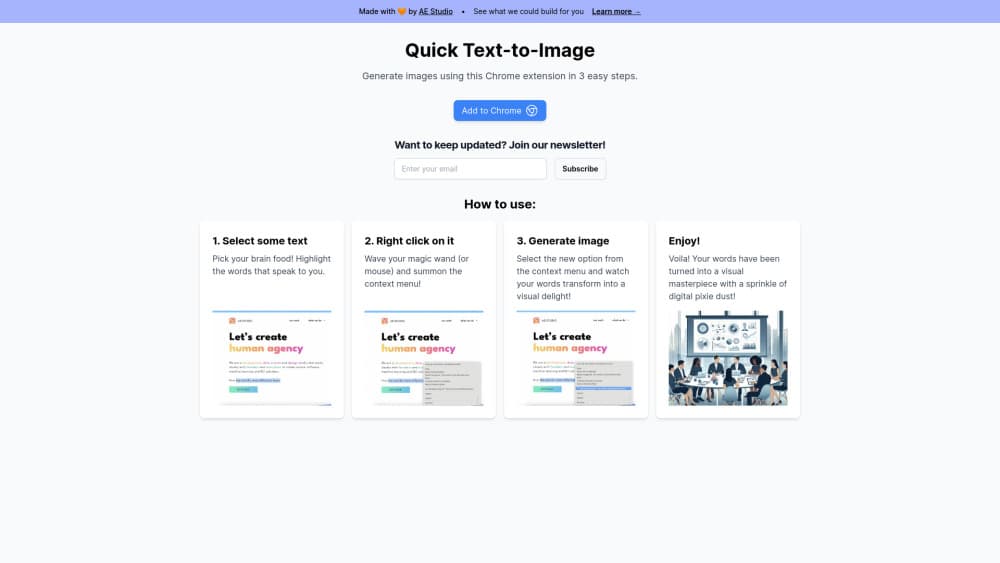
Quick Text-to-Image is a free Chrome extension that turns highlighted text into an AI image with Stable Diffusion. Select a passage, right click, and the result opens in a new tab.
About Quick Text-to-Image Chrome Extension
What Is Quick Text-to-Image
Quick Text-to-Image is a small browser add-on from Agency Enterprise, the studio behind AE Studio. It does one job: it takes whatever words you highlight on a page and sends them to Stable Diffusion as a prompt. A few seconds later you get a picture.
The appeal is the missing step. Most AI image generator extensions make you open a panel, paste a prompt and choose a model. This one lives in the right-click menu, so the text you were already reading becomes the prompt. Nothing needs typing.
The tradeoff is control. There is no style picker, no aspect ratio, no seed field and no gallery of past results. You get one image per request, and if it misses, your only option is to select different text and try again. The extension is also English only, and this Art & Design extension counts a few hundred users on its Chrome Web Store listing, so it feels closer to a focused utility than a polished design tool.
Getting Started
- Open the Quick Text-to-Image listing in the Chrome Web Store and click Add to Chrome.
- Confirm the permission prompt. The extension needs access to page content so it can read your selection and add a context menu entry.
- Open any page, highlight a sentence or phrase, then right click the selection.
- Choose Quick Text-to-Image from the menu.
- The generated image opens in a new tab, where you can save it with the browser's usual save option.
Product Information
A quick look at Quick Text-to-Image Chrome Extension's pricing, supported platforms, and performance.
Best for
The users, tasks, and scenarios where this tool fits best.
Users
- Writers and bloggers
- Social media managers
- Teachers and students
- Anyone curious about Stable Diffusion
Tasks
- Turning a quote into artwork
- Sketching a blog header idea
- Explaining an abstract phrase
- Collecting reference images while reading
Scenarios
- Reading an article and hitting a vivid sentence
- Mid-way through a draft in Google Docs
- A classroom or study session
Key features
Right-Click Generation
The whole workflow sits in the context menu. This right-click image generator asks you to highlight text on any page, right click and pick Quick Text-to-Image. There is no popup to open and no prompt box to fill, which is the main reason the tool feels faster than a full AI image generator extension.
Stable Diffusion Backend
The extension sends your selected text to Stable Diffusion, according to its Chrome Web Store listing. That means the output has the look people expect from that model: illustration, painterly scenes and photoreal attempts, with the same variance from one request to the next.
Results in a New Tab
Each generation opens in a fresh tab at full size. You can inspect the image, keep the tab open as a reference, or save the file with the browser's standard save command. Nothing is added to the page you were reading.
Selection as the Prompt
There is no separate prompt field. The sentence you highlight is the prompt, so the quality of your result depends on how concrete that sentence is. A line about a red boat on a cold lake gives the model more to work with than a line about quarterly strategy.
Tiny Install
The package is listed at about 10.78 KiB, which is smaller than most ad blockers. Startup cost is close to zero and there is no background dashboard or library to load.
Clear Data Statement
The developer declares that the extension does not collect or use your data. Text still travels to an image service to be rendered, so the statement covers storage and sale rather than local processing.
Pros and cons
Pros
- Free to install and use, with no subscription tier or credit counter mentioned in the listing.
- Zero setup: the context menu replaces the prompt box, so you can generate images from selected text in two clicks.
- Works on any page with selectable text, including docs, articles and email.
- Very small download, so it won't slow browser startup.
- Clear privacy declaration from the developer, with no data collection listed.
Cons
- No controls for style, aspect ratio, resolution or seed, so you can't steer the output beyond the words you select.
- A highlighted sentence is a weak prompt, and results often drift from what you pictured, which means repeated attempts.
- One image per request with no history or gallery, so you need to save files yourself before closing tabs.
- English-only interface and a small user base, with only three ratings on the Chrome Web Store at the time of writing.
Frequently asked questions
It converts highlighted text into an AI image. You select words on a page, right click, choose the extension, and Stable Diffusion renders a picture that opens in a new tab.
Related content
Explore related tools, skills, and articles for Quick Text-to-Image Chrome Extension.
Quick Text-to-Image Chrome Extension Alternatives

Google EmbeddingGemma 2
Google DeepMind · Writing · Image · CodingGoogle EmbeddingGemma 2 is a 740M-parameter open model that turns text, code, images, audio, and video frames into vectors in one 768-dimension space, running on phones and laptops.

Tractionwave
TractionWave · Image · MarketingTractionWave is an AI attention heatmap tool for static ads. Upload a PNG or JPG and it returns predicted attention, ranked hotspots, and fixes before you spend budget.

Imejis.io
Imejis.io · Image · MarketingImejis.io is an AI design studio for agents and marketing teams. Describe an image in plain words, and it writes the copy, builds the layout, reflows it to every size, then exports a finished file.