

Quill
Afeez Olalekan Yunus · Productivity
Quill is a Mac clipboard manager that saves everything you copy and keeps it searchable. It suits anyone who copies text all day and wants a fast way to find old snippets again.
About Quill
What Is Quill
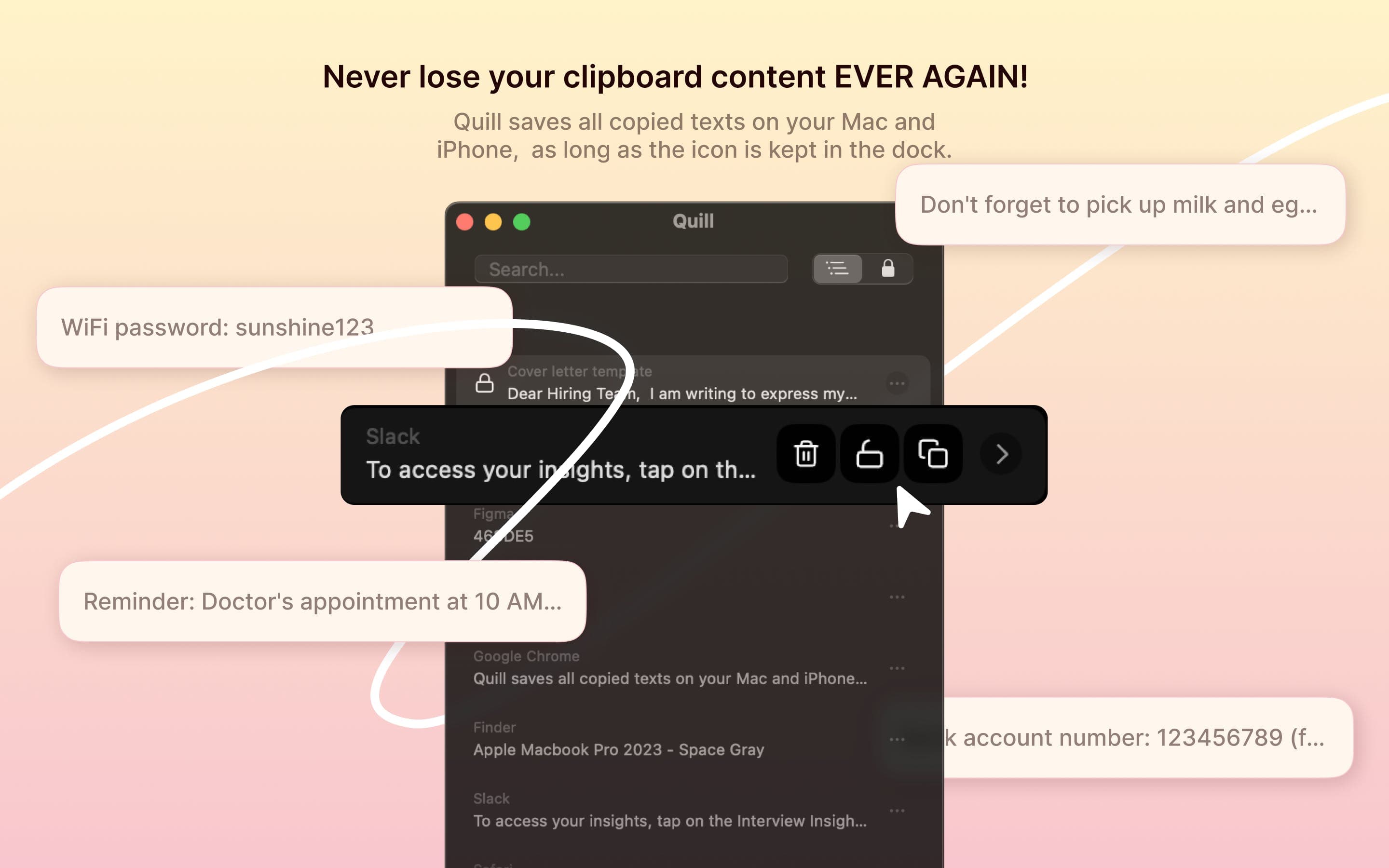
Quill is a clipboard manager for Mac, built by developer Afeez Olalekan Yunus. It watches what you copy and keeps a running list of your clips, so a link you grabbed an hour ago is still there when you need it. Instead of a clipboard that holds one item at a time, Quill holds as many as you let it.
The problem it solves is a small one that shows up constantly. You copy a code snippet, then a password, then a quote, and the first two are gone. Quill stores each one and gives you a place to look them up, tag them, and paste them again. It also pulls in text you copy on an iPhone or iPad through Apple's Universal Clipboard, so a snippet from your phone lands on your Mac.
Two limits are worth knowing before you buy. Quill is a Mac app only, so there's no Windows or Android version, and it costs $5.99 as a one-time purchase with no free tier to try first. It also captures text rather than images or files, so it's a writing and coding tool more than a general-purpose clip vault.
Getting Started
- Buy and install Quill from the Mac App Store. It requires macOS 14 or later.
- Grant the app permission to read the clipboard so it can start capturing what you copy.
- Copy text as usual in any app. Each item shows up in the Quill list automatically.
- Open the snippet list to search, sort, or pin a clip you use often.
- Lock the clips you want to keep, and set an auto cleanup window for the rest.
Product Information
A quick look at Quill's pricing, supported platforms, and performance.
Best for
The users, tasks, and scenarios where this tool fits best.
Users
- Writers and editors who copy quotes and drafts all day
- Developers moving code between an editor, a terminal, and docs
- Mac users with an iPhone or iPad
- People who paste the same replies or addresses often
Tasks
- Finding something you copied earlier
- Reusing a snippet
- Keeping important clips safe
- Trimming the history without thinking about it
- Moving text between your Mac and your phone
Scenarios
- Writing sessions where you keep grabbing references
- Debugging and refactoring code
- Managing replies and templates
- Late-night work
Key features
Universal Clipboard support
Quill captures text you copy on your Mac and text you copy on other Apple devices through Universal Clipboard. That means a note copied on an iPhone shows up in the same Mac history, so you don't have to send it to yourself first. For anyone who works across a phone and a laptop, this keeps both devices feeding one list. It covers text, so links and messages travel even if images and files don't.
Quick access and organization
Every clip you copy lands in one list you can open whenever you need it, and you can sort and group items without much effort. The point is speed. You open the list, spot what you want, and paste it, rather than redoing the copy from scratch. Organizing here means shaping the list to how you work, not building a filing system.
Smart search
Quill searches across your clips and filters them, so you can find a specific snippet by typing part of what it said. Because it keeps so many items, search is what keeps the list usable over weeks of copying. It saves the slow path of reopening the original app and selecting the text again. You describe what you remember about the clip, and the list narrows to matches.
Locking important clips
You can lock a clip so it stays put no matter how long the list gets. Locked items survive the cleanup routine, which means a frequently used password field, address, or reply stays within reach. The feature matters most for clips you'd be annoyed to lose, like a block of config text or a customer reply template. It's a simple safeguard, and it changes cleanup from risky to routine.
Auto cleanup
Quill can delete older snippets on its own after a set period, keeping the list from filling with things you no longer need. Auto cleanup is what makes a large history practical, since a list that grows forever gets hard to scan and slow to search. You decide the window, and the app does the trimming in the background. The risk is losing something useful, which is why locking pairs with it.
Dark mode
The app ships with a dark theme for working at night. It covers the whole interface, not just a color swap, so the snippet list stays readable in low light. It's a small touch that matters if you write or code late, when a bright window is the last thing you want. The feature sits alongside the app's core job rather than competing with it.
Pros and cons
Pros
- Keeps a long, searchable history of everything you copy, so old snippets rarely need re-copying.
- Universal Clipboard support folds text from an iPhone or iPad into the same Mac list.
- Locking and auto cleanup work together, so you keep the clips that matter while the rest clears itself.
- One-time purchase at $5.99 with no subscription, which keeps the long-term cost low.
- A dark mode and a quick-access list keep the app light to use during long sessions.
Cons
- It's a Mac app only, so anyone working mainly on Windows or Android can't use it.
- There's no free plan and no trial, which makes it harder to test before paying.
- It captures text rather than images or files, so it won't store screenshots or copied files the way some clipboard managers do.
Frequently asked questions
Quill is a clipboard manager for Mac that saves everything you copy and makes it searchable. Instead of holding one item at a time, it keeps a history of your clips so you can find and reuse them. It requires macOS 14 or later and is sold on the Mac App Store.
Related content
Explore related tools, skills, and articles for Quill.
Quill Alternatives
Arc
Rethink · Productivity · AI Assistant · ChatbotArc is an AI screen assistant for Android, Mac and Windows that reads whatever is on your screen, then summarizes, reads aloud, rewrites or answers questions about it without copy and paste.

Zerg Router
ZergAI · Coding · ProductivityZergRouter is a hosted AI model router that runs DeepSeek V4.1 Flash inside Codex and connects other coding clients through one endpoint, with key budgets, quota views, and usage records.

Harness Router
Protocol Lattice · Coding · ProductivityHarness Router picks the next tool inside an AI agent harness you already run, using cached decisions, Jev routing, and optional MCTS. Execution stays with your loop.