

Quizgecko
Version Zero Limited · Leaning
Quizgecko is an AI study tool that turns notes, PDFs, slides, and links into quizzes, flashcards, study notes, and podcasts for exam prep.
About Quizgecko
What Is Quizgecko
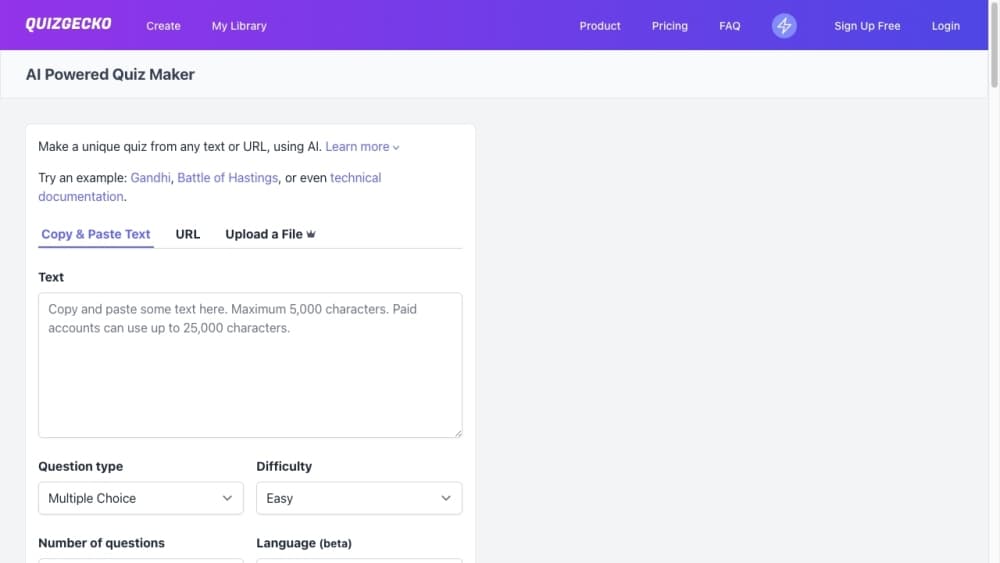
Quizgecko is an AI quiz generator and flashcard maker built for people studying for exams. You feed it a PDF, lecture slide deck, textbook page, web link, or a public YouTube video, and it produces practice questions, flashcards, concise study notes, and even audio episodes from the same material. The pitch is simple: instead of rereading a dense chapter, you work through bite-sized questions that force active recall.
The tool leans toward high-stakes learners. Nursing, medicine, pharmacy, dentistry, and law students get dedicated question banks and revision tracks, and the question set covers six formats: multiple choice, select all that apply, true or false, fill-in-the-blank, matching, and short answer. You can set the difficulty and question count before generating, then edit any draft against your source.
Quizgecko isn't a replacement for official exam material. Its questions are AI drafts, so you still need to check answers against a trusted source, especially for professional exams. It also works best with factual text rather than opinion-heavy or narrative writing, which tends to produce weaker questions. The main limits are accuracy you have to verify and the ceiling a free plan puts on how much you can generate.
Behind the study app sits a developer API. Version 2 generates full courses with an outline, modules, and activities, and it's aimed at teams wiring question generation into a learning platform or course builder.
Getting Started
- Go to quizgecko.com and create a free account with email or Google.
- Upload a PDF, paste text, add a URL, or drop in a public YouTube link.
- Choose your question types, difficulty, and how many questions to generate.
- Review the draft quiz or flashcards and edit anything that doesn't match your source.
- Study on the web app or the mobile app, and track weak topics before your next session.
Product Information
A quick look at Quizgecko's pricing, supported platforms, and performance.
Best for
The users, tasks, and scenarios where this tool fits best.
Users
- Exam-focused students
- Self-directed learners
- Educators and trainers who need quick drafts
Tasks
- Turning PDFs and slides into practice questions
- Building flashcards for spaced recall
- Summarizing dense reading into study notes
- Generating audio reviews
- Exporting questions into a course
Scenarios
- Cramming the week before finals
- Language study
- Certification prep
- Team onboarding
Key features
Quiz Generation From Many Sources
Quizgecko accepts PDFs, lecture slides, textbook pages, plain text, web URLs, and public YouTube links. It builds an editable draft across six question types, so you can mix multiple choice, select all that apply, true or false, fill-in-the-blank, matching, and short answer in one set.
Flashcard Maker
The same source material becomes a flashcard deck, which pairs well with spaced repetition. Cards are tied to the notes you upload, so the content stays matched to what you're actually studying rather than a generic deck.
Study Notes and Podcast Generator
Quizgecko condenses your material into short study notes and can turn them into an audio podcast. That second format helps when you want to review while walking, driving, or working out instead of sitting at a screen.
Subject Tracks for High-Stakes Exams
There are dedicated tracks for medicine, nursing, pharmacy, dentistry, and law, plus a beta NCLEX-RN question bank. Questions lean on clinical reasoning, drug mechanisms, case law, and other applied recall rather than trivia.
AI Tutor and Readability Options
An AI tutor helps walk through tricky concepts, and the reading view offers dyslexia-friendly, ADHD-friendly, and high-contrast modes on web and mobile. That makes long study sessions easier for readers who struggle with standard text layouts.
Export and LMS Integration
You can print a worksheet, download questions as a PDF, or share a link for online practice. Canvas and Moodle Aiken exports are available on supported plans, which matters if you build course content for a school or company.
Mobile App and Multi-Platform Access
Quizgecko runs in the browser and ships iOS and Android apps, plus a Chrome extension for grabbing content from a page. Courses sync across devices, so a session started on a laptop continues on your phone.
Developer API
The version 2 API generates full courses with outlines, modules, and activities, and lets you poll generation status and fetch structured content. Teams that want to embed question generation in their own product can call it directly, while a legacy v1 endpoint still covers plain question generation.
Pros and cons
Pros
- One upload produces quizzes, flashcards, notes, and audio, so you cover several study formats without separate tools.
- Six question types give more variety than the multiple-choice-only output many competitors ship.
- Subject tracks for medicine, nursing, pharmacy, dentistry, and law fit learners in demanding programs.
- A usable free plan lets you test the workflow before paying, and the API opens the door for teams.
Cons
- AI questions are drafts you have to check against your source, which adds a review step and can mislead anyone who skips it.
- Opinion-heavy or narrative text produces weaker questions, so the tool favors factual material.
- Some capabilities sit behind higher tiers, and the free plan caps how much you can generate.
- OCR from scanned documents isn't always clean, so image-only PDFs can need a fix before they upload well.
Frequently asked questions
Quizgecko is an AI study platform that converts your notes, PDFs, slides, and links into quizzes, flashcards, study notes, and podcasts. It's built mainly for exam prep, with subject tracks for fields like medicine, nursing, and law.
Related content
Explore related tools, skills, and articles for Quizgecko.
Quizgecko Alternatives

HireKey
HireKey · Voice & Language · Productivity · LeaningHireKey is an AI job search copilot built by a former tech recruiter. It checks role fit, tailors resumes, runs interview practice and tracks every application.

Lune
Retrograde Labs · Productivity · LeaningLune is a research search engine for scientific AI agents. It runs as an MCP server that lets Claude, ChatGPT and Cursor search peer-reviewed computer science papers and cite them.
Coddy
Coddy · Coding · LeaningCoddy is a gamified platform to learn to code through short interactive lessons in 20+ languages, with a browser editor, an AI tutor and free certificates.