

Receiptor AI
Merlino, Inc. · Business
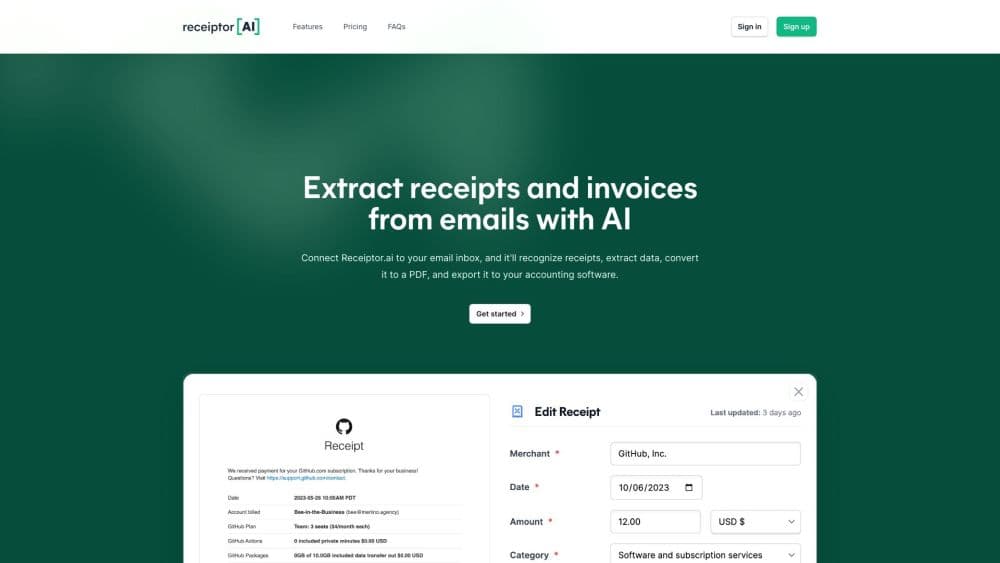
Receiptor AI is an AI bookkeeping tool that finds receipts and invoices in email, WhatsApp, or uploads, pulls out the key data, and syncs it to Xero or QuickBooks.
About Receiptor AI
What Is Receiptor AI
Receiptor AI is receipt and invoice automation for small businesses, freelancers, and accounting firms. It sits above your accounting system as a capture layer: it watches the inboxes and chat accounts where receipts actually arrive, extracts the merchant, amount, tax, and date, then pushes a finished record into your books with the original document attached. In practice it's receipt scanning software with a workflow layer on top.
The product comes from Merlino, Inc. and launched in August 2023 after founder Romeo Bellon got tired of hunting through his own inbox at tax time. It runs on Gmail, Outlook, any IMAP inbox, WhatsApp, and iMessage, and it also takes bulk uploads.
The main limits are practical. There's no free plan, and the monthly subscription only covers new mail from the day you sign up. Old receipts need a separate one-time Retroactive Scan, which is quoted by email volume. Document allowances also cap how much each plan processes before overage fees kick in.
Getting Started
- Create an account and connect a mailbox, WhatsApp number, or upload a batch of files.
- Pick the business entity and the chart of accounts that Receiptor should categorize against.
- Connect Xero or QuickBooks, or choose a storage destination such as Google Drive, Dropbox, or Amazon S3.
- Review the first extracted documents, correct any category, then let the automatic workflows take over.
- Export a CSV, PDF report, or ZIP of originals whenever your accountant asks.
Product Information
A quick look at Receiptor AI's pricing, supported platforms, and performance.
Best for
The users, tasks, and scenarios where this tool fits best.
Users
- Freelancers and contractors
- Bookkeepers and accounting firms
- Multi-entity owners
Tasks
- Recovering a backlog of past receipts
- Monthly expense categorization
- Handing books to an accountant
Scenarios
- Tax season with incomplete records
- Teams that bill across countries
- Agencies with several brands
Key features
Retroactive Email Scan
The Retroactive Scan walks through old email history and pulls out receipts and invoices from any year. You pay once per scan, based on how many emails it reads, with a starting rate around $0.012 per email at high volume. Smart filtering lets you skip specific senders or domains so the scan doesn't grind through newsletters.
Inbox, WhatsApp, and Upload Capture
Receiptor connects to Gmail, Outlook, Yahoo, any IMAP inbox, Google Workspace, and Microsoft 365, and it also accepts forwarded WhatsApp or iMessage receipts. A receipt that arrives as a link or a PDF attachment gets followed and read, not skipped. Bulk uploads cover the paper receipts you photograph on your phone.
Context-Aware Expense Categorization
The model reads what the purchase actually was, then maps it to your chart of accounts. Receipt extraction based on context is a different approach from keyword rules, which tend to dump every Amazon order into office supplies. You can still correct a category, and saved context helps the next similar document land in the right place.
Direct Publishing to Xero and QuickBooks
Records publish with the extracted fields filled in and the original document attached, so an auditor can open the source file from inside the accounting entry. The Xero and QuickBooks sync keeps that link intact. Receiptor is an Intuit App Partner at Silver level and a Xero Connected App, which means the connections are officially supported rather than scraped.
Multi-Entity Workspaces
Each document gets assigned to the legal entity that was billed, then categorized under that entity's accounts and sent to its own QuickBooks or Xero company. For groups with shared inboxes this removes the manual sorting step that usually eats a morning each month.
Exports, API, and Agent Access
You can export a CSV, a PDF report, or a ZIP of original files, or forward documents by email to a storage destination. The Growth plan adds API, MCP, and CLI access, which lets a finance team script its own handoff instead of clicking through the dashboard.
Security and Data Handling
Receiptor stores message IDs rather than message bodies, and it says its Google API use follows the Limited Use requirements. It has completed a Cloud Application Security Assessment and meets CASA Tier 2, which is the level enterprise buyers usually ask about before connecting a mailbox.
Pros and cons
Pros
- Captures receipts from email, chat, and uploads in one place, so there's no second app for the paper pile.
- Works with any currency and language, which suits businesses buying abroad.
- Official QuickBooks and Xero integrations keep the original document attached to each entry.
- Retroactive scans recover years of missed deductions without manual searching.
- Multi-entity routing handles several companies from one login.
Cons
- No free plan, and the $29 entry tier includes only 50 documents per month before overage charges.
- Historical scanning is sold separately, so new subscribers often pay twice in the first month.
- The Starter plan allows a single accounting connection, which blocks anyone running two sets of books.
- Setup asks for a chart of accounts decision up front, and that's the step most users get wrong on day one.
Frequently asked questions
No. A subscription only processes mail that arrives after you connect the account. Past receipts need a one-time Retroactive Scan, quoted by email volume, and most customers buy both.
Related content
Explore related tools, skills, and articles for Receiptor AI.
Receiptor AI Alternatives
Liveplan
Palo Alto Software · BusinessLivePlan is business plan software that helps founders and small business owners turn an idea into a funder-ready plan. It combines AI-assisted writing, market research with cited sources, and connected financial forecasting so your income statement, cash flow, and balance sheet move together when you change one number. Over 1.5 million businesses have used it to plan, forecast, and track performance against real accounting data. That's a lot of founders. It's also a signal the tooling survived contact with real lenders.

Swms
Swms AI · Writing · Productivity · BusinessSwms is an AI safety compliance tool that turns a plain description of a job into ready-to-use safety documents. Describe your project, trade, and known hazards, and it writes a safe work method statement, job hazard analysis, safe work procedure, RAMS, or safety data sheet in seconds. It also ships with Oscar, a chat assistant that answers workplace safety questions in any language. Teams in construction, mining, transport, and warehousing use it to cut the paperwork that usually eats into a workday.

Rows
Rows (Superhuman) · Productivity · BusinessRows is an AI spreadsheet and data analysis tool that imports live data from more than 50 sources, then lets you work with it using plain language instead of SQL queries or nested formulas. You can pull numbers out of PDFs, connect ad platforms, databases, and bank accounts, and ask the AI to build reports, merge datasets, or set up models that recalculate themselves. It runs in the browser, works like a spreadsheet, and now sits under the Superhuman umbrella.