

Reclaim AI
Reclaim.ai · Productivity
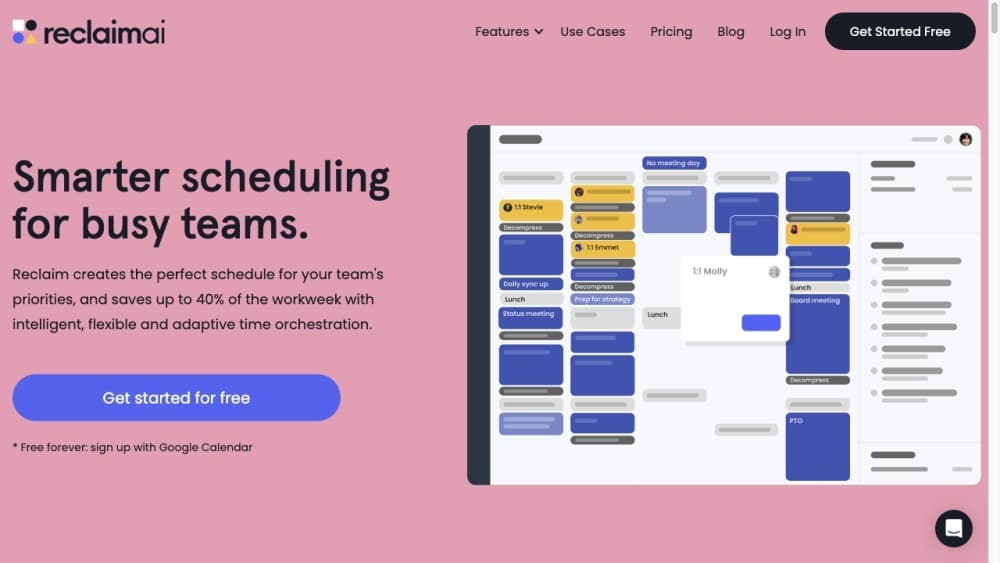
Reclaim AI is an AI calendar assistant that auto-schedules your tasks, focus time, habits, and breaks around Google or Outlook events to protect deep work and cut meeting overload.
About Reclaim AI
What Is Reclaim AI
Reclaim AI is a smart scheduling app built for people whose calendars run their day instead of the other way around. It connects to a Google Calendar or Outlook account, studies how you actually work, and then books time for the things that keep getting pushed aside: focused work, prep time, breaks, and personal commitments.
The product treats your calendar as something to defend, not just record, which is why teams reach for it as a calendar time management tool rather than a plain scheduler. When a week fills up with meetings, Reclaim AI shifts tasks and habits into whatever gaps remain, so important work still lands somewhere on the calendar instead of vanishing into a to-do list.
The biggest catch is that it needs calendar access to do any of this, and it works best once it has a few weeks of patterns to learn from. People who keep a messy calendar with overlaps and untitled blocks will need to clean it up first.
Getting Started
- Sign up at reclaim.ai with your Google or Outlook account and grant calendar access.
- Set your working hours, so the AI knows when it's allowed to schedule things.
- Create your first Focus Time goal or Habit, like a two-hour block for deep work or a daily lunch break.
- Connect task tools such as Google Tasks, Todoist, or Asana so Reclaim AI can find time for real work.
- Review your calendar after the first week and adjust priorities until the schedule reflects what you actually value.
Product Information
A quick look at Reclaim AI's pricing, supported platforms, and performance.
Best for
The users, tasks, and scenarios where this tool fits best.
Users
- Busy professionals
- Engineering and product teams
- Managers
Tasks
- Protecting deep work
- Turning a to-do list into calendar time
- Cleaning up recurring meetings
Scenarios
- A week that keeps filling with meetings
- Managing a hybrid schedule with commute days
Key features
AI Focus Time
Set a weekly goal for deep work and Reclaim AI blocks that time automatically, then defends it as new meetings arrive. When your week gets crowded, it can move focus blocks to a better slot instead of letting them overlap. It's the feature most users start with, and the one that delivers the clearest return.
AI Tasks and Task Sync
The calendar assistant pulls your task list from Google Tasks, Todoist, Asana, ClickUp, Jira, or Linear and books time for each task based on priority and due date. You can also track time spent per task with built-in timers, which feeds more accurate reports. It turns a passive to-do list into scheduled work you can actually see.
Smart Meetings
Recurring meetings become Smart Meetings that Reclaim AI monitors for conflicts, low-quality time slots, and attendee clashes. It flags problems and suggests a fix in one click, so organizers stop playing scheduling detective. This matters most for teams with standing meetings that drift into bad time slots.
AI Habits
Habits are recurring events, like lunch, exercise, or a daily review, that the AI places at the best time within your scheduling windows. A habit template library lets you activate common work and life routines in a click. Because habits move rather than break, they survive busy weeks that would normally wipe them out.
Buffer Time
Reclaim AI automatically adds breaks before and after meetings, reserve travel time for events that need a commute, and keeps tasks from stacking back to back. Buffers mean you get a moment to reset between calls rather than jumping straight from one to the next.
AI Assistant and Agents
As an AI scheduling tool, Reclaim AI pairs an LLM chat assistant that analyzes your schedule, fixes conflicts, finds meeting times, and sets up agents that keep working on your behalf. You can plan your week conversationally and preview or approve changes before they apply. It's the layer that makes the rest of the app feel less like a rigid rule engine.
Pros and cons
Pros
- Automatically defends focus time and habits without manual calendar wrangling, so deep work survives a busy week.
- Syncs tasks from Google Tasks, Todoist, Asana, Jira, and Linear, turning to-do lists into real scheduled blocks.
- Free plan exists, so you can test automatic time blocking before paying for a seat.
- Weekly reports and stats show how time is actually split between meetings, tasks, and focus.
- Built-in Slack, Zoom, Google Meet, and ChatGPT integrations keep the schedule in the tools you already use.
Cons
- Requires full calendar access to schedule anything, which is a hard sell for privacy-conscious users.
- Needs a few weeks of data before its scheduling suggestions get sharp; the first days feel rough.
- The most useful team and analytics features sit behind the Business and Enterprise plans, so small teams pay more per seat.
- A messy calendar with overlaps and untitled blocks has to be cleaned up first, or the AI schedules around the mess.
Frequently asked questions
It's an AI calendar assistant that automatically schedules your tasks, focus time, habits, and breaks around your existing Google Calendar or Outlook events. You set the rules and priorities, and it finds the best time for everything, rebalancing as your week changes.
Related content
Explore related tools, skills, and articles for Reclaim AI.
Reclaim AI Alternatives

Base Code
Base44 (Wix) · Coding · ProductivityBase Code is a shared cloud development environment from Base44. Teammates describe changes to an existing GitHub codebase in chat, preview them live and send them back as pull requests.

Knocket
Knocket (Tencent RTC team) · Productivity · Business · ChatbotKnocket is a free live chat and contact page tool that lets visitors message you from your website, app, or a shareable link, with every reply handled from Telegram or one inbox.

FloorGen
Vinit Kumar (FloorGen) · Productivity · China AIFloorGen is a browser-based floor plan maker that turns a sentence or a sketch into an editable 2D plan and a 3D walkthrough. Export to PDF, DXF or video, and draw without an account.