
Redesign With AI
Redesign · Image
Redesign With AI turns short text prompts into icons, logos, stickers, posters, mockups, and other design assets in a browser, with a built-in editor and 3 free credits to start.
About Redesign With AI
What Is Redesign With AI
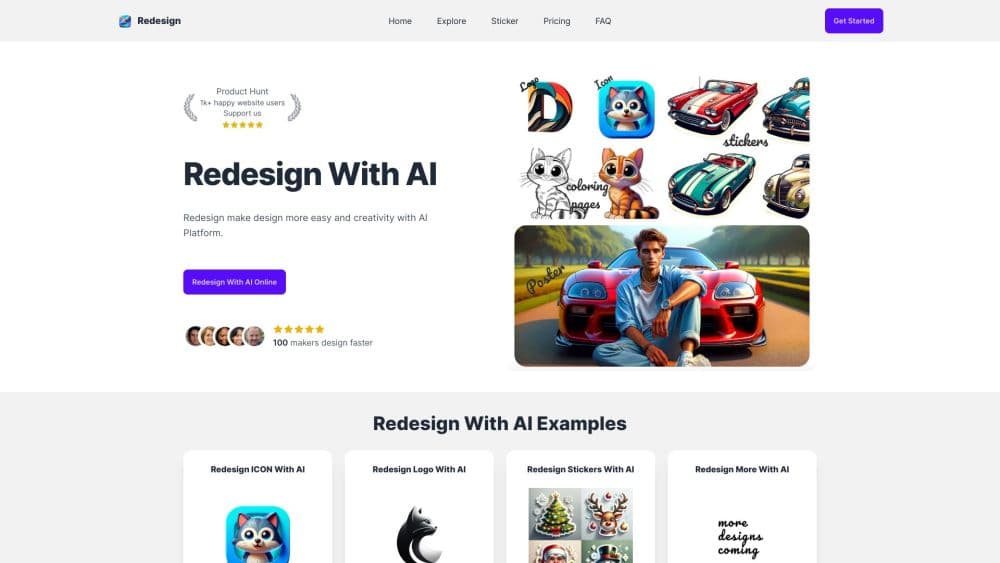
Redesign With AI is a web app for making finished design images from a written prompt. You pick a design type, choose a model, describe what you want, and the site returns an image you can download or tweak in its editor. It works as an AI design generator for everyday projects, and the catalog covers icons, logos, stickers, posters, coloring pages, mockups, birthday cards, tattoos, and illustrations.
It targets the gap between hiring a designer and fighting with professional software. A small shop that needs a promotion poster, or a developer who wants an app icon by Friday, can get something usable without learning Illustrator. The site says more than 50,000 people have used it, and the public Explore feed shows what others have generated.
The limit is control. You work from prompts and preset design types, so small adjustments like moving one element or matching an exact brand palette are awkward. The tool is strongest at fast concept images, not at production files with layers, vectors, or print-ready specs.
Getting Started
- Create an account on redesignwithai.com and open the dashboard.
- Choose a design type, such as logo, poster, or sticker.
- Select an image model and write a prompt. A title is optional.
- Generate the image, then download it or refine it in the design editor.
Product Information
A quick look at Redesign With AI's pricing, supported platforms, and performance.
Best for
The users, tasks, and scenarios where this tool fits best.
Users
- Small business owners
- App and web developers
- Parents, teachers, and hobbyists
Tasks
- Drafting a logo
- Building an app icon set
- Making party or classroom printables
Scenarios
- A launch week with no designer available
- Testing a product idea
- A weekend craft project
Key features
Prompt-Based Design Generator
The dashboard asks for a design type, a model, and a text prompt. You don't draw anything or start from a blank canvas, which keeps the first result a few clicks away. It suits people who can describe an idea but can't sketch it.
Nine Design Categories
The site separates icons, logos, stickers, posters, coloring pages, mockups, birthday cards, tattoos, and illustrations. Each category comes with prompts and examples tuned to that format, so an AI poster maker request doesn't return a square logo by accident. The AI icon generator, AI sticker generator, AI tattoo generator, AI coloring page generator, and AI mockup generator entries all follow that same pattern.
Flux AI Image Model
Flux AI handles the current image generation, and the Premium plan advertises unlimited use of it. On the Starter and Free plans, each Flux image costs one credit. The model choice matters most for text inside images and for clean, graphic shapes.
Face To Many
This mode turns one face photo into a range of stylized looks, and it costs one credit per image on paid plans. It works for avatar experiments and character sheets. Faces with heavy shadow or odd angles produce weaker results.
Design Editor
Generated images open in an editor where you can adjust the composition and export a final file. It covers light cleanup rather than full layer-based design work, so complex retouching still belongs in another tool.
Image History and Explore Feed
Every generation stays in your history, so you can return to an earlier version without rerunning the prompt. The public Explore section shows other users' images and works as a prompt library when you're stuck.
Pros and cons
Pros
- Fast first results: a usable concept image arrives in minutes, which makes it easy to test several directions.
- Wide format coverage: nine design types cover most small business and personal projects in one place.
- Low entry cost: three free credits and a $9.99 monthly plan let you try the workflow before committing.
- Browser only: nothing to install, and it runs on a laptop, tablet, or phone.
Cons
- Credits run out quickly: 800 credits a month sounds generous until you generate variations, and there is no unlimited tier below Premium.
- Weak fine control: prompts and presets can't match an exact layout, font, or brand color.
- No refunds: the official policy states that payments are non-refundable, so a wrong plan purchase is money lost.
- Unclear commercial terms: the FAQ only suggests making images "without any copyright," so check the license before using output for paid work.
Frequently asked questions
It generates design images from text prompts. You choose a category such as logo, poster, sticker, or mockup, describe the idea, and the site returns an image you can download or edit.
Related content
Explore related tools, skills, and articles for Redesign With AI.
Redesign With AI Alternatives

Google EmbeddingGemma 2
Google DeepMind · Writing · Image · CodingGoogle EmbeddingGemma 2 is a 740M-parameter open model that turns text, code, images, audio, and video frames into vectors in one 768-dimension space, running on phones and laptops.

Tractionwave
TractionWave · Image · MarketingTractionWave is an AI attention heatmap tool for static ads. Upload a PNG or JPG and it returns predicted attention, ranked hotspots, and fixes before you spend budget.

Imejis.io
Imejis.io · Image · MarketingImejis.io is an AI design studio for agents and marketing teams. Describe an image in plain words, and it writes the copy, builds the layout, reflows it to every size, then exports a finished file.