

AI Resume Builder
Refit Resume · AI Assistant
Refit Resume is an AI resume builder that turns your work history into an ATS-ready document, then typesets it with LaTeX for a clean, professional finish.
About AI Resume Builder
What Is Refit Resume
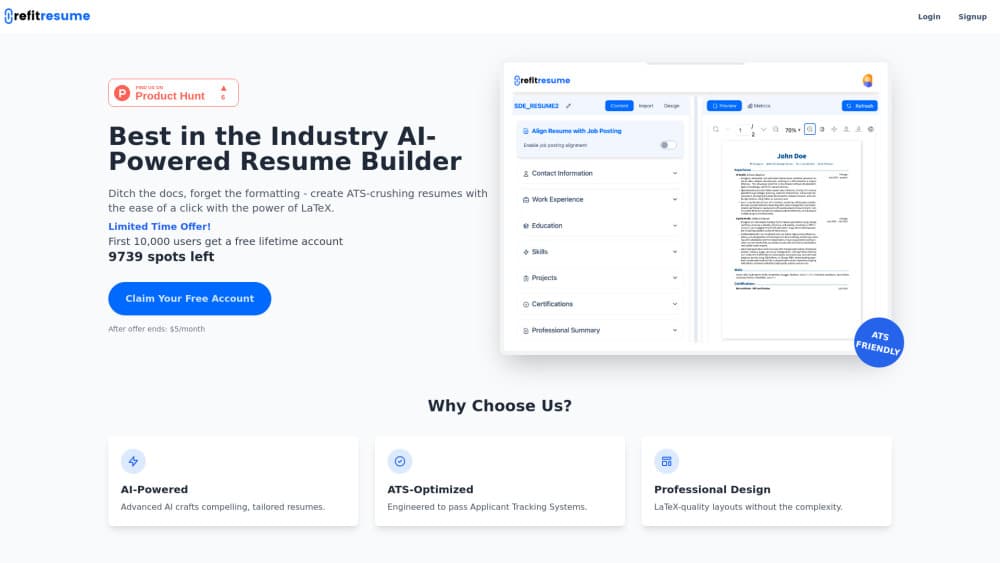
Refit Resume is a browser-based resume builder for job seekers who want a polished, machine-readable document without learning LaTeX or wrestling with Word's layout tools. You fill in your background, the AI rewrites the wording, and the builder compiles the result into a typeset file.
The pitch is narrow on purpose. Most resume tools sell templates. Refit Resume sells output quality. Layout comes from LaTeX, the typesetting system academics and engineers use for papers, so spacing, alignment, and fonts hold steady after every edit.
Three limits are worth knowing before you sign up. It runs in a browser only, with no mobile app. Design freedom sits inside the options in the Design tab, so a graphic-heavy or two-column creative resume isn't going to happen here. And the AI writes from what you feed it. Thin input gives you thin bullet points.
Getting Started
- Sign up at refitresume.com with an email and password, or request a magic link.
- Choose Import to pull in an existing resume, or open a blank document in the Content tab.
- Work through the sections: contact information, professional summary, work experience, education, skills, projects, certifications.
- Switch on Align Resume with Job Posting and paste the posting when you want the wording aimed at one role.
- Check the live preview, then download, print, or share the file from the toolbar above it.
Product Information
A quick look at AI Resume Builder's pricing, supported platforms, and performance.
Best for
The users, tasks, and scenarios where this tool fits best.
Users
- Software engineers and technical candidates
- Career changers
- Recent graduates with little work history
Tasks
- Rewriting flat bullet points
- Tailoring one resume to a single posting
- Rebuilding an outdated resume file
- Producing a clean PDF for an application portal
Scenarios
- Applying through a large company careers site
- Applying with a deadline in a few hours
- Keeping several versions of one resume
Key features
AI drafting across every section
The AI works inside the sections you already know: professional summary, work experience, education, skills, projects, certifications. It expands a short prompt into full sentences you can edit in place, so the tool stays useful after the first draft.
Job posting alignment
A toggle labeled Align Resume with Job Posting lets you point the document at one opening. Paste the posting, and the wording shifts toward the language that role uses. This is a nudge, not a rewrite of your history, so read the output before you send it.
LaTeX typesetting without LaTeX
The builder renders your resume through LaTeX, the system behind academic papers and technical documentation. You get even margins, consistent heading hierarchy, and fonts that don't drift when a line grows. No packages, no compile step, no error logs.
Resume import
Import takes a resume you already have and turns it into editable fields. For anyone with a long work history, this is the difference between a ten-minute setup and an evening of retyping. Check the parsed dates and titles, since imports rarely land perfectly.
Live preview with page and zoom controls
The right-hand preview updates as you type, with page navigation, zoom from a thumbnail view to full size, and a metrics panel for a quick read on the document. Two-page resumes are easy to spot before a recruiter does.
Design tab and export options
The Design tab holds the layout choices, and the LaTeX engine does the rest. From the preview toolbar you can download the file, print it, or share it. Output stays text-based, which matters more for ATS resume screening than any visual flourish.
Pros and cons
Pros
- The finished document looks typeset rather than assembled from a template, which stands out in a stack of Word files.
- Job posting alignment is one switch, not a separate paid add-on or a second tool.
- Resume import saves the retyping that usually kills a rebuild before it starts.
- Section names follow the standard set recruiters and parsers expect, so nothing gets lost in translation.
- At $5 per month after the free lifetime offer, the price sits well below most AI resume generators.
Cons
- Browser only. No Android or iOS app, so editing on a phone means pinch-zooming a desktop layout.
- The AI writes confidently, and sometimes wrongly. Every bullet needs a fact check against your actual record.
- The set of resume templates is small compared with design-first builders, and creative layouts are out of reach.
- No public API or automation, so updating a resume from a script or a recruiting workflow isn't possible.
Frequently asked questions
Refit Resume is a web app that writes and typesets resumes with AI help and LaTeX. You enter your history, the AI drafts the wording, and the builder exports a finished document.
Related content
Explore related tools, skills, and articles for AI Resume Builder.
AI Resume Builder Alternatives
Agibot
Agibot · Productivity · AI Assistant · ChatbotAgibot is a personal AI agent for Mac that keeps running after you close the window, runs routines on a schedule, and works from Telegram or Slack with your own API keys.

Foley
Hanamori Labs, LLC · Voice & Language · Productivity · AI AssistantFoley is a voice to-do list that turns a spoken sentence into a filed task, complete with project, date and time, then helps you plan the day around what is already there.

Ghost Core
Ghost · Productivity · AI AssistantGhost Core is a $3,499 screenless personal AI computer that runs local AI models on its own hardware, builds context from your apps and devices, and acts without waiting for a prompt.