

Reindeer
KeyValue Software Systems · Coding
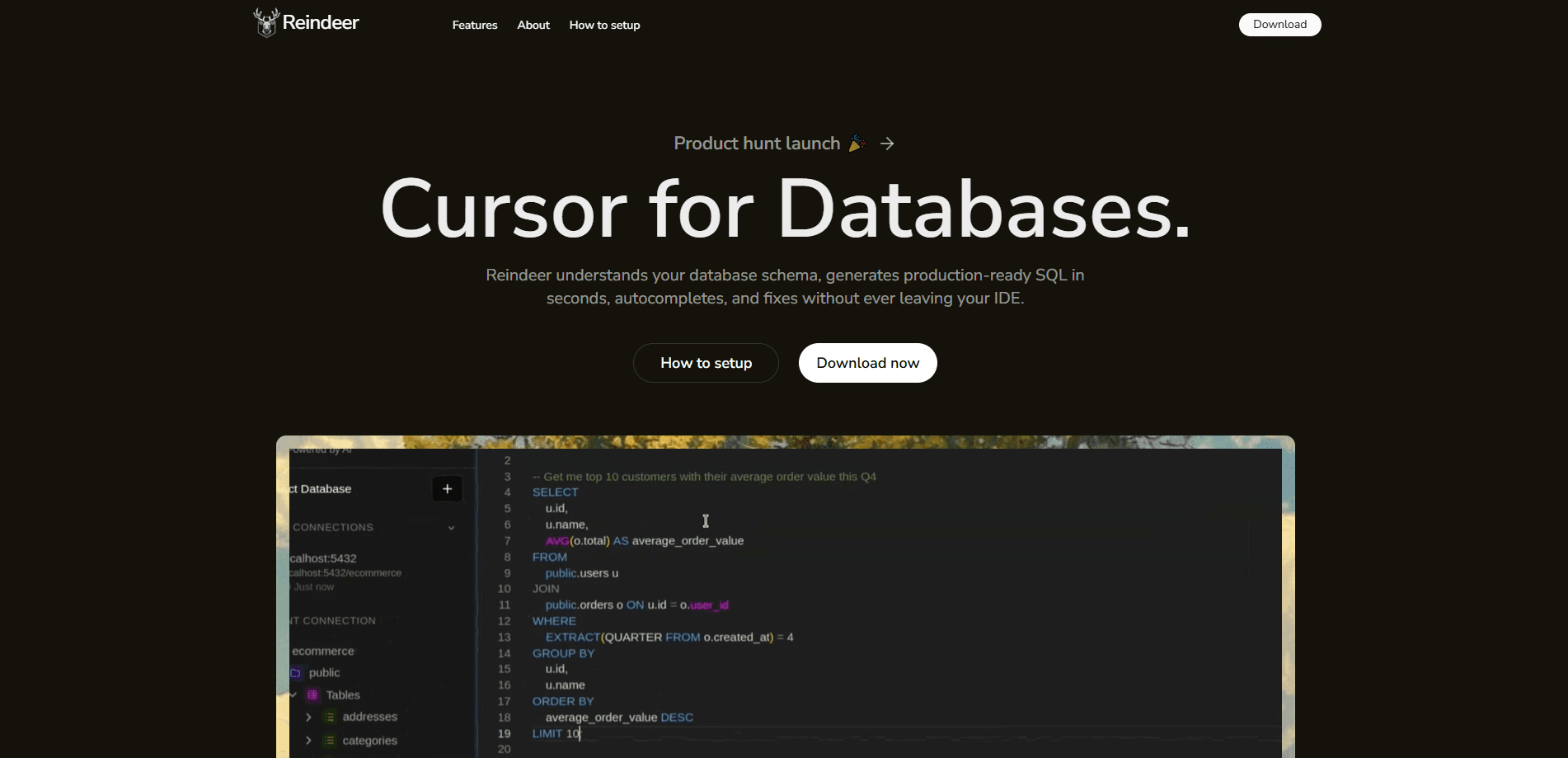
Reindeer is an AI SQL assistant that lives inside your IDE and helps you write, repair, and generate database queries. It reads your actual schema, then autocompletes SQL as you type, corrects broken queries automatically, and turns a plain English request into a working statement. The pitch, straight from the team, is a Cursor-like experience built for databases rather than code files.
About Reindeer
What Is Reindeer
Reindeer is a database copilot from KeyValue Software Systems, first built during the company's KeyCode 2025 internal hackathon. It targets a chore most developers know well: writing SQL against a schema you half-remember, then hunting down the typo or logic slip that breaks the query. The tool connects to your database, reads the structure of your tables, and uses that context to suggest and correct SQL right where you write it. Simple idea. Tricky to pull off well.
Unlike chat-tab assistants that ask you to paste in your schema, Reindeer keeps the connection alive inside the editor. Autocomplete suggestions, error fixes, and the inline chat all draw on the same live schema. The column names and joins it proposes are yours. Not generic examples from a textbook.
The catch is scope. Reindeer is an IDE companion. It only helps while you're writing queries in your editor. So what happens outside the editor? Nothing, for now. The site leans on early user testimonials from developer teams rather than published benchmarks, and the pricing page isn't public yet. Confirm plan details before rolling it out to a team.
Getting Started
- Visit tryreindeer.com and download the extension for your IDE.
- Install it, then connect the database you want to work with so Reindeer can read your schema.
- Open a SQL file and start typing; accept autocomplete suggestions as they appear.
- Paste a broken query to see the AI fix, or use the inline chat to describe what you need in plain English.
- Review the generated query, run it, and check the results against your expectations.
Product Information
A quick look at Reindeer's pricing, supported platforms, and performance.
Best for
The users, tasks, and scenarios where this tool fits best.
Users
- Backend and data developers who write SQL daily and want faster query authoring without switching to a separate client
- Analysts who know what they want from the data but aren't fluent in SQL syntax
- Engineering teams already working inside an IDE who want database help in the same window
Tasks
- Drafting new SELECT, JOIN, and aggregation queries against a live schema
- Fixing syntax and logic errors in queries that fail to run
- Generating SQL from a plain English description of the intended result
- Speeding up routine reporting queries that follow the same pattern each time
Scenarios
- Exploring an unfamiliar database where you don't yet know the table or column names
- Debugging a long query that throws an error you can't spot by eye
- Turning a quick data question into a working query during a meeting or standup
Key features
Real-Time SQL Autocomplete
Reindeer suggests SQL as you type, based on the tables and columns in your connected database. Suggestions are schema-aware. Joins and column names match what actually exists rather than guesses. It's the feature the team puts first, and it works as a practical SQL query generator for everyday work.
AI Error Fixing
When a query fails, Reindeer reads the statement and corrects syntax and logic errors automatically. It's built to fix SQL errors fast. You don't have to trace a mismatched bracket or a bad clause by hand. The fix is proposed in place, and you stay in your editor to review it.
Inline Chat for Natural Language Queries
A built-in chat lets you describe what you need in everyday language, and it generates the matching query. Ask for "last month's signups by plan," and Reindeer translates that into SQL against your schema. This is the fastest path when you know the goal but not the exact syntax.
Built-In Schema Awareness
The whole tool runs on your live database structure. Because Reindeer reads your tables and columns, the autocomplete, the error fixes, and the chat output all stay consistent with your real data model. No drifting into generic examples.
IDE-Native Workflow
Reindeer installs as an extension and works where you already write code. There's no separate database client to open, no schema to copy and paste into a chat box. That keeps the database work in one place. For developers who live in their editor, that matters.
Team-Backed Development
Reindeer grew out of KeyCode 2025, the annual hackathon at KeyValue Software Systems, and the team lists a set of professional developers who use it daily. Those testimonials come from real engineering roles. Treat them as early user impressions rather than formal reviews.
Pros and cons
Pros
- Schema-aware autocomplete means suggestions use your real table and column names
- Error fixing catches syntax and logic mistakes without a manual trace
- Natural language queries clear the syntax hurdle for less SQL-fluent users
- Works inside the IDE, so there's no context switch to a separate client
Cons
- Pricing isn't published, so you can't compare plans before signing up
- It's an IDE extension only, which means no help outside your editor
- The team's public evidence is early testimonials rather than independent benchmarks
Frequently asked questions
Reindeer is an AI SQL assistant that sits in your IDE. It autocompletes queries as you type, fixes broken SQL automatically, and turns plain English descriptions into working queries, all using your connected database's schema.
Related content
Explore related tools, skills, and articles for Reindeer.
Reindeer Alternatives
Forefront
Forefront · CodingForefront is a web platform for building with open-source AI. It lets you fine-tune leading open-source language models on your own data, evaluate how they perform, and run them through an API or export them to host yourself. Developers who want the convenience of a closed-source platform but insist on owning their models and data are the target audience here.

Startkit
StartKit.AI · CodingStartkit is a boilerplate for building AI SaaS and AI wrapper products. Think of it as an AI startup boilerplate with the boring parts already wired up: authentication, Stripe and Lemon Squeezy payments, usage limits, transactional email, and an AI API starter that talks to OpenAI, Anthropic, Groq, or Llama. You clone the repo, set your price, and start on the part of your product that people actually pay for. It's Next.js under React and Tailwind, so most of the boilerplate code already feels familiar.
Testim
Tricentis · CodingTestim is an AI-powered test automation platform for building and running end-to-end tests across web, mobile, and Salesforce applications. It leans on machine learning to keep tests stable when an interface changes, so teams spend less time fixing broken selectors. Not bad for an automated testing tool you can start using today. You create tests by recording actions in a browser, then optionally add JavaScript when you need more control. It's a solid pick for busy QA teams.