
Reshot AI
Reshot AI · Image
Reshot AI is an online AI face editor that reshoots expressions, eye direction and head pose in your photos, aimed at creators and professionals polishing portraits.
About Reshot AI
What Is Reshot AI
Reshot AI is a browser-based AI photo editor built around one job: fixing faces. Think of it as a facial expression editor first and a general photo tool second. Instead of retouching skin or swapping backgrounds, it regenerates a portrait with a new expression, a different gaze direction or a shifted head angle while keeping the person recognizable. Upload a photo, pick the kind of change you want, and the tool returns several variations in seconds.
It fits the awkward middle ground between a full AI headshot generator and a manual photo editor. You don't need a studio shoot. You don't need to nudge sliders for half an hour. The trade-off is scope. Reshot AI is a face-only tool, so body edits, background swaps and full outfit changes are outside what it does. As an online photo editor, it's also online-only, which means a stable connection and uploading your images to their servers. From what I can tell, the company behind it keeps a low public profile, so most of what you can verify comes straight from the product itself.
Getting Started
- Open reshot.ai in any modern desktop or mobile browser, no install required.
- Create an account and pick a plan; there's no permanent free tier, only a paid subscription.
- Upload a clear, well-lit photo where the face is fully visible and not too far from the camera.
- Choose what to change: eye direction, smile, mouth expression or head rotation and tilt.
- Generate a batch of options, compare them side by side, and download the one you want.
Product Information
A quick look at Reshot AI's pricing, supported platforms, and performance.
Best for
The users, tasks, and scenarios where this tool fits best.
Users
- Content creators
- Job seekers
- Photographers and retouchers
Tasks
- Changing a closed or distracted gaze into an eye-contact shot
- Replacing a stiff smile with a natural one
- Nudging head tilt and rotation for better composition
- Editing YouTube thumbnails
Scenarios
- You have one strong portrait but the subject blinked or looked away, and there's no chance of a second take.
- You're preparing a batch of profile pictures for a team or portfolio and want consistent, polished expressions.
- You shoot on green screen and want cleaner face framing for compositing.
Key features
Precision Eye Editor
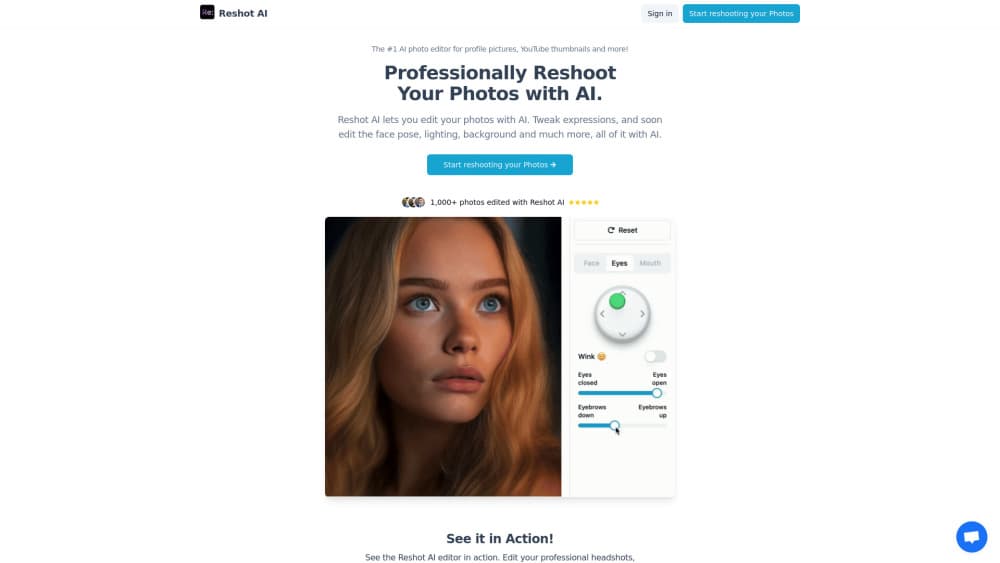
The eye controls handle more than a simple gaze swap. Can you really fix a blink after the fact? Here, yes. You can fine-tune eyebrow position, redirect where the eyes look, adjust how open the eyelids are, and even add a subtle wink. For portraits where the expression hinges on the eyes, this is the part that carries most of the weight.
Advanced Expression Sculptor
This set of tools targets the mouth. You can shape a specific smile, soften a smirk, or control mouth movement so the result looks like a genuine expression rather than a pasted-on grin. It's the feature most people reach for when a photo is technically fine but the emotion is off. Simple as that.
3D Pose Manipulator
Head angle is often what makes a portrait feel awkward. The 3D controls let you rotate and tilt the head to improve composition, which is handy when a subject turned slightly too far or held their chin at an odd angle. Small adjustments here often do more for a photo than heavy retouching. It works fast, too.
Real-Time Editing at High Resolution
Edits render in seconds, and the tool works with photos up to 4K. That speed matters. When you're generating a batch and picking the best option, you iterate quickly instead of waiting on each render. It also keeps the workflow practical for people editing several photos at once.
Unlimited Photos and Full Commercial Rights
Both plans advertise unlimited photos and unlimited AI editing, with no per-image limits mentioned. No credits. No caps. The service also grants full commercial rights and ownership of the photos you edit, so the output is yours to use for social posts, professional profiles or client work.
Pros and cons
Pros
- Face editing is the whole product, so the expression and pose controls go deeper than general photo editors.
- Edits come back in under 30 seconds as multiple options, which makes comparing results easy.
- You keep full commercial rights to the edited photos.
- Works in a browser with no install and handles 4K source images.
Cons
- No free plan, so you have to subscribe before you can test it on your own photos.
- It's face-only editing, which means no body reshaping, background replacement or object removal.
- Everything runs online, so your images are uploaded to their servers and you need a connection to work.
- Price sits above casual one-off editing apps, which is a lot if you only need it occasionally.
Frequently asked questions
It's used to change the face in a photo. You can adjust facial expressions, eye direction and head pose so an existing portrait looks more natural or more confident without taking a new shot.
Related content
Explore related tools, skills, and articles for Reshot AI.
Reshot AI Alternatives

Google EmbeddingGemma 2
Google DeepMind · Writing · Image · CodingGoogle EmbeddingGemma 2 is a 740M-parameter open model that turns text, code, images, audio, and video frames into vectors in one 768-dimension space, running on phones and laptops.

Tractionwave
TractionWave · Image · MarketingTractionWave is an AI attention heatmap tool for static ads. Upload a PNG or JPG and it returns predicted attention, ranked hotspots, and fixes before you spend budget.

Imejis.io
Imejis.io · Image · MarketingImejis.io is an AI design studio for agents and marketing teams. Describe an image in plain words, and it writes the copy, builds the layout, reflows it to every size, then exports a finished file.