

Resleeve AI Fashion Design
Resleeve · Image
Resleeve is an AI fashion design studio that turns sketches and CADs into photorealistic garments, on-model photos, and runway video without samples or a physical shoot.
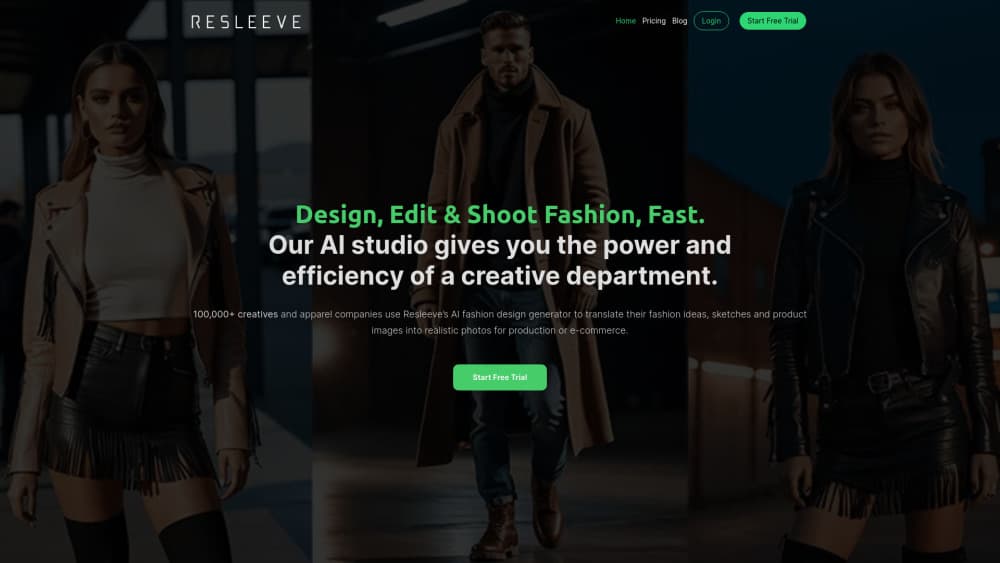
About Resleeve AI Fashion Design
What Is Resleeve
Resleeve is fashion design software built for the stage where a collection is still sketches and half-formed ideas. You upload a rough drawing or a CAD file, describe the fabric and fit you have in mind, and the tool returns a photorealistic garment on a model. The company sells this as a way to skip weeks of sampling before you know which idea deserves a sample at all.
The fashion focus is the selling point. General image models treat a dress like any other object, so they miss how a bias cut falls or why a dropped shoulder reads differently in wool than in jersey. Resleeve's models were trained on garments, which means prompts about draping, texture, prints, and studio lighting land closer to what a technical designer means. That gap is what separates an AI fashion design tool from a general image generator.
One thing to know before you plan around it: as of October 2026, resleeve.ai opens on a general workspace for AI bots that handle business tasks, and the old fashion pages return 404. The live pricing is $19/mo for Basic and $49/mo for Plus, sold as a monthly usage balance. The fashion capabilities below come from the company's own product material from the fashion period, so confirm availability with the company before you build a calendar on it.
Getting Started
- Create an account at resleeve.ai. Signup is free, and the company says it doesn't ask for a card to start.
- Pick a starting point: a text description for a design from scratch, or an upload of a sketch or CAD file for a sketch to image render.
- Set the garment details. Choose fabric, color or print, silhouette, and model pose. Specific descriptions return renders closer to your intent than short ones do.
- Generate variations, then export at higher resolution. Upscaling to 4K handles the files that end up in a line sheet or a lookbook.
- Save the looks that work and iterate from them, instead of rebuilding the prompt every session.
Product Information
A quick look at Resleeve AI Fashion Design's pricing, supported platforms, and performance.
Best for
The users, tasks, and scenarios where this tool fits best.
Users
- Independent designers
- Small and mid-size fashion brands
- Manufacturers and sampling teams
- Fashion schools and educators
Tasks
- Turning sketches into on-model visuals
- Testing colorways and prints
- Building lookbook and ecommerce imagery
- Pitching a collection internally
Scenarios
- A capsule drop on a two week lead time
- A pre-sampling review
- A lookbook shot on a freelancer budget
Key features
Sketch and CAD to Photoreal Image
This is the core workflow. Feed in a hand drawing, a flat sketch, or a CAD file and the tool rebuilds it as a garment on a body, keeping the silhouette you drew. Designers use it to check whether a rough idea holds up before anyone touches a pattern.
AI Clothing Design From a Prompt
You can also start with nothing but words. Describe a garment and the tool generates complete concepts, including cuts, fabric suggestions, and styling. It's useful when you need volume, since generating twenty directions takes about as long as sketching one.
Virtual Model Photo and Video Shoots
The AI photoshoot generator places your garment on generated models in generated settings, with lighting that matches the scene. It also outputs short runway video, which is the part most still-image tools skip. No studio, no model release forms, no shipping samples.
Color, Print, and Fabric Application
Textures, patterns, and color variations apply to a finished render in seconds. That makes the tedious part of a design review cheap: same garment, six colorways, one screen. Fabric behavior stays approximate, so treat it as a visual guide rather than a spec.
4K Upscaling and Multi-View Rendering
Renders come out at production resolution, and the tool can show the same garment from several angles. Multi-view output is what makes a render usable in a technical discussion, since a buyer or a pattern maker needs the back and the side, not only the front.
Trained Looks for Brand Consistency
Resleeve lets you train a look on your own references so repeated generations keep the same styling, palette, and model type. That solves the usual problem with AI fashion imagery, where every new prompt produces a house style that belongs to nobody.
Pros and cons
Pros
- Trained around garments, so draping, fabric weight, and styling prompts behave better than they do in general image models.
- Turns a sketch into an on-model image in minutes, which compresses the concept loop from weeks to an afternoon.
- Removes the studio, model, and sample shipping costs from the early visual stage of a collection.
- Color and print variations are quick enough to test a full palette instead of guessing at two.
- The company states that designs and intellectual property stay with the user, and that customer data is encrypted.
Cons
- This isn't a pattern making tool. There's no grading, no measurement spec, and no tech pack export, so you still need CLO, Optitex, or a pattern cutter downstream.
- Renders look photographic but they aren't fabric tests. Weight, stretch, and how a seam pulls under tension still need a real sample.
- The fashion product pages have been pulled from the live site, which makes current feature documentation and fashion-specific pricing hard to verify.
Frequently asked questions
It generates fashion visuals. You bring a sketch, a CAD, or a text description and it returns a photorealistic garment, an on-model photo, or a short runway clip. The point is to see and sell an idea before you spend money on a sample.
Related content
Explore related tools, skills, and articles for Resleeve AI Fashion Design.
Resleeve AI Fashion Design Alternatives

Google EmbeddingGemma 2
Google DeepMind · Writing · Image · CodingGoogle EmbeddingGemma 2 is a 740M-parameter open model that turns text, code, images, audio, and video frames into vectors in one 768-dimension space, running on phones and laptops.

Tractionwave
TractionWave · Image · MarketingTractionWave is an AI attention heatmap tool for static ads. Upload a PNG or JPG and it returns predicted attention, ranked hotspots, and fixes before you spend budget.

Imejis.io
Imejis.io · Image · MarketingImejis.io is an AI design studio for agents and marketing teams. Describe an image in plain words, and it writes the copy, builds the layout, reflows it to every size, then exports a finished file.