

ResumaidPro
YMS Group · AI Assistant
ResumaidPro was an AI resume builder for career changers moving into tech, with ATS-friendly templates and a Chrome extension. The service has shut down.
About ResumaidPro
What Is ResumaidPro
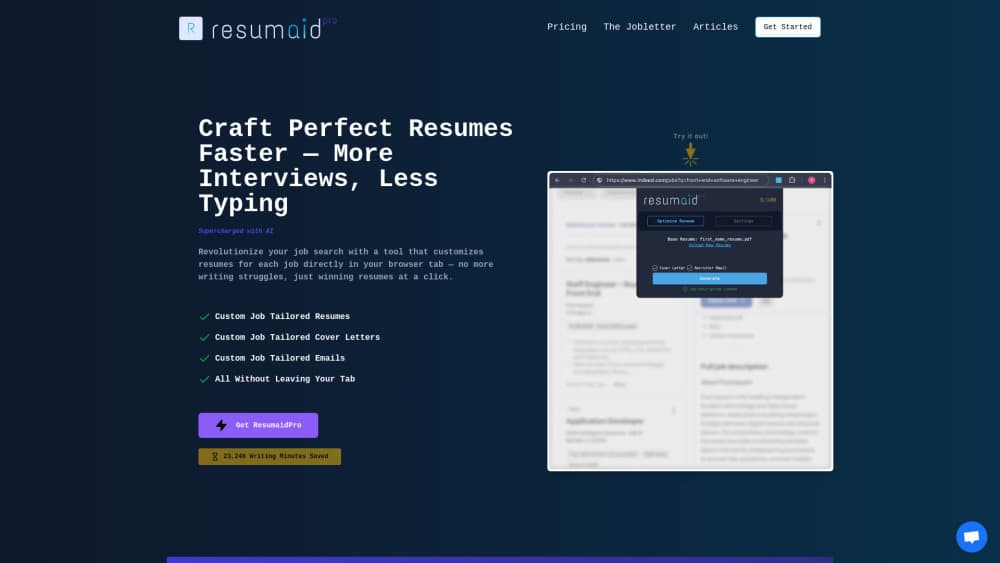
ResumaidPro was an AI resume builder built around a single audience: people switching into tech from another field. You brought a job listing and your existing work history, and the tool rewrote that history in the language of the role you wanted. Resumes, cover letters, and follow-up emails all came out of the same workspace, and a Chrome extension pulled job descriptions straight from LinkedIn and Indeed.
The problem it attacked is real enough. A teacher applying for a product support job usually has the right experience and the wrong vocabulary. ResumaidPro tried to close that gap by rewriting bullet points around the keywords a recruiter or an applicant tracking system would look for, which is the tedious part of resume tailoring most people skip.
The product is no longer running. The official site now shows a single notice saying the app is no longer available, with an email address for questions. There's no export tool, no read-only archive, and no path back into an old account. Scale was always modest too: a founder's sale listing put the user base at just over 250 registered accounts and $546 in revenue, so third-party reviews and long-term reliability signals were thin even before the shutdown.
Getting Started
- Create an account on the website and start a new document from your current resume, either by pasting the text or uploading a file.
- Paste the job description you're targeting. The tool compared your wording against the listing and flagged the terms a recruiter would expect to see.
- Run the Magic Wand over individual bullet points. Each rewrite turned a vague line into something closer to a measured result, with action verbs and role-specific keywords.
- Generate the matching cover letter and follow-up email from the same job details, then edit the drafts by hand.
- Export the finished documents as a PDF built to pass an ATS parse, and keep each version saved against the role it was written for.
Product Information
A quick look at ResumaidPro's pricing, supported platforms, and performance.
Best for
The users, tasks, and scenarios where this tool fits best.
Users
- Career changers from teaching, healthcare, or operations
- Bootcamp graduates with projects but little formal experience
- People with ten or more years in one field
- Job seekers sending applications and hearing nothing back
Tasks
- Tailoring one resume to one listing
- Writing a cover letter that echoes the listing
- Following up after an interview or a silent application
Scenarios
- Applying through LinkedIn or Indeed at volume
- A pivot with no tech titles on the resume
- A short, focused job search
Key features
Magic Wand Bullet Rewrites
Every bullet point carried a wand icon. Clicking it rewrote that single line: vague duties became quantified achievements, weak verbs became action verbs, and industry keywords were folded into the sentence. The useful part was the granularity. You could keep the bullets that already worked and only touch the ones that read like a job description, rather than regenerating a whole section and losing your voice.
Job Description Matching
The core of the product was a comparison between your resume and a specific listing. The tool pulled the terms that mattered out of the posting and showed where your document was silent, which is roughly what an applicant tracking system does before a recruiter ever sees the file. For a career changer, that gap list doubles as a writing prompt.
ATS-Friendly Templates
The template library was designed around parsing rules rather than visual flair. Single-column layouts, standard section headings, and clean text layers mean the software on the recruiter's side can read the file. That's a low bar most designer resume templates fail, and it was the reason the output looked plain.
Chrome Extension for LinkedIn and Indeed
The extension sat on top of job boards and read the description from the page itself. From there you could tailor a resume without switching tabs or copying a wall of text into a form. It was the part of the workflow that saved the most clicks, and the part users mentioned most in launch discussions.
Cover Letters and Follow-Up Emails
Resumes were only one of three document types. An AI cover letter was generated from the same job details, and so was the follow-up email, each with its own template set. The follow-up piece is the one that stands out, since most resume tools stop at the resume and leave you to write the message that actually gets a reply.
One Workspace for Every Version
Each tailored resume was saved against the role it was written for, so a job search produced a small archive instead of a folder of files named final_v3. Duplicating a base resume and adjusting it per listing was the intended workflow, which is also how recruiters expect candidates to work.
Pros and cons
Pros
- Fast first draft: a tailored resume, cover letter, and follow-up email came out of one job listing in a single session.
- The Chrome extension removed the copy-paste step on LinkedIn and Indeed, which is where most of the time goes in a high-volume search.
- The rewriting was pitched at career changers, so it handled the "how do I describe fifteen years of classroom work for a tech role" question better than general builders.
- Flat pricing with unlimited documents, which suits a burst of applications better than per-document credits.
- Low learning curve: no design decisions, no layout work, and a short path from listing to PDF.
Cons
- The service is gone, so none of the features above can be used today and existing accounts have no export route.
- The focus on tech hiring is narrow. Applicants in healthcare, trades, or public sector roles got less useful keyword suggestions.
- The user base was small, with roughly 250 registered accounts at the time of sale, so independent reviews and long-term track records were hard to find.
- No API and no integrations beyond the browser extension, which limited anyone who wanted to automate applications or connect the tool to an existing workflow.
Frequently asked questions
No. The official site now displays a notice that the app is no longer available, and it points questions to an email address at the operator's domain. There's no replacement product and no migration path for saved documents.
Related content
Explore related tools, skills, and articles for ResumaidPro.
ResumaidPro Alternatives
Agibot
Agibot · Productivity · AI Assistant · ChatbotAgibot is a personal AI agent for Mac that keeps running after you close the window, runs routines on a schedule, and works from Telegram or Slack with your own API keys.

Foley
Hanamori Labs, LLC · Voice & Language · Productivity · AI AssistantFoley is a voice to-do list that turns a spoken sentence into a filed task, complete with project, date and time, then helps you plan the day around what is already there.

Ghost Core
Ghost · Productivity · AI AssistantGhost Core is a $3,499 screenless personal AI computer that runs local AI models on its own hardware, builds context from your apps and devices, and acts without waiting for a prompt.