

ResumeBuilder.com
Bold LLC · Productivity · AI Assistant
ResumeBuilder.com is a free online resume builder with AI writing help, 25+ ATS-friendly templates, and expert tips, for job seekers who want a polished, ready to send resume fast.
About ResumeBuilder.com
What Is ResumeBuilder.com
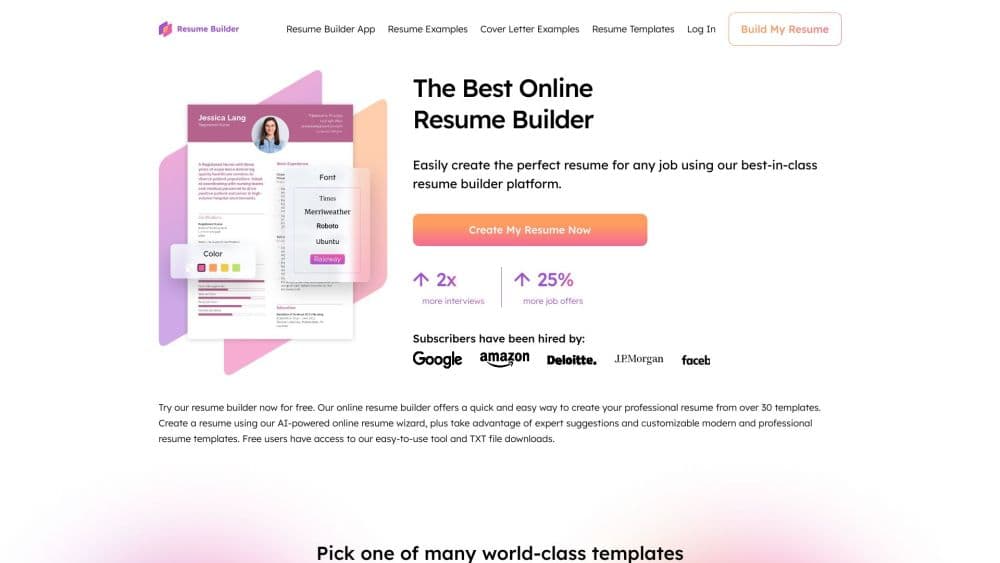
ResumeBuilder.com is a web based resume builder from Bold LLC that walks you through writing a resume, one section at a time. You pick a template, fill in guided prompts, and lean on AI suggestions when you get stuck on wording. The finished file exports as a clean document you can send to employers.
The problem it solves is the blank page. Most people know what jobs they have held but not how to phrase the achievements behind them or how to format a layout that survives screening software. The builder handles both, and its template library is built to pass applicant tracking systems (ATS), the programs that scan resumes before a human sees them.
The main limit is the download format. The free plan exports text files only, so a polished PDF or Word resume needs a paid subscription. The tool also leans on templates and prompts rather than turning you into a resume expert, and the AI writes suggestions you still have to fact check.
Getting Started
- Go to the ResumeBuilder.com site and pick a template, or click Import Resume to upload a draft you already have.
- Fill in the guided sections for contact details, work history, education, and skills. Expert prompts and an AI writer offer phrasing you can edit.
- Use ResumeCheck to review the finished draft for weak spots before you send it.
- Save the resume by creating a free account, then download it as a TXT file or upgrade to export Word and PDF.
- Optionally build a matching cover letter in the same style for a consistent application package.
Product Information
A quick look at ResumeBuilder.com's pricing, supported platforms, and performance.
Best for
The users, tasks, and scenarios where this tool fits best.
Users
- First time job seekers
- Career changers
- Experienced professionals
- People applying on the go
Tasks
- Writing a first resume
- Customizing a resume for a specific job
- Exporting an ATS-friendly file
- Pairing a resume with a cover letter
Scenarios
- A job posting closes tonight and you still have no resume
- You keep getting rejected before an interview
- You are applying to several roles from your phone
Key features
Guided Resume Builder
The core editor breaks a resume into sections and prompts you for each one, so you fill in contact details, experience, education, and skills in order. Expert tips sit alongside each field, which is what keeps the process moving for someone who has never written a resume. You can also skip the guided flow and import an existing file.
AI Resume Writer
The AI resume builder turns short prompts into full bullet points. Type a phrase like a job title, and it returns a worked sentence you can edit, which saves time on the wording that trips most people up. It follows common resume conventions for tense and tone. You still check every claim for accuracy, since the wording can overstate what you did.
ATS-Friendly Templates
The library holds 25+ professional templates and 500+ examples across industries, all built to work with applicant tracking systems. Templates stay clean under the surface so screening software can read the text, while the visible design still looks polished. You can switch templates without retyping your content.
Cover Letter Builder
A cover letter tool mirrors the resume workflow so you can build both documents in one style. It shares the same guided prompts and AI help, which matters because pairing a matching letter with a resume makes an application read as one package rather than two unrelated files.
ResumeCheck Review
ResumeCheck scans a finished draft and flags weak spots before you send it. It looks at structure, wording, and missing elements that recruiters notice, and it gives you something to fix rather than a vague score. This is the feature that helps people who keep getting filtered out learn why.
Mobile and Cross-Device Editing
The builder runs in a browser on phone, tablet, or desktop, with no app download required. Your edits sync across devices, so you can start a resume on a laptop and finish it on a phone. Font and color controls work on any screen size.
Pros and cons
Pros
- The free plan acts as a complete online resume maker, letting you build, save, and export a resume as a TXT file with no cost, which covers a first application.
- 25+ ATS-friendly templates and 500+ examples give you a starting point for almost any field, from nursing to software engineering.
- The AI writer and ResumeCheck shorten the slow parts, turning short prompts into editable bullet points and flagging gaps before you apply.
- Browser based editing works on phone, tablet, and desktop without an install, so you can work wherever you are.
- It states GDPR and CCPA compliance, with encrypted storage and a policy of not selling your data.
Cons
- The free plan exports text only, so a polished PDF or Word resume requires a paid subscription, which is where the real value sits.
- The 14-day trial auto-renews at $25.95 every four weeks unless you cancel, so a one-off need turns into a recurring charge fast.
- AI suggestions still need fact checking, since the tool writes plausible phrasing that may not match what you actually did.
- There is no documented public API, so teams wanting to generate resumes programmatically cannot build on it.
Frequently asked questions
It builds resumes and cover letters online, guiding you section by section and helping with wording through AI suggestions. The point is to turn a blank page into a formatted, ATS-friendly document you can send to employers.
Related content
Explore related tools, skills, and articles for ResumeBuilder.com.
ResumeBuilder.com Alternatives

Base Code
Base44 (Wix) · Coding · ProductivityBase Code is a shared cloud development environment from Base44. Teammates describe changes to an existing GitHub codebase in chat, preview them live and send them back as pull requests.

Knocket
Knocket (Tencent RTC team) · Productivity · Business · ChatbotKnocket is a free live chat and contact page tool that lets visitors message you from your website, app, or a shareable link, with every reply handled from Telegram or one inbox.

FloorGen
Vinit Kumar (FloorGen) · Productivity · China AIFloorGen is a browser-based floor plan maker that turns a sentence or a sketch into an editable 2D plan and a 3D walkthrough. Export to PDF, DXF or video, and draw without an account.