

Revisely
Revisely · Leaning
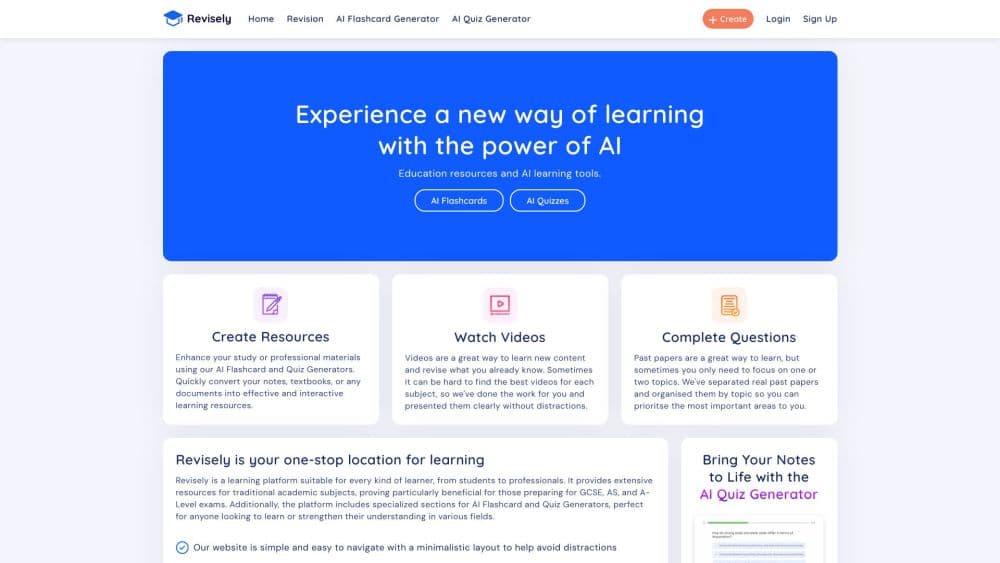
Revisely is an AI study platform that turns notes, PDFs, slides and videos into flashcards, quizzes and summaries for students, teachers and professionals.
About Revisely
What Is Revisely
Revisely is an AI study platform, and its AI flashcard generator, quiz maker and notes tools all live inside one web app. Upload a photo, a PDF, a Word file, a PowerPoint or a YouTube link, and the site builds a set of study materials from it in seconds. It grew out of a UK revision platform built around A-Level, AS and GCSE exam questions and past papers, so the study habits it was designed for are exam-focused rather than open-ended note-taking.
The pitch is speed. A student who has three hours of lecture slides and an exam in the morning can turn that pile into flashcards and a practice quiz without retyping anything. Teachers get a second use out of the same tool: generate a quiz from last week's reading and share it with a class. The sharing layer is what separates Revisely from a plain flashcard maker, since you can send quizzes, notes and flashcard decks to peers or students in a few steps.
Where it stops matters as much as what it does. The AI reads and reorganizes what you feed it, so the quality of the output depends on the quality of the input. It doesn't sit an exam for you, and it can't verify that a generated quiz matches the exact syllabus wording your board expects. Treat it as a fast first draft of your revision materials, not a replacement for checking the official specification.
Getting Started
- Create a free account with Google or email to unlock the AI tools, then open the tool you need: flashcards, quizzes, notes or video summaries.
- Upload your material. Revisely accepts images, PDFs, Word documents, PowerPoints and YouTube links, and it handles typed and handwritten content.
- Let the AI generate the deck, quiz or summary, then edit anything that came out wrong using the built-in editor.
- Share the results with a class or study group, or export them to a platform like Anki, and print them single-sided or double-sided for offline use.
Product Information
A quick look at Revisely's pricing, supported platforms, and performance.
Best for
The users, tasks, and scenarios where this tool fits best.
Users
- Students revising for school and university exams
- Teachers building class materials
- Professionals studying for certifications
Tasks
- Turning lecture slides into flashcards
- Building a practice quiz from a chapter
- Summarizing a long video
Scenarios
- A university student who records a lecture and wants notes from it before the next class.
- A teacher who needs a quick comprehension check from the week's reading without drafting questions manually.
- A study group that shares one flashcard deck and drills it together the night before a test.
Key features
AI flashcard generator
Upload an image, take a picture, or add a PDF and Revisely's AI turns the material into flashcards. It reads handwritten content too, not just typed text. Decks can be shared, printed single-sided or double-sided, or exported to platforms like Anki for spaced repetition.
AI quiz generator
The quiz maker reads your notes, textbook chapters or slides and writes questions you can take as a test. The AI also assesses answers and can edit individual questions, which is what makes the quiz tool useful for teachers who want a marking hand rather than just a question list.
AI notes and document generator
This tool cleans up and reshapes written content with a set of editing actions: extend a draft, shorten it, rephrase it, fix spelling and grammar, swap in better words, change the tone or writing style, and translate. You can stack several actions on the same passage, and there's a full editor for manual edits.
AI video summarizer
Paste a link to a publicly viewable YouTube video and the summarizer produces a written summary of it. It works on lectures, webinars, training videos and vlogs, and the result can be refined with the same AI editing tools or edited by hand.
Sharing and collaboration
Generated quizzes, notes and flashcards can be sent to peers or instructors, which turns the platform into a group study tool rather than a solo one. This is the feature that distinguishes Revisely from a standalone flashcard or notes app.
Instant exam mode
Once a deck is ready, exam mode tests your recall and returns feedback generated by the AI. It's a light way to check whether you actually learned the material before the real test, without setting up a separate quiz.
Pros and cons
Pros
- One account covers four tools, so flashcards, quizzes, notes and video summaries don't need four separate subscriptions.
- Accepts many input types, including images, PDFs, Word documents, PowerPoints, YouTube links and handwritten notes.
- The free tier is usable, with unlimited non-AI study tools and a daily allowance of AI chat messages.
- The paid plan is cheap at $4.99 per month billed annually, and it removes the caps on AI generation.
- Sharing and Anki export make it easy to move your materials into an existing study routine.
Cons
- The free tier is tight. It caps you at 5 pages per document, 25,000 characters per text upload and 5 AI chat messages a day, which runs out fast during exam season.
- Content quality depends on your source material, so a messy PDF in means a messy deck out, and you'll spend time cleaning it up.
- The exam-question library is built around UK curricula like A-Level and GCSE, which is less useful if you're studying under a different system.
- There's no public API, so schools and developers can't wire Revisely into their own systems or automate bulk generation.
Frequently asked questions
Revisely turns your own study material into flashcards, quizzes, notes and video summaries using AI, and lets you share the results. It's built mainly for exam revision, but the notes and summary tools work for professionals and teachers too.
Related content
Explore related tools, skills, and articles for Revisely.
Revisely Alternatives

HireKey
HireKey · Voice & Language · Productivity · LeaningHireKey is an AI job search copilot built by a former tech recruiter. It checks role fit, tailors resumes, runs interview practice and tracks every application.

Lune
Retrograde Labs · Productivity · LeaningLune is a research search engine for scientific AI agents. It runs as an MCP server that lets Claude, ChatGPT and Cursor search peer-reviewed computer science papers and cite them.
Coddy
Coddy · Coding · LeaningCoddy is a gamified platform to learn to code through short interactive lessons in 20+ languages, with a browser editor, an AI tutor and free certificates.