

Roam Virtual Office
Roam · Productivity
Roam is a virtual office platform that turns a distributed company into a shared map. You see who is in, drop into meetings, and get AI notes through On-It.
About Roam Virtual Office
What Is Roam
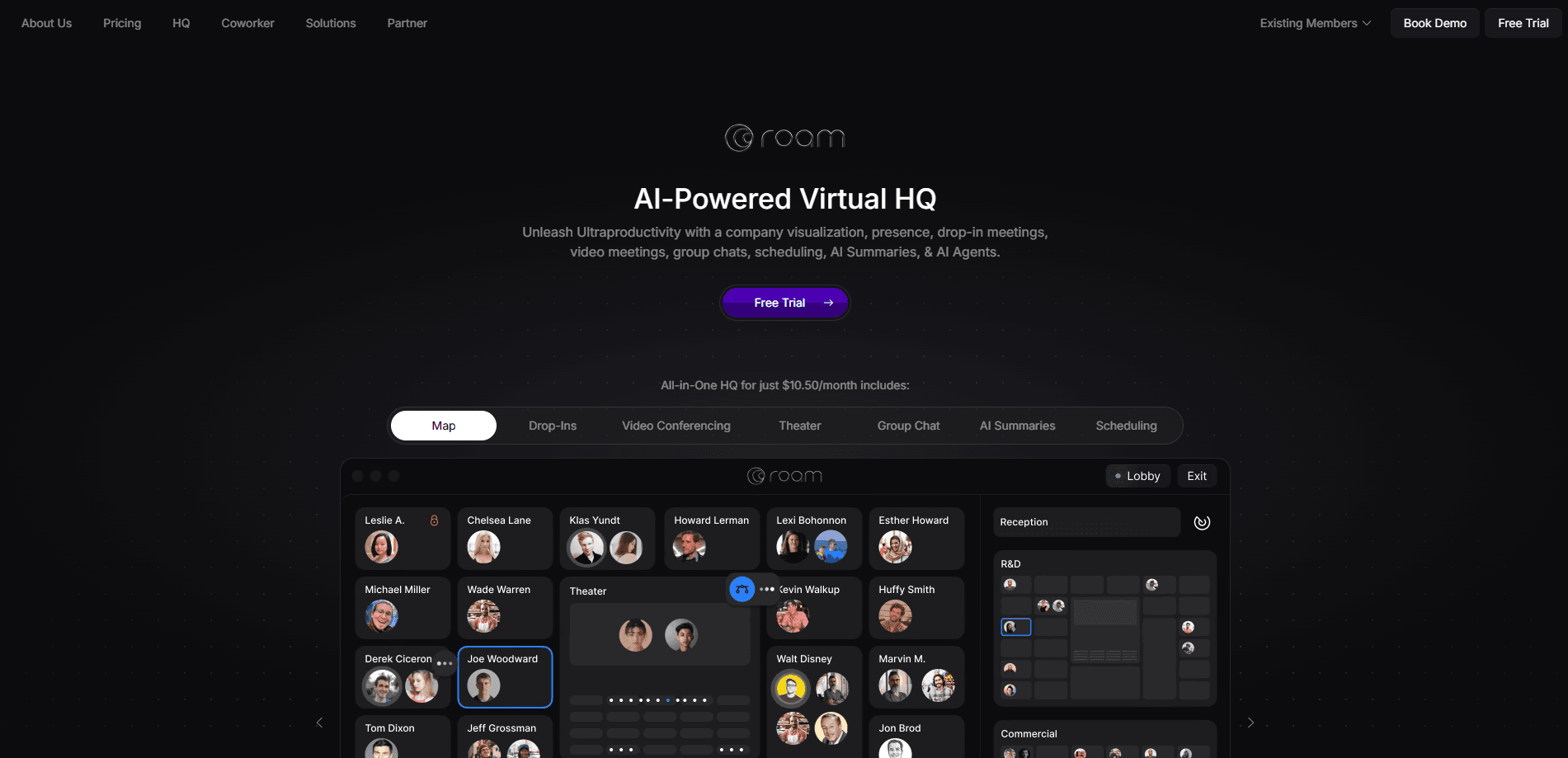
Roam is a virtual office and virtual HQ for remote teams. Instead of stacking video calls back to back, a company gets one map that shows who is in the office, who is meeting with whom, and who is digging into deep work. Click someone to chat, or sit in an empty seat to start a voice meeting.
The problem Roam targets is presence. In a real office you can read the room without asking. Remote work software throws that away, so distributed teams default to calendars full of status calls. Roam rebuilds the ambient signal as a live map, then layers an AI assistant on top to act on it.
The catch is scale and habit. Roam becomes useful once a team commits to living on the map, which suits remote-first companies far more than teams that drop in once a week. A small group that mostly works solo won't get much out of it, and some features assume a company big enough to have an org chart worth watching.
Getting Started
- Create a workspace at ro.am and invite your team by email.
- Set up your Private Office and Meeting Rooms, then place people on the map as they join.
- Open the overworld to see live presence, then chat, drop in, or start a video meeting from a room.
- Turn on Magic Minutes in any meeting so everyone gets a transcript and an AI summary in a group chat.
- Meet On-It, the built-in AI assistant, and hand it scheduling, follow-ups, and questions about past meetings.
Product Information
A quick look at Roam Virtual Office's pricing, supported platforms, and performance.
Best for
The users, tasks, and scenarios where this tool fits best.
Users
- Remote-first companies
- Sales and customer success teams
- Managers who follow up a lot
Tasks
- Seeing who is free right now
- Running an all-hands
- Getting meeting notes without a notetaker
Scenarios
- Onboarding a new hire into a distributed team
- Catching up after time away
- Keeping a field team visible
Key features
Virtual Office Map
The core of Roam is a live map of the whole company. It shows who is in the office, who is meeting with whom, who is talking, and even the music people are playing. You click a head to chat or an empty seat to enter a room, so presence becomes something you read at a glance instead of asking about in chat.
Drop-In Meetings and Video Rooms
Knock on an empty seat in someone's Private Office to start an audio-only Drop-In Meeting. If they accept, you can also peek at their shelf, a wall of books, music, and photos they choose to show. When you need more, jump into a Meeting Room for video, screen sharing, and a shared whiteboard, then leave when the work is done.
Theater for All-Hands
Theater is Roam's presentation format for big-company moments. The audience sits in rows where they can whisper with neighbors, there is a backstage for presenters and a Q&A microphone, and stadium mode holds up to 3,000 people. It is built for all-hands and large events rather than one-to-one calls.
Magic Minutes AI Meeting Notes
Turn on Magic Minutes and every participant gets a transcript and an AI summary in a shared group chat. You can prompt the notes for specifics, ask what a decision was, and get an automated catch-up if you arrive late. The same assistant also summarizes chat threads and PDFs.
On-It AI Assistant
On-It is an AI agent that observes the office. It tells you when someone enters or frees up, schedules meetings inside and outside the company, and follows up over chat or email. When it has the skill, it volunteers for action items after a meeting, and it can use all your past transcripts as context.
AInbox, Lobby, and Magicast
AInbox handles direct messages, group chats, and confidential chats with custom folders and search across your history. Lobby gives guests a link to book time on your calendar. Magicast records your screen with picture-in-picture video to turn sales demos or updates into a shareable presentation.
Pros and cons
Pros
- Presence you can read at a glance: the live map shows who is in, who is busy, and who is free without a status update.
- AI woven through the workflow: Magic Minutes and On-It sit in meetings and chat, so notes, scheduling, and follow-ups happen where the work does.
- Strong mobile story: native iOS and Android apps, plus Apple Watch and CarPlay, keep a field team visible.
- Guest access is free: guest badges let outside contacts chat and visit without a paid seat for every visitor.
- Scales to big meetings: Theater holds up to 3,000 people, so all-hands don't need a separate tool.
Cons
- Value depends on adoption: the map is only useful if most of the team lives on it, so a mostly-solo crew gets little from Roam.
- Unclear public pricing: the site does not list seat prices, so you have to contact sales before you can compare plans.
- Busy by design: a map with presence, music, and 3D chats can feel like a lot going on for people who prefer a quiet inbox.
- Always-on presence takes getting used to: showing where you are all day raises questions about privacy that a plain chat app avoids.
Frequently asked questions
Roam is a virtual office platform for remote teams. It puts the whole company on a shared map so you can see who is present, drop into meetings, and get AI notes and scheduling from the On-It assistant.
Related content
Explore related tools, skills, and articles for Roam Virtual Office.
Roam Virtual Office Alternatives

Base Code
Base44 (Wix) · Coding · ProductivityBase Code is a shared cloud development environment from Base44. Teammates describe changes to an existing GitHub codebase in chat, preview them live and send them back as pull requests.

Knocket
Knocket (Tencent RTC team) · Productivity · Business · ChatbotKnocket is a free live chat and contact page tool that lets visitors message you from your website, app, or a shareable link, with every reply handled from Telegram or one inbox.

FloorGen
Vinit Kumar (FloorGen) · Productivity · China AIFloorGen is a browser-based floor plan maker that turns a sentence or a sketch into an editable 2D plan and a 3D walkthrough. Export to PDF, DXF or video, and draw without an account.