

Routine: Calendars & Tasks
Routine · Productivity
Routine is an AI work operating system that puts tasks, calendars, notes and meetings in one app, then lets AI agents and automations run the busywork for you.
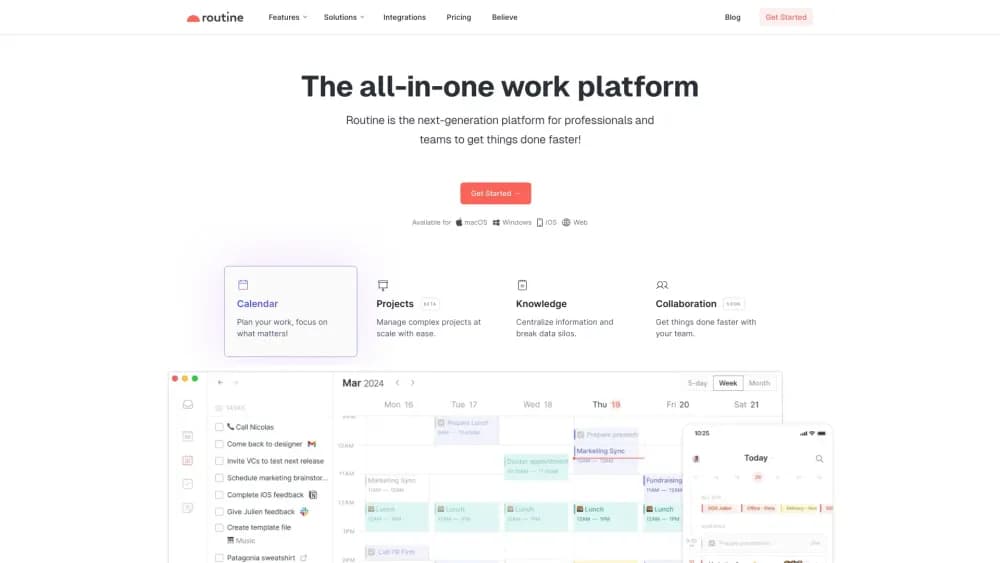
About Routine: Calendars & Tasks
What Is Routine
Routine is a productivity app built around a single inbox. Tasks, calendar events, notes, and meeting records all land in the same place, and AI sits on top to file, plan, and act on them. The pitch is simple: stop hopping between a to-do app, a calendar, and a note tool, and work out of one screen instead.
The company targets busy professionals and small teams who already juggle several tools. Routine pulls data in from services like Google Calendar, Slack, and Gmail through two-way sync, so the calendar you see is the one everyone else sees. On paid plans, AI agents take over research and triage, and AI automations connect the tools without anyone clicking through a checklist each morning.
The limits matter as much as the features. The free plan caps you at three integrations and 250 AI credits, which runs out fast if you lean on AI daily. AI meeting notes, agents, and automations sit behind the Professional plan. And a public API is still marked as coming, so developers who need to build on Routine should plan around what exists today.
Getting Started
- Sign up at routine.co. The Free plan starts you with tasks, calendars, notes, and an AI assistant, no card needed.
- Connect your tools. Link Google Calendar, Gmail, or Slack and let Routine sync both ways so your schedule stays accurate.
- Capture work. Use the desktop hotkey or the dashboard to drop in a task, event, or note in seconds, then sort it into a project.
- Let AI help. Ask the assistant to plan your day, or on a paid plan hand research and follow-ups to an AI agent.
- Record meetings and publish. Turn a meeting into notes with action items, then share the week through export or a workspace.
Product Information
A quick look at Routine: Calendars & Tasks's pricing, supported platforms, and performance.
Best for
The users, tasks, and scenarios where this tool fits best.
Users
- Busy professionals
- Small teams and studios
- Founders and operators
Tasks
- Planning your week
- Recording and summarizing meetings
- Automating routine workflows
- Centralizing scattered notes and tasks
Scenarios
- Running a small company on one tool
- Preparing for a client meeting
- Managing a research-heavy job
Key features
Unified Tasks, Calendar, and Notes
Routine's core is a single workspace where tasks, events, and notes coexist rather than living in three apps. You capture a thought once, then file it as a task, an event, or a note without switching context. A universal inbox gathers meetings, integration items, and quick captures in one list. For anyone who's lost track of a task buried in a notes app, that consolidation is the whole reason to switch.
AI Agents That Work in the Background
On the Professional plan and up, you can delegate research, triage, and follow-ups to specialized AI agents. An agent can sift through incoming items, structure data, or pull together background on a topic while you stay on your main task. It's less a chatbot and more a set of background workers tied to your workspace. The catch is that agents consume AI credits, so usage scales with how much you hand off.
AI Automations
Automations connect your tools and keep information current without a daily manual pass. You can build a workflow that files incoming items, updates connected services, or reorganizes your schedule, and tie it to a keyboard shortcut. For repetitive admin, that means the chores run on their own. Building a useful automation takes some setup, so the payoff shows up once your tools are wired in.
Meeting Notes Without a Bot
Routine records meetings and generates a transcript, summary, and action items, and it does this without a meeting bot joining the call. That keeps your invite clean and works across platforms. You decide whether action items become checklist items, tasks, or custom objects. Finding a past meeting is quick too, since every recording is stored and searchable. It's a patch on the default habit of taking notes by hand.
Two-Way Integrations
Routine connects the apps you already use and syncs both ways, so edits land on both sides. The Free plan allows three integrations, Personal allows ten, and Professional and above are unlimited. Because the data flows both directions, the workspace reflects reality instead of drifting out of date. If you live inside Slack, Gmail, or Google Calendar, this is what stops Routine from becoming just another silo.
Custom Databases and Views
You can define your own data model with custom databases and types, then build views that group, filter, and sort however your work needs. Redirection and references let you link items and see backlinks, so related objects stay connected. For teams that outgrew a flat to-do list, this turns Routine into a light project system. The structure is only as good as what you define, so some planning goes in up front.
Time Blocking and Time Tracking
Time blocking lets you reserve calendar space for your most important tasks so they actually get done, and time boxing breaks the day into fixed slots. A task-specific timer records how long you spent, which feeds back into your calendar. Combined with event coloring and labels, the day gets organized around priorities. This is the planning side that free task apps usually leave out.
Pros and cons
Pros
- One app for tasks, calendar, notes, and meetings, which removes the constant app-switching that fragments attention.
- A genuinely useful free plan: tasks, calendar, notes, an AI assistant, and three integrations at no cost.
- AI agents and automations that run background work, so research and admin move without your input.
- Meeting notes with no bot in the call, which keeps invites clean and avoids awkward joiners.
- Two-way sync with the tools teams already use, so the workspace stays accurate.
Cons
- AI credits run down fast: the free plan's 250 credits and even the paid allowances are easy to exhaust if you lean on agents daily, so heavy users face real limits.
- Key AI features sit behind the Professional plan, which means meeting notes, agents, and automations aren't available on Free or Personal.
- The public API and webhooks are still on the roadmap, so developers who need to build on Routine can't yet.
Frequently asked questions
Routine is a work operating system that combines a task manager, calendar, notes, and meetings in one app, with AI agents and automations on top. It suits people who want their daily work in a single place instead of spread across several tools. You capture tasks, plan your week, and record meetings without leaving the app.
Related content
Explore related tools, skills, and articles for Routine: Calendars & Tasks.
Routine: Calendars & Tasks Alternatives

Base Code
Base44 (Wix) · Coding · ProductivityBase Code is a shared cloud development environment from Base44. Teammates describe changes to an existing GitHub codebase in chat, preview them live and send them back as pull requests.

Knocket
Knocket (Tencent RTC team) · Productivity · Business · ChatbotKnocket is a free live chat and contact page tool that lets visitors message you from your website, app, or a shareable link, with every reply handled from Telegram or one inbox.

FloorGen
Vinit Kumar (FloorGen) · Productivity · China AIFloorGen is a browser-based floor plan maker that turns a sentence or a sketch into an editable 2D plan and a 3D walkthrough. Export to PDF, DXF or video, and draw without an account.