

rtrvr.ai
Retriever AI · Coding
Retriever AI (rtrvr.ai) is an AI browser agent that scrapes pages, fills forms and runs multi-step web tasks in Chrome, Cloud, the API or MCP.
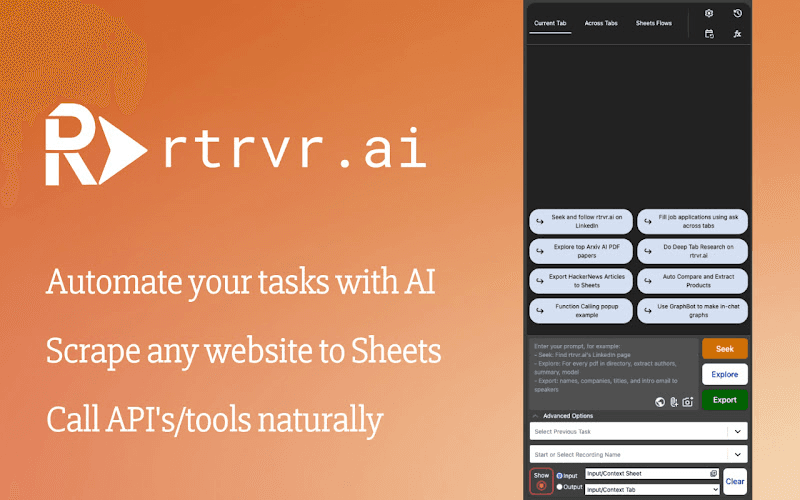
About rtrvr.ai
What Is Retriever AI
Retriever AI is a browser agent that drives a real browser to get a job done. You describe the outcome, and it plans the route across the open web or the sites you're already signed into, then returns structured data, a filled form or a finished update. It works in the Chrome extension where you're logged in, in a separate Cloud browser, and through an API or MCP client.
The appeal is that most web work still needs a human clicking through tabs. Retriever AI takes a plain-language goal like "get the attendees of this event and email each one an invite", then runs the clicks, pagination and form entries on its own. Because it reads the signed-in page instead of scraping public HTML, it can act on accounts behind a login.
The main limits are the free tier and the setup. Free Mode covers interactive tasks with sponsored cards and a daily allowance, while schedules, triggers and Chrome control through the API or MCP need a paid plan. Cloud runs also depend on syncing the right logins before they start.
Getting Started
- Create a workspace at rtrvr.ai, then generate an API key only when you need programmatic access.
- Install the Chrome extension to work in a browser you're already signed into, or keep the Cloud option for jobs that must run away from your laptop.
- Type the goal and the starting URL, then pick the routing: your own Chrome or a Cloud browser.
- Read the returned result, then save repeatable workflows as Shortcuts or Replays for consistent runs.
Product Information
A quick look at rtrvr.ai's pricing, supported platforms, and performance.
Best for
The users, tasks, and scenarios where this tool fits best.
Users
- Sales and growth teams
- Anyone who lives in the browser
- Developers who want a browser in their product
Tasks
- Web automation on live sites
- AI web scraping
- AI form filling
- Lead enrichment
Scenarios
- Recurring back-office runs
- Research across many sites
- Work that outlives your laptop
Key features
Planner with specialized sub-agents
One command goes to a Planner that coordinates more than 20 sub-agents, each handling a slice like clicks and navigation, data extraction, pagination or PDF and file work. That split is why a long job keeps moving instead of looping on one step. When a task repeats, Shortcuts and Replay skip the planning pass for the same result every time.
Chrome extension for signed-in sites
The extension drives the Chrome browser already on your device, so it can work inside logins, SSO and internal tools that public scrapers can't reach. It marks the tabs it opens and leaves your own tabs alone. A download lands in your normal Chrome Downloads folder, with a link in the result.
Cloud browser with schedules and triggers
Export a working task to the Cloud and it runs headless on a schedule or a trigger, without your laptop. Each run remembers the last one and writes to the Sheet, Doc or Slides you picked. Runs can browse from a chosen country on that place's clock, and you can cancel any run.
API, SDK and MCP access
The Agent API plans and runs a job in a Cloud browser and returns structured output, while the Scrape API hands back page content and the accessibility tree for your own model. An MCP endpoint lets a client use your signed-in Chrome session or Cloud tools. API and WhatsApp runs bill the resources they use.
File, PDF and form handling
You can attach files up to 128 MB, and the agent reads PDFs, fills form fields and generates new documents. It uploads attached files into a page's file input when asked, which suits job applications and back-office forms. For security it can't browse files you haven't attached to the task.
Bring your own key and enrichment datasets
The "Add your LLM API" flow takes keys from OpenAI, Google Gemini, DeepSeek, OpenRouter or a local endpoint, and using your own key avoids model-credit charges. Paid lookups add purchased people and company data through enrichment datasets, so a list of URLs can be filled in without scraping each site.
Pros and cons
Pros
- Runs on sites behind a login, including internal tools and SSO, which public scrapers can't touch.
- Free Mode includes supported AI models and Cloud time, so you can finish interactive tasks without your own API key.
- One agent covers scraping, form filling, enrichment and scheduled runs instead of four separate tools.
- The credit ceiling pauses a runaway task and asks before it spends past a set limit.
- Structured API and MCP output drops results into your own app or sheet rather than a chat window.
Cons
- Schedules, triggers and Chrome control through the API or MCP need a paid plan, so free users can't automate recurring jobs.
- Free Mode shows sponsored cards beside results, and the daily allowance resets rather than refilling on demand.
- Cloud runs need the right logins synced first, or a task that works locally can stumble in the Cloud.
- Per-task credit ceilings mean heavy crawling can pause for a "Continue" answer unless you raise the limit.
Frequently asked questions
Retriever AI drives a real browser to complete web tasks you describe in plain language, returning structured data, a filled form or a finished update. It runs in a Chrome extension, a Cloud browser, and through an API or MCP client.
Related content
Explore related tools, skills, and articles for rtrvr.ai.
rtrvr.ai Alternatives

Udon
Udon · Coding · ProductivityUdon turns an Apple Silicon Mac into a home server you run from a browser, with container controls, file shares, and an optional AI sysadmin.

offstage
offstage cloud · Coding · Productivityoffstage gives AI coding agents and CI jobs a real Mac: a fresh macOS account on Apple silicon, driven over an API and billed by the second.

BotBus
Chengdu Tuyang Tusen Technology Co., Ltd. · Coding · ProductivityBotBus lets you control AI coding agents from your phone and watch: approve commands, start tasks and read results while the code stays on your desktop.