
SaaS Pronto
Eduardo Borges (Ready For Mars) · Coding
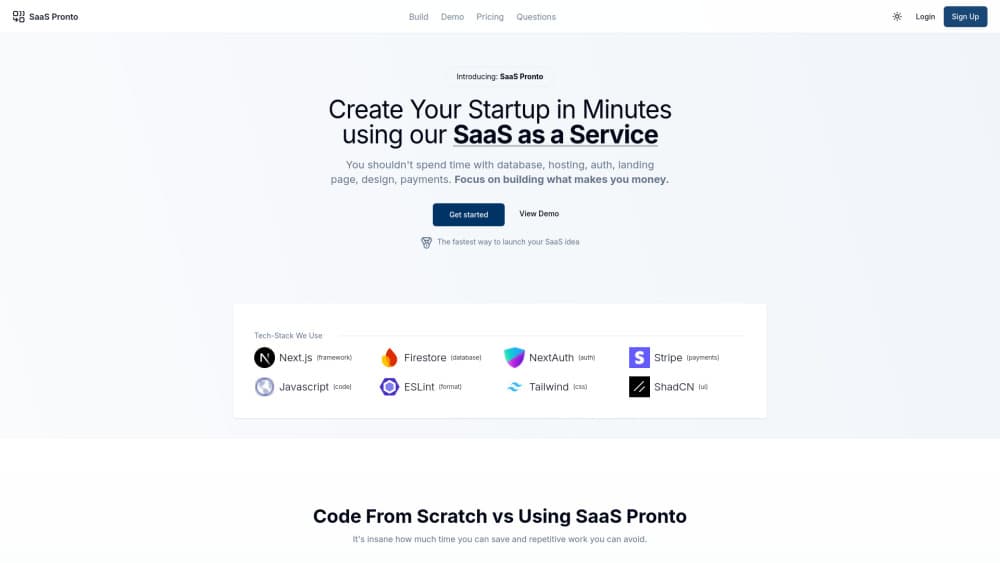
SaaS Pronto is a Next.js and Firebase SaaS boilerplate with a ready-made dashboard, built for solo founders who want to launch a subscription product fast.
About SaaS Pronto
What Is SaaS Pronto
SaaS Pronto is a starter kit for people who want to ship a software business without writing the boring parts again. Instead of a course or a no-code builder, you get an actual codebase: a working dashboard, authentication, and the plumbing that every subscription app needs. You copy it, rename it, and start building the one feature that makes your product worth paying for.
The project came out of a Brazilian software house run by Eduardo Borges, who has launched dozens of small products and kept rewriting the same foundation each time. SaaS Pronto is that foundation, packaged. It targets founders who can read and edit JavaScript but don't want to spend three weeks wiring up logins and billing before they learn whether anyone wants their idea.
The honest catch: the product is no longer maintained as a standalone offering. Its site now points to the maker's portfolio, where it's listed among archived projects. That makes it a poor fit if you need support, updates, or a team behind the code.
Getting Started
- Get the codebase from the maker's portfolio page and clone it into a fresh repository.
- Create a Firebase project and connect it, since the boilerplate uses Firebase for auth and data.
- Rename the app, swap in your branding, and strip the demo content you don't need.
- Add your first real feature and connect any payment flow your plan requires.
- Deploy the dashboard, invite a few test users, and watch how they use it.
Product Information
A quick look at SaaS Pronto's pricing, supported platforms, and performance.
Best for
The users, tasks, and scenarios where this tool fits best.
Users
- Solo founders who code
- Freelance developers
- Side-project builders on a budget
Tasks
- Prototyping a subscription app
- Learning full-stack structure
- Rebuilding an internal tool
Scenarios
- A weekend hackathon where you need a demo, not a polished product.
- Testing whether a paid feature gets signups before you invest in real infrastructure.
- A developer who already knows Next.js and wants to skip the setup they've done five times before.
Key features
Ready-Made Dashboard
The core of SaaS Pronto is a working dashboard you can log into immediately. It handles the layout, navigation, and user-facing shell that most subscription apps need, which saves you from designing and building an admin area before you've validated anything.
Next.js Front End
The front end runs on Next.js, so you get file-based routing, server rendering, and a modern React setup out of the box. If you already work in Next.js, the structure will feel familiar, and hiring help later is easier because the stack isn't exotic.
Firebase Backend
Authentication, data storage, and hosting lean on Firebase rather than a custom server. That trade keeps early costs low and removes server maintenance, but it also ties your app to Google's platform and its pricing as you grow.
Subscription-Ready Structure
The project was built to power a paying product, not a free demo, so the data and page structure assume users, plans, and gated content. You still have to connect your own payment provider, but the shape of a subscription app is already there.
Starter Positioning
SaaS Pronto treats setup as the enemy. Its whole pitch is that the first week of a SaaS build is repetitive, so the repetitive parts come pre-built and you only write the part that's actually yours.
Pros and cons
Pros
- Saves real time on the unglamorous work of auth, routing, and dashboard scaffolding.
- Built on common tools, so any Next.js or Firebase developer can pick it up.
- Firebase keeps early hosting and database costs low while you test an idea.
- Small enough to read end to end, which makes it a decent learning base.
Cons
- No longer maintained as a standalone product, so you get no updates or support.
- Firebase lock-in makes a later move to another backend expensive.
- Payment integration is left to you, so "ready to bill" isn't really true out of the box.
- Pricing was never published clearly, which makes it hard to judge value against active alternatives.
Frequently asked questions
It's a SaaS boilerplate: a pre-built codebase that includes a dashboard, authentication, and app structure so you can build a subscription product without starting from scratch.
Related content
Explore related tools, skills, and articles for SaaS Pronto.
SaaS Pronto Alternatives

Udon
Udon · Coding · ProductivityUdon turns an Apple Silicon Mac into a home server you run from a browser, with container controls, file shares, and an optional AI sysadmin.

offstage
offstage cloud · Coding · Productivityoffstage gives AI coding agents and CI jobs a real Mac: a fresh macOS account on Apple silicon, driven over an API and billed by the second.

BotBus
Chengdu Tuyang Tusen Technology Co., Ltd. · Coding · ProductivityBotBus lets you control AI coding agents from your phone and watch: approve commands, start tasks and read results while the code stays on your desktop.