

SampleFaces
LMT · Image
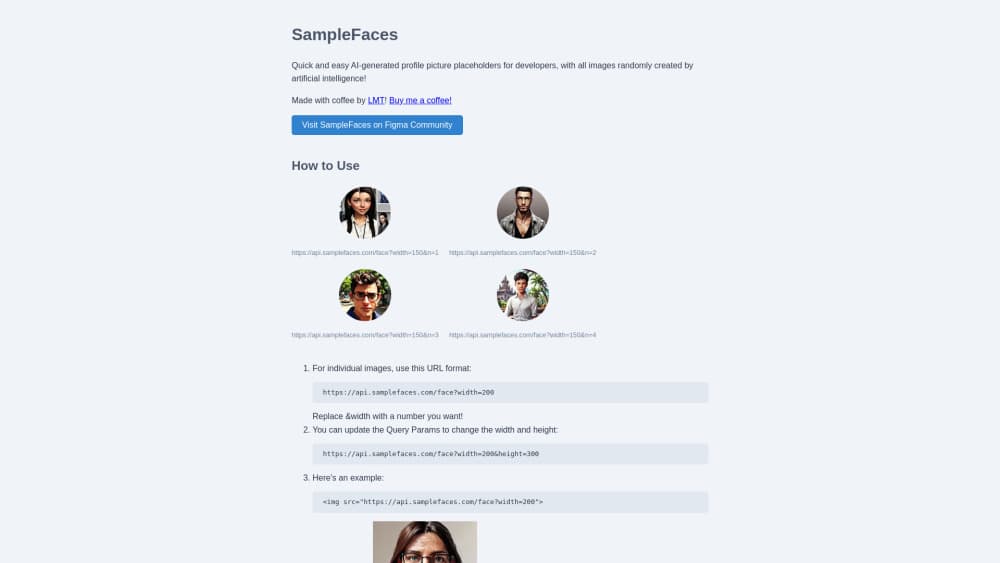
SampleFaces is a free API that returns AI-generated profile pictures as placeholders by URL, so developers can fill mock user lists without real photos.
About SampleFaces
What Is SampleFaces
SampleFaces is a small web service that hands out AI-generated face images for use as placeholder avatars. You point an image tag at a URL and get a face back. No signup, no key, no dashboard. It was built by LMT as a side project and runs on the Cloudflare CDN.
The problem it solves is narrow and real. When you build a user list, a comment section, or a chat mockup, you need faces that don't belong to anyone. Stock photos carry licensing questions, and scraping real profile pictures is worse. SampleFaces gives you a face that was never a person, so there's nothing to clear.
The limits matter more than the features here. Every image is a stranger's face, so you can't pick age, gender, or mood. Images are 1024x1024 by default and come back as webp. It's a placeholder, not an avatar maker, so don't plan to use it for anything a real person has to look at twice.
Getting Started
- Drop an image URL into your markup as the source of an image tag, using
https://api.samplefaces.com/face?width=200. - Set the width and height you need with query params, such as
?width=200&height=300. - Use the
nparam with a rising number to pull several different faces in one list. - Loop the
nparam in your component so each row of mock users gets its own face. - Swap the URL for real image sources before you ship to production.
Product Information
A quick look at SampleFaces's pricing, supported platforms, and performance.
Best for
The users, tasks, and scenarios where this tool fits best.
Users
- Frontend developers building mock user lists
- Designers putting together comment sections and chat screens
- Students and hobbyists on prototypes
Tasks
- Filling placeholder avatars in a UI mockup
- Generating a batch of different faces for a list
- Standing in for real profile pictures during testing
Scenarios
- Early-stage app prototypes where accounts don't exist yet
- Screenshot and tutorial mockups that need many faces fast
- Demo builds shown to stakeholders
Key features
URL-Based Face API
Every image lives behind a single endpoint, so you build the URL and get a face back with no SDK or library. You set width and height as query params to match your layout, and the response streams straight into an image tag. It fits any stack that can render an image URL.
Multiple Faces With One Param
The n param returns different faces as you raise the number, so a user list can have a hundred avatars that don't repeat. You loop the value in your template, and each row gets its own face. That's the core of what SampleFaces does for mock data.
Fixed 1024x1024 Source Images
Images ship at 1024x1024 by default and scale through the URL, so you get one size to work with instead of hunting for the right resolution. The trade-off is that you can't request a specific aspect at source, only resize what's there.
Fast webp Delivery on Cloudflare
Faces come back as webp and are served from Cloudflare's CDN, so loading stays quick even when a page pulls many avatars at once. Smaller files also help keep mock builds light.
Free With No Account
There's no signup, no API key, and no rate plan to read. You use it, and it costs nothing. That keeps the barrier low for prototypes, but it also means there's no support channel or usage guarantee behind it.
Pros and cons
Pros
- Costs nothing and needs no account, so you can try it in a minute.
- A single URL fills an avatar slot, which fits any framework that renders images.
- The `n` param returns many distinct faces, so long user lists look real.
- Images are AI-generated, which sidesteps the licensing questions that come with stock or scraped photos.
- webp delivery over the Cloudflare CDN keeps pages light when avatars load in bulk.
Cons
- You can't choose gender, age, or expression, so you take whatever face the API returns.
- Everything is a stranger's face, so it works as a placeholder and nothing more.
- There's no documentation, support channel, or uptime promise, so production use is a gamble.
- The source size is fixed at 1024x1024, which limits heavy cropping or print work.
Frequently asked questions
SampleFaces is a placeholder avatar API for developers. You point an image tag at its URL and get an AI-generated face back, which you use to fill mock user lists, comment sections, and prototypes without real photos.
Related content
Explore related tools, skills, and articles for SampleFaces.
SampleFaces Alternatives

Google EmbeddingGemma 2
Google DeepMind · Writing · Image · CodingGoogle EmbeddingGemma 2 is a 740M-parameter open model that turns text, code, images, audio, and video frames into vectors in one 768-dimension space, running on phones and laptops.

Tractionwave
TractionWave · Image · MarketingTractionWave is an AI attention heatmap tool for static ads. Upload a PNG or JPG and it returns predicted attention, ranked hotspots, and fixes before you spend budget.

Imejis.io
Imejis.io · Image · MarketingImejis.io is an AI design studio for agents and marketing teams. Describe an image in plain words, and it writes the copy, builds the layout, reflows it to every size, then exports a finished file.