

Saner.AI
Saner.AI · Productivity · Leaning
Saner.AI is an AI personal assistant for ADHDers that puts emails, notes and to-dos in one place, so you can search, plan and create just by asking. It syncs Google Drive, Slack, Gmail and Calendar.
About Saner.AI
What Is Saner.AI
Saner.AI is a personal knowledge and task assistant, often called an AI assistant for ADHD, built for people who lose track of information across too many apps. The idea is simple: instead of jumping between an AI note taking app, an email client and a to-do list, you keep everything in one workspace and let an AI make sense of it.
The product was built by a team that includes a co-founder with ADHD, so it leans toward low-friction capture and automatic organizing rather than manual folders and tags. It doubles as an AI task manager and an AI email assistant, and it's designed for entrepreneurs, researchers, managers and creators who feel buried by scattered notes, meeting recaps and half-finished tasks. According to Saner.AI, more than 100,000 professionals use it.
The main limitation is that the free plan is genuinely a trial tier. It caps AI messages, notes and storage, and the most useful automation sits behind the paid Starter and Standard plans.
Getting Started
- Sign up for a free account on saner.ai with an email address. No credit card is required for the free plan.
- Connect the sources you already use, such as Gmail, Google Calendar, Slack and Google Drive, so new items flow into your workspace automatically.
- Capture what's on your mind. You can type a note, record a voice note, or upload a PDF, and new items land in a Smart Inbox.
- Ask Skai, the built-in assistant, to turn an email into a task, break a goal into steps, or pull an answer out of your own notes.
- Let AI suggest tags and folders, then review related notes the app surfaces from your past.
Product Information
A quick look at Saner.AI's pricing, supported platforms, and performance.
Best for
The users, tasks, and scenarios where this tool fits best.
Users
- People with ADHD who need capture and planning to take less mental effort. The distraction-free layout and automatic tagging matter here, and the most useful automation needs a paid plan.
- Entrepreneurs and founders juggling email, notes and tasks. One workspace replaces several apps, so it works as a second brain app for email, notes and tasks, as long as you're willing to connect your accounts.
- Researchers and students who read a lot. Asking questions across PDFs and past notes beats digging through folders, but large files are limited by your plan's per-file size.
Tasks
- Turning emails into to-do items. Skai reads an email thread and drafts the follow-up task for you, which removes the manual rewrite.
- Planning a week from a messy brain dump. You write freely and ask the assistant to sort the ideas into steps and a schedule.
- Recalling a fact you forgot you saved. AI search finds the note even when you don't remember the exact words.
Scenarios
- Morning triage when you're behind. The Proactive AI surfaces emails to follow up, tasks to start and highlights from meeting notes, instead of you checking each app.
- Working across a topic for weeks. You save sources as you go and ask questions across the whole set later, so the research stays usable.
- Keeping scattered ideas from slipping away. A quick voice note or Chrome capture saves the thought, and the app connects it to related material over time.
Key features
Skai Personal Assistant
Skai is Saner.AI's built-in assistant. You can ask it to search your notes, schedule your day, draft a task from an email, or summarize a set of files. It works alongside your working documents, so you don't have to switch tabs to search the web and your own notes at the same time.
Proactive AI
Instead of waiting for a question, the assistant flags what needs attention. It highlights emails worth following up, tasks to pick up next, and important subjects from meeting notes. For someone who forgets things easily, this is the feature that does the heavy lifting.
Smart Inbox and Auto-Organizing
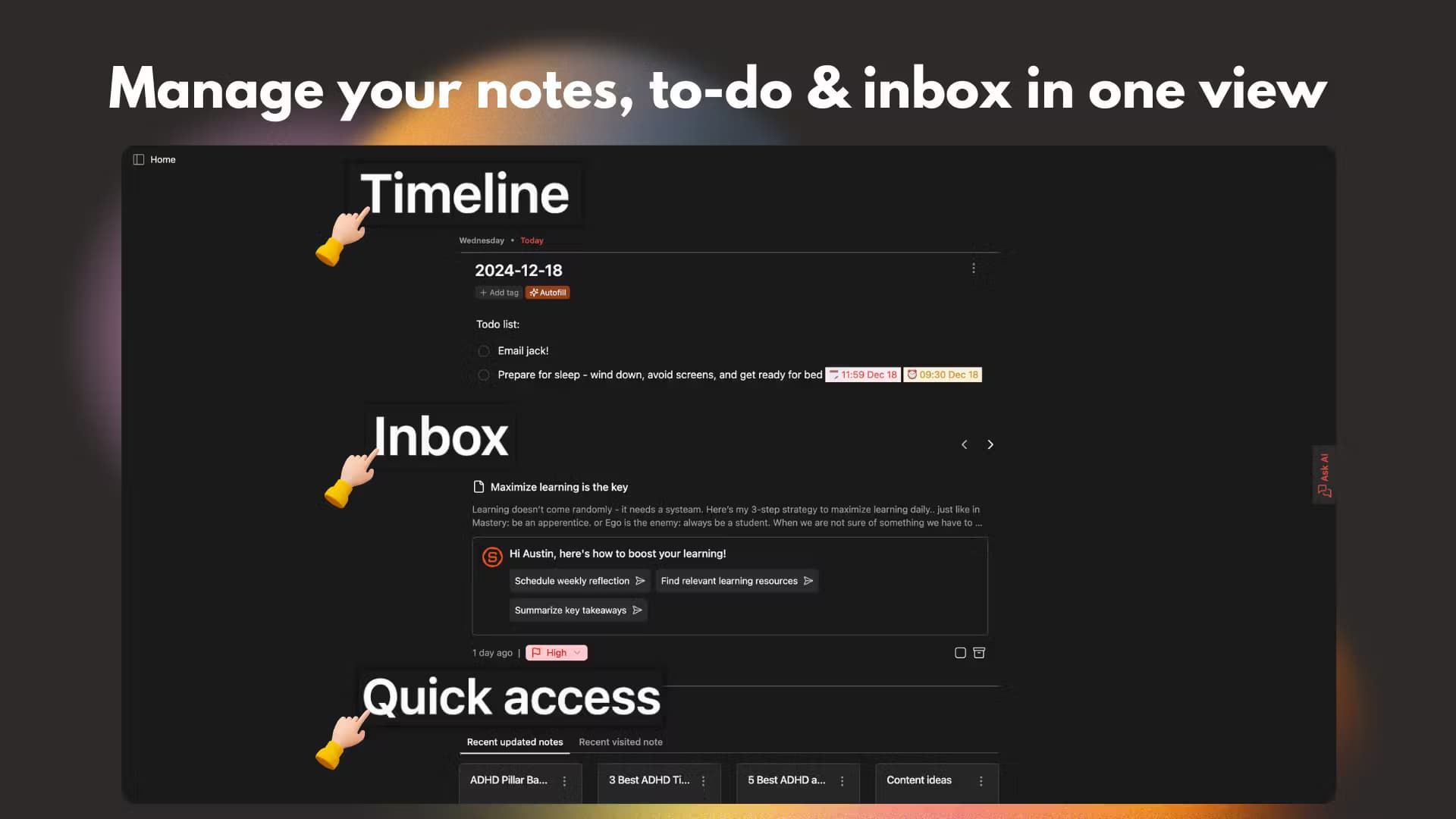
Everything new, from notes to emails to uploads, lands in an inbox for sorting. From there the AI suggests tags based on the content and your past habits, and surfaces related notes you saved before. You stay organized without building a folder system by hand.
Integrations and Sync
Saner.AI pulls information automatically from Google Drive, Gmail, Slack and Google Calendar. The payoff is a single timeline where your emails, files and calendar live next to your notes, which cuts the constant app switching.
Capture Anywhere
You can write on Chrome, record a voice note on the go, or upload and import files in minutes. Voice to text turns a spoken thought into a note, which is faster than typing when an idea hits mid-commute.
External AI Models
Beyond its own models, Saner.AI gives you access to external AIs such as GPT, Claude and Gemini. You either pay per token or use your own API key, and messages to those models don't count against your plan's message limit.
Pros and cons
Pros
- One workspace for notes, email, calendar and tasks, which cuts the constant tab switching.
- Proactive AI surfaces follow-ups and priorities without you setting manual reminders.
- Strong ADHD focus shows in the simple, low-clutter interface and automatic tagging.
- Integrations with Gmail, Slack, Drive and Calendar make the assistant useful from day one.
- Access to external models like GPT, Claude and Gemini if you want a specific engine.
Cons
- The free plan is limited to 30 AI messages a month and 100 notes, so it works more as a trial than a daily driver.
- Messaging external AIs isn't included in your plan, which means an extra per-token cost if you rely on them.
- Prices are billed in US dollars and the app works best when you connect your email and calendar, which some users won't want to do.
Frequently asked questions
It's used to keep notes, emails, tasks and files in one place and then ask an AI about them. You can turn an email into a task, plan your week, or find a detail from your own notes without digging through folders.
Related content
Explore related tools, skills, and articles for Saner.AI.
Saner.AI Alternatives

Base Code
Base44 (Wix) · Coding · ProductivityBase Code is a shared cloud development environment from Base44. Teammates describe changes to an existing GitHub codebase in chat, preview them live and send them back as pull requests.

Knocket
Knocket (Tencent RTC team) · Productivity · Business · ChatbotKnocket is a free live chat and contact page tool that lets visitors message you from your website, app, or a shareable link, with every reply handled from Telegram or one inbox.

FloorGen
Vinit Kumar (FloorGen) · Productivity · China AIFloorGen is a browser-based floor plan maker that turns a sentence or a sketch into an editable 2D plan and a 3D walkthrough. Export to PDF, DXF or video, and draw without an account.