

Weave
Weave · Productivity
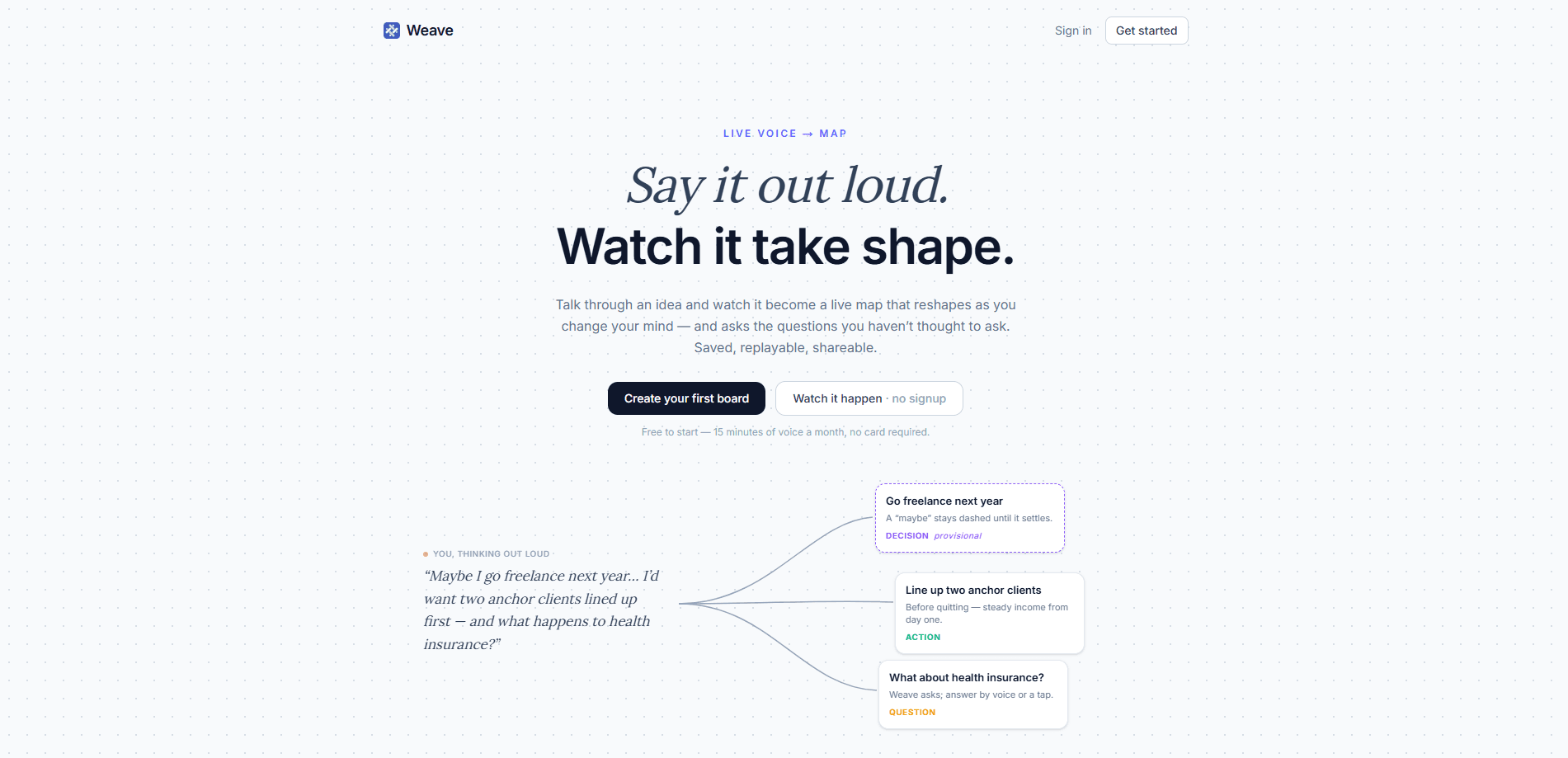
Weave is a voice-first idea mapping tool that listens while you talk and draws a live thinking map of what you're saying. It's an AI idea mapping app at heart, so sentences land as linked cards, disagreements split into separate cards, and open questions stay visible instead of getting buried. It works solo when you're untangling a decision, or in a room when you want AI meeting notes that capture the call and give everyone the same building map over one shared link.
About Weave
What Is Weave
Weave is a web app built around a simple idea. Thinking out loud should leave a trail you can see. Instead of recording audio or typing notes you'll never reread, it acts as a voice notes app that listens to your speech and turns it into a connected AI mind map of cards. Each card holds one idea, a fact, or a question, and the links between them show how the pieces relate.
It solves the problem that meetings and solo brainstorms both create: good thinking that vanishes the moment the conversation moves on. A transcript keeps every word and hides the three that mattered. Weave flips that. It surfaces decisions and who owns them, then keeps unanswered questions as their own cards so nothing quietly falls through the cracks. It also asks the questions nobody in the room thought of, which is where the "thinks back" framing comes from.
The main limit is the metering. Only live listening burns voice minutes, so the tool is generous for reading, editing, replaying, and sharing, but you still plan around a monthly allowance. Everything else, including charts, sits on every plan. Nothing is held back.
Getting Started
- Open Weave in a browser and sign in, then start a new board. No card is needed on the free plan.
- Hold Space and talk, or start a capture for a call. Sentences become cards as you speak.
- Pause when you're ready and let the board tidy itself. Dashed guesses settle into final cards, and questions float in.
- Share a read-only link with the room, or copy the map straight into Claude.
- Export the finished board as Markdown, PNG, or SVG when someone needs the write-up.
Product Information
A quick look at Weave's pricing, supported platforms, and performance.
Best for
The users, tasks, and scenarios where this tool fits best.
Users
- People in a lot of meetings
- Solo thinkers stuck on a decision
- Note-takers who never reread notes
- Small teams that need a shared record
Tasks
- Capturing a meeting
- Untangling a plan
- Charting numbers you mention
- Handing work to an AI assistant
- Following up on unresolved items
Scenarios
- A weekly team call where three decisions need to be remembered
- A late-night solo session on a stuck project
- Sharing with someone who missed the meeting
- Preparing a write-up for a client or manager
Key features
Live Voice-to-Map Capture
Hold Space and talk, and Weave turns each sentence into a linked card within seconds. You don't write anything or clean up afterward; the map builds while you speak. It handles a solo session and a captured call the same way, which means one skill covers both.
Cards That Reshape as You Think
Early thoughts arrive as dashed guesses rather than fixed statements. Pause, and the board tidies itself, settling loose ideas and floating in questions nobody thought to ask. It's the closest thing here to a thinking partner, and it's what separates Weave from a plain recorder. Half-formed ideas get room to breathe.
Meeting Capture With Speaker Attribution
Start capturing a call and the map draws itself while everyone talks, tagging each card with who said it. Rename a speaker once and it fixes every card, export, and replay retroactively. Decisions and open questions split out as they're spoken, so the outcome is readable at a glance.
Charts From Spoken Numbers
When you mention figures out loud, Weave builds charts into the map instead of leaving them as text. It's a small touch. It still saves you rebuilding data in a spreadsheet later.
Replay, Share, Export
Every board is saved. You can replay how a thought unfolded, share a read-only link that needs no account, copy the map into Claude, or export as Markdown, PNG, or SVG. Right, no scrolling through an hour of audio to find it.
One Shared Link, Not a File
Attendees open a read-only map in the browser, which makes it the shared memory of what was agreed rather than a document you email around. No account. No app. That's the difference between a record people actually open and one they scroll past.
Pros and cons
Pros
- Turns speech into a structured idea map with no manual note-taking.
- Charts and speaker attribution come standard, not as paid extras.
- Every plan includes the full product; the only meter is voice minutes.
- Read-only sharing needs no account, so guests can follow along instantly.
- Exports cover Markdown, PNG, and SVG for whatever your workflow needs.
Cons
- Only live listening is free, so heavy meeting users will hit the monthly minutes cap and need top-ups.
- There's no mobile app, so you work from a browser tab.
- Prices are listed in pounds, which can be awkward if you think in dollars or euros.
- Charts come from spoken numbers, so it's not a replacement for a real spreadsheet.
Frequently asked questions
It's a voice-to-map tool. It listens to you talk and turns your speech into a linked map of idea cards, then saves the map so you can replay, share, or export it. It works for solo thinking and for capturing meetings.
Related content
Explore related tools, skills, and articles for Weave.
Weave Alternatives

Base Code
Base44 (Wix) · Coding · ProductivityBase Code is a shared cloud development environment from Base44. Teammates describe changes to an existing GitHub codebase in chat, preview them live and send them back as pull requests.

Knocket
Knocket (Tencent RTC team) · Productivity · Business · ChatbotKnocket is a free live chat and contact page tool that lets visitors message you from your website, app, or a shareable link, with every reply handled from Telegram or one inbox.

FloorGen
Vinit Kumar (FloorGen) · Productivity · China AIFloorGen is a browser-based floor plan maker that turns a sentence or a sketch into an editable 2D plan and a 3D walkthrough. Export to PDF, DXF or video, and draw without an account.