
MapsScraperAI
MapsScraperAI · Coding · Business
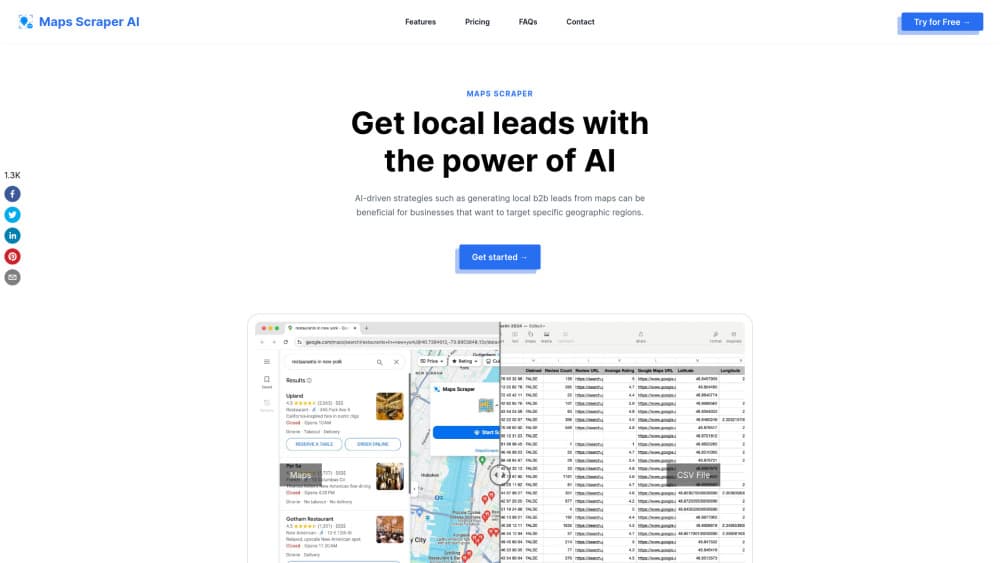
MapsScraperAI is a Chrome and Edge extension that pulls local business leads from Google Maps, including emails, phone numbers, social profiles and reviews, then exports them to CSV or XLS.
About MapsScraperAI
What Is MapsScraperAI
MapsScraperAI is a browser extension that turns a Google Maps search into a spreadsheet. You run a query like "dentists in Austin," open the extension, and it scrolls the results, opens each listing, and copies the business name, phone number, address, rating, review count and category into a table. From there it goes a step further than Maps itself and hunts the open web for an email address and social profiles tied to that business.
The problem it solves is dull but real. Local lead generation by hand means clicking dozens of listings and retyping the same fields. Sales teams, agencies and solo founders do this constantly, and it eats hours. The extension compresses that into one pass and hands you a file you can drop into a CRM.
The limits matter as much as the features. It's an extension, not a cloud platform, so your browser has to stay open while a job runs and your results live on your machine. Google changes Maps markup regularly, which is why the developer ships updates to keep the parser working. Email and social data come from crawling the public web, so coverage varies by business and some rows come back empty. Scraping Maps also sits in a gray zone under Google's terms, and the seller carries that risk, not the tool.
Getting Started
- Install the extension from the Chrome Web Store or the Edge add-ons store, then pin it to your toolbar.
- Open Google Maps and search for a category and location, such as "coffee shops in Portland." Scroll the results panel once so the listings load.
- Click the MapsScraperAI icon. The extension starts walking the result list and collecting fields from each place page.
- Pick your columns, then export. The free plan allows 15 records per batch and 1,000 leads a month. Paid plans lift the batch cap and add emails, social profiles, plus codes and bulk runs.
- Open the CSV or XLS file in Excel, Google Sheets or your CRM, and clean the rows that came back without an email.
Product Information
A quick look at MapsScraperAI's pricing, supported platforms, and performance.
Best for
The users, tasks, and scenarios where this tool fits best.
Users
- Local sales reps
- Marketing agencies
- Freelancers and solo founders
- Market researchers
Tasks
- Building a cold outreach list
- Extracting emails from Google Maps listings
- Collecting competitor locations
- Pulling reviews for analysis
- Checking local coverage
Scenarios
- Launching a service in a new city
- Feeding a CRM each month
- Auditing a franchise network
Key features
Google Maps Listing Capture
The core job is simple and it does it without code. Point the extension at a Maps search, and it walks the result list, opening each place page and reading the fields visible there. You get names, addresses, phone numbers, websites, categories, price bands, opening hours, coordinates and place identifiers such as CID and Place ID. For anyone who has copied this by hand, the time saved is the whole pitch.
Email and Social Profile Discovery
Most people install the tool to extract emails from Google Maps, and that part happens after the listing capture. Maps rarely lists an email, and a Google Maps scraper that only reads Maps would stop there. This one looks further. It visits the business website and public profiles, then tries to match an address and links to Facebook, Instagram, LinkedIn, YouTube or Yelp to the listing. This is where the tool earns its keep for outreach, and also where results get uneven. Small businesses with a single page often turn up clean data. Chains and businesses with no site often return blanks.
Batch Keyword Runs
Instead of one query at a time, you can queue several keywords and let the extension work through them. A plumber in three suburbs, or five restaurant types in one city, becomes one job rather than five manual passes. On paid plans the batch can run without you babysitting every step, which is the difference between a test and a real list-building session.
CSV and XLS Export
The Maps data export lands as a CSV or XLS file with the columns you selected. There's no proprietary format to fight and no lock-in: the file opens in Excel, Google Sheets, Airtable or any CRM importer. Free accounts export 15 records at a time. Paid accounts remove the per-batch limit and raise the monthly ceiling to 100,000 leads.
Human-Like Browsing
The extension drives a normal Chrome session rather than a headless server, so requests look like a person scrolling Maps. That lowers the chance of a block compared with hammering Google from a datacenter IP. It doesn't make scraping risk-free. Long runs, aggressive speeds and repeated queries from one account still attract attention.
Field Depth Beyond Contact Data
Review text, review counts, average ratings, photo links, claimed status and plus codes all come through in the same export. That turns the tool into a light research instrument, not just an address book. You can sort by rating to find weak competitors, or filter unclaimed profiles as prospects who may need help with their listing.
Pros and cons
Pros
- No code and no setup beyond installing an extension. You can run a first export in minutes.
- Email and social discovery goes past what Maps shows, which is the main reason people pick a Google Maps lead scraper over manual copying.
- The free tier is usable, with 1,000 leads a month and 15 records per batch, so you can judge data quality before paying.
- Yearly billing drops the Pro plan to $9.9 per month, which is cheap next to most B2B contact databases.
- Exports are plain CSV or XLS, so the data moves into any CRM without a connector.
- Runs inside a normal Chrome session, which keeps requests looking like a person browsing Maps rather than a server sweep.
Cons
- Browser-bound operation means no scheduled cloud runs and no headless scaling. Your machine has to stay on during a job.
- Email and social coverage varies. Expect gaps, especially for businesses without a website, and budget time for verification.
- Google Maps markup changes can break collection until the developer pushes an update. It's maintained, but you're dependent on that cadence.
- Scraping Maps conflicts with Google's terms of service. The account and legal risk sits with you, and heavy use raises the chance of a temporary block.
Frequently asked questions
It builds local business lead lists from Google Maps. You search Maps as usual, run the extension, and get a spreadsheet with contact details, ratings, reviews and location data for each listing. Sales prospecting and competitor research are the two most common uses.
Related content
Explore related tools, skills, and articles for MapsScraperAI.
MapsScraperAI Alternatives

Udon
Udon · Coding · ProductivityUdon turns an Apple Silicon Mac into a home server you run from a browser, with container controls, file shares, and an optional AI sysadmin.

offstage
offstage cloud · Coding · Productivityoffstage gives AI coding agents and CI jobs a real Mac: a fresh macOS account on Apple silicon, driven over an API and billed by the second.

BotBus
Chengdu Tuyang Tusen Technology Co., Ltd. · Coding · ProductivityBotBus lets you control AI coding agents from your phone and watch: approve commands, start tasks and read results while the code stays on your desktop.