
Scribble Diffusion AI
Replicate · Image
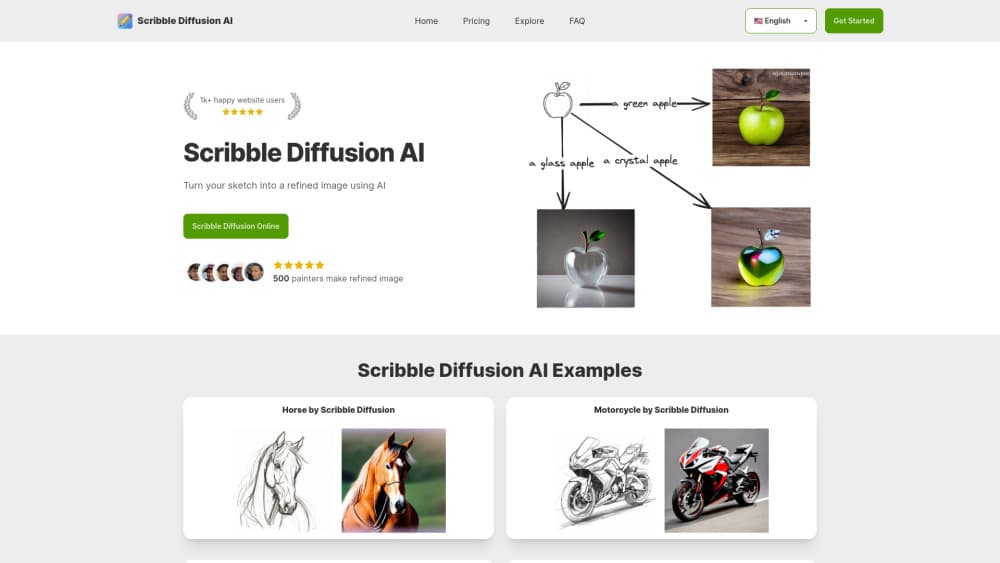
Scribble Diffusion is an open source sketch to image app from Replicate. You draw on a canvas, type a prompt, and ControlNet paints the picture. The public demo is offline, so you host it yourself.
About Scribble Diffusion AI
What Is Scribble Diffusion
Scribble Diffusion is a small web app with one canvas, one prompt box, and one button. Replicate built it in February 2023 to show what ControlNet could do with hand drawn input, then published the code under the MIT license. It isn't a design suite or a subscription platform. Most people find it on lists of AI drawing tools, and it earns the spot by doing one job well.
The job it solves is composition. Text prompts are bad at telling an image model where things go. If you want a lighthouse on the left and a boat on the right, describing that in words wastes ten attempts. Sketching it takes five seconds, and the model follows your lines. Different colors on the canvas signal different objects, which keeps a tree from melting into the sky.
The catch is availability. The demo at scribblediffusion.com no longer serves the app. As of late 2026 the domain redirects to an unrelated site, and the hosted version is gone. The GitHub repo is alive, still unarchived, with roughly 3,000 stars and commits through August 2025. Running it yourself needs Node.js and a Replicate API token, and each render bills your Replicate account at about $0.057.
So this page describes a working piece of software that you host, not a sketch to image tool you can open in a tab. That distinction matters before you start.
Getting Started
- Clone the repository from GitHub and install Node.js 18 or newer.
- Create a Replicate account, copy your API token, and save it in a file called .env.local as REPLICATE_API_TOKEN.
- Run npm install, then npm run dev, and open localhost:3000 in your browser.
- Draw a rough shape on the canvas, add a prompt that names the subject and style, then hit Go.
- Download the PNG you like. Every click produces a different result, so generate a few before you judge the prompt.
Setup takes about ten minutes if Node is already on your machine. The first render feels slow because the model cold starts. Later ones settle into a normal rhythm.
Product Information
A quick look at Scribble Diffusion AI's pricing, supported platforms, and performance.
Best for
The users, tasks, and scenarios where this tool fits best.
Users
- Illustrators blocking out a scene
- Developers testing ControlNet
- Teachers running a workshop
- Writers and game masters who can't draw
Tasks
- Locking composition for a key art idea
- Generating concept variations fast
- Prototyping a sketch to image product
- Explaining diffusion models to non technical people
Scenarios
- A Sunday afternoon of idea sketching
- A design review where the argument is about layout
- A classroom demo on generative AI
Key features
Sketch Canvas With Color Separation
The canvas is the whole interface. You draw with a mouse, trackpad, or stylus, erase what went wrong, and clear the board when you want a fresh start. Using separate colors for separate objects tells the model where one thing ends and another begins. That single trick fixes most of the muddled output people get from text only prompting.
Prompt Guided Rendering
Your sketch sets the geometry, and the prompt sets the material. The same outline of a house becomes a watercolor cottage, a photo of a concrete bunker, or a neon cyberpunk block depending on what you type. Prompt detail matters. Naming the light, the medium, and the mood does more work than stacking adjectives about quality.
ControlNet Scribble Under the Hood
The app calls the ControlNet scribble model on Replicate, which reads your lines as a structural guide instead of a suggestion. That's why the output keeps your rough proportions. It's also why a lazy sketch gives a lazy result: the model is faithful to what you drew, including the parts you drew badly.
Open Source Codebase
The repository is public, MIT licensed, and small enough to read in an evening. Next.js handles the front end and the API route, Tailwind handles the styling, and Replicate handles the inference. You can strip it down, restyle it, or drop the canvas into a larger product without asking anyone for permission.
Local Hosting With Your Own Token
Running the app on your own machine or server keeps your sketches off a third party dashboard and puts you in control of spend. Your token stays in an environment file, and you can cap usage on the Replicate side. For a team, that's usually the difference between a demo and something you'd actually deploy.
Instant Variation Loop
Every render is different, even with an identical sketch and prompt. That randomness is the point. You generate a batch, keep the one with the right lighting, and adjust the prompt from there. It's closer to directing than to drawing, and the feedback loop is fast enough to hold your attention.
Pros and cons
Pros
- Composition control that text prompts can't match, which saves a dozen wasted generations on layout.
- Free to run the code, with usage billed per image at roughly $0.057 instead of a monthly subscription.
- The MIT license makes it a practical starting point for a commercial sketch to image feature.
- Setup is short: clone, add a token, run one command, and the app is live on localhost.
Cons
- The hosted demo is gone, so there's no way to try it without installing Node.js and paying for a Replicate account.
- Output is a single flat image with no layers, no undo history, and no project saving, which means every export starts a new file.
- Sketch fidelity cuts both ways. Sloppy line work shows up in the result, and fixing it means redrawing rather than editing.
- There's no built in upscaler, so a finished image usually needs a pass through another tool before print or large format use.
Frequently asked questions
The code is, the website isn't. The GitHub repository remains public and unarchived, but the domain now redirects to an unrelated site, so the free hosted version is no longer reachable. You can still run the app locally with your own Replicate token.
Related content
Explore related tools, skills, and articles for Scribble Diffusion AI.
Scribble Diffusion AI Alternatives

Google EmbeddingGemma 2
Google DeepMind · Writing · Image · CodingGoogle EmbeddingGemma 2 is a 740M-parameter open model that turns text, code, images, audio, and video frames into vectors in one 768-dimension space, running on phones and laptops.

Tractionwave
TractionWave · Image · MarketingTractionWave is an AI attention heatmap tool for static ads. Upload a PNG or JPG and it returns predicted attention, ranked hotspots, and fixes before you spend budget.

Imejis.io
Imejis.io · Image · MarketingImejis.io is an AI design studio for agents and marketing teams. Describe an image in plain words, and it writes the copy, builds the layout, reflows it to every size, then exports a finished file.