

SeaArt
SeaArt (Haiyi) · Image · China AI
SeaArt is a free AI art generator that turns prompts into images, videos, and AI characters. It pairs an AI image generator and an AI video generator with a large model library.
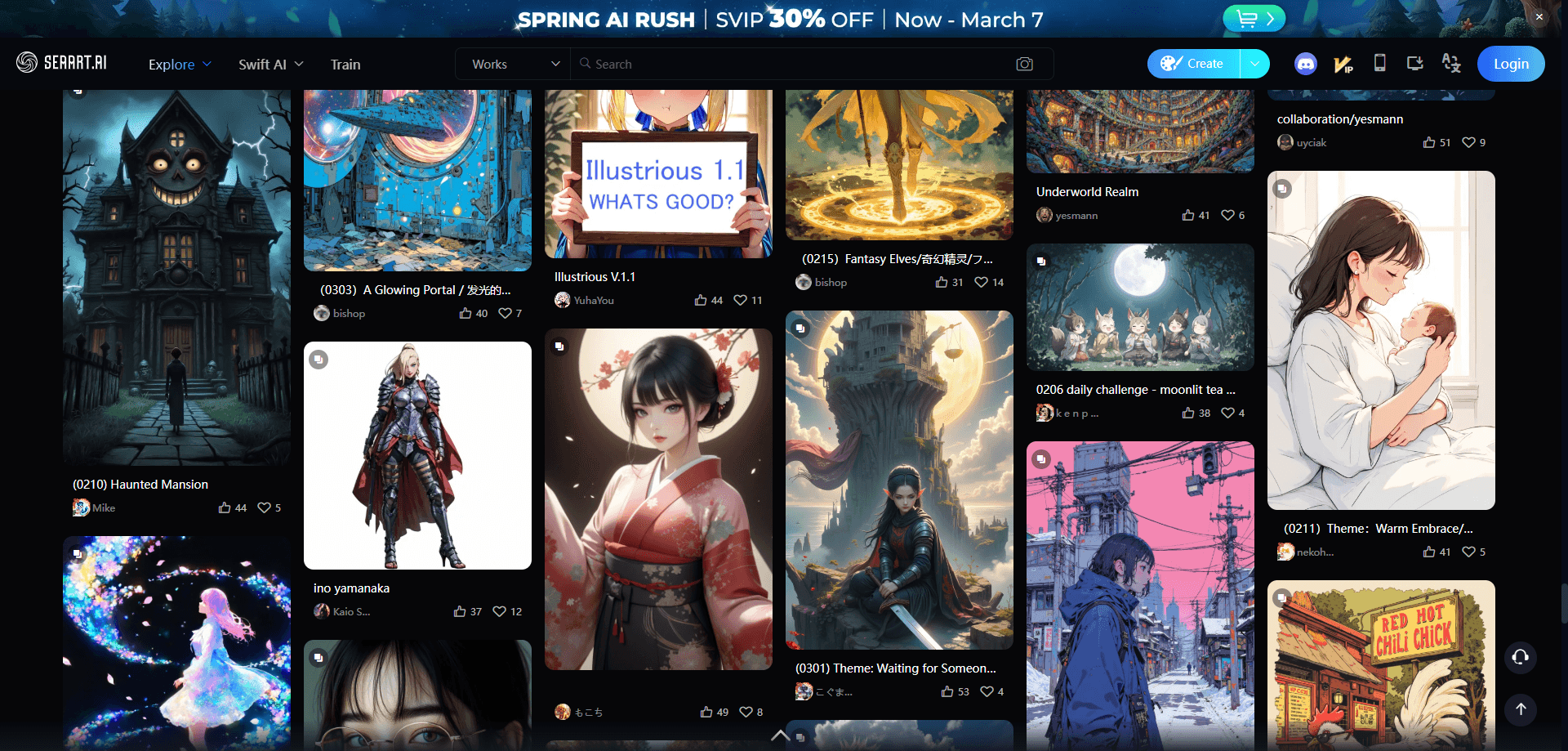
About SeaArt
What Is SeaArt
SeaArt is a browser-based AI creativity platform built by the Haiyi team. It started as an image generator in 2023 and grew into a broader studio that handles pictures, short videos, characters, and interactive tools from one place. Instead of teaching you the math behind a diffusion model, it wraps the heavy settings into presets and templates, so a beginner can type a sentence and get a usable result in under a minute.
The draw is the community side. Every model, LoRA, and workflow on the platform can be reused, remixed, or sold by other creators, which means you rarely start from a blank page. You pick a style you like, hit the remix button, and adjust from there. The library covers anime, photorealism, illustration, and product shots, and the platform claims hundreds of thousands of models alongside its own house models such as SeaArt Infinity and SeaArt Realism.
The trade-off is that the platform leans on a daily allowance. Free accounts get a fixed pool of stamina each day, and the most capable models, longer videos, and heavier tools burn through it faster than a quick image does. Serious users end up on a paid tier or buying extra credits. Video and animation also take a while, and output still needs a human check before you post it, since hands, text, and faces can wobble.
Getting Started
- Open seaart.ai in a browser, or install the app on iOS or Android, then sign up with an email or a linked account.
- Browse the home feed or the model library and pick a style, model, or template you want to work from.
- Type a prompt describing what you want, and set the size, quality, and number of images in the panel.
- Generate, then refine the result with inpainting, upscaling, or a remix of the same prompt.
- Download the file, or post it to the community feed and share the workflow behind it.
Product Information
A quick look at SeaArt's pricing, supported platforms, and performance.
Best for
The users, tasks, and scenarios where this tool fits best.
Users
- Beginners with no drawing background
- Anime and illustration fans
- Social and content creators
- Small product and marketing teams
Tasks
- Generating images from a text prompt
- Making short videos from a still or a prompt
- Training a custom LoRA
- Building a ComfyUI workflow
- Swapping faces or outfits
Scenarios
- Testing a campaign idea on a small budget
- Keeping a solo brand on style
- Filling a content calendar fast
Key features
Text to Image With a Large Model Library
The core tool takes a written prompt and returns finished artwork, so it works as a plain AI image generator before you touch any setting. What sets it apart is the size of the library behind it, since you can switch between house models and community checkpoints and LoRAs to reach a specific look. A quick fashion concept, for example, gets a handful of variations at once, and you keep the one that works.
AI Video Generation
SeaArt turns a prompt or a still image into a short clip, with controls for camera movement and start and end frames. Short social spots and animated character loops come out in a couple of minutes, and the platform supports several leading video models. It suits quick motion pieces rather than long edits, since duration and resolution both cost stamina. Anyone hunting for a free AI video generator will find the basics covered, and the platform keeps adding newer video models over time.
LoRA Training
You can train your own LoRA model by uploading a set of reference images, which teaches the system a specific face, product, or artistic style. After that LoRA training step, the model plugs into any future prompt, so a consistent character or brand look carries across images without repeating long descriptions.
ComfyUI Workflows
For advanced work, SeaArt packs a node-based workflow builder that mirrors ComfyUI. You drag nodes to chain steps such as upscaling, inpainting, and image conversion into one pipeline, then save it and reuse it. That ComfyUI workflow route is where power users move past single prompts into repeatable production.
Community and Remixing
The feed works like a creative network. You can browse what others made, tap remix to reuse their settings, and publish your own work with the workflow attached. Creators can also share or sell models and templates, which turns the platform into a place to pick up a style rather than only a tool.
Image Editing and Utility Tools
Alongside generation, SeaArt ships a set of editing tools: inpainting to change part of an image, upscaling to boost resolution, background removal, and face or outfit swaps. They cover the small fixes that come after a first render, so you rarely need to leave the site to finish a piece.
Pros and cons
Pros
- Free daily stamina gives casual users a real starting point with no payment details.
- The model library is one of the largest around, so specific styles are easy to find.
- Community remixing shortens the path from idea to result, since you can borrow settings.
- ComfyUI workflows and LoRA training cover advanced needs in the same place as basic generation.
- Image, video, and editing tools live under one account, so you avoid juggling apps.
Cons
- The daily stamina runs out fast on video and high-quality generation, which pushes heavy users toward a paid tier or credit packs.
- Video and detailed renders take a while to finish, so it is not built for instant turnaround.
- Output still needs a human check, since faces, hands, and text can come out wrong.
- The sheer number of models and settings can overwhelm a first-time user who just wants one good image.
Frequently asked questions
Yes, there is a free plan. It gives you a daily pool of stamina for basic image generation, and you can use the core tools without adding a card. Video, the strongest models, and heavier features use that pool faster, so regular users often move to a paid tier or buy extra credits.
Related content
Explore related tools, skills, and articles for SeaArt.
SeaArt Alternatives

Google EmbeddingGemma 2
Google DeepMind · Writing · Image · CodingGoogle EmbeddingGemma 2 is a 740M-parameter open model that turns text, code, images, audio, and video frames into vectors in one 768-dimension space, running on phones and laptops.

Tractionwave
TractionWave · Image · MarketingTractionWave is an AI attention heatmap tool for static ads. Upload a PNG or JPG and it returns predicted attention, ranked hotspots, and fixes before you spend budget.

Imejis.io
Imejis.io · Image · MarketingImejis.io is an AI design studio for agents and marketing teams. Describe an image in plain words, and it writes the copy, builds the layout, reflows it to every size, then exports a finished file.