

Sharly AI
VOX AI Inc. · Productivity
Sharly AI is an AI research assistant and PDF summarizer that turns documents into summaries and answers with citations, so researchers verify facts faster.
About Sharly AI
What Is Sharly AI
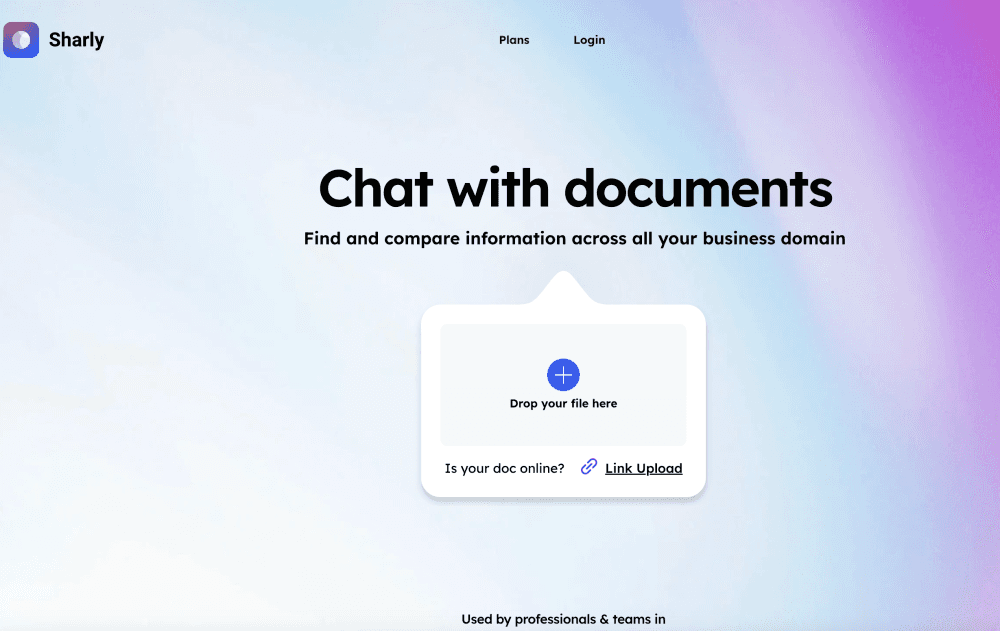
Sharly AI is a web research assistant from VOX AI Inc. You upload documents, ask questions in plain language, and get answers that link back to the exact sentences they came from. It works as a PDF summarizer and a document summarizer across DOCX, PPTX, spreadsheets, Notion exports, Google Docs, and URLs, so a literature review or an audit file lives in one place instead of ten browser tabs.
The pitch is speed without losing trust. Every insight carries a source you can hover over and check, and the tool pulls metadata like titles, authors, and DOIs to build citations in APA, MLA, or Chicago. For teams, shared workspaces, annotations, and role-based permissions keep the reasoning visible to everyone working on the same file. VOX AI says more than 2 million researchers and teams use it.
The limits matter too. The free plan caps you at 5 documents a day and 50 messages a month, which runs out fast on a real project. Answers rest on what you upload, so a thin source set gives thin results, and the tool leans on documents rather than general web knowledge. You also need an account, and the strongest security features sit behind the Business plan.
Getting Started
- Create an account at app.sharly.ai. Sign in with email or a Google account, and the Free plan starts immediately with no card.
- Upload your sources. Drop in PDFs, DOCX, PPTX, XLSX, Notion exports, Google Docs, or paste a URL. The Free plan takes 5 documents a day.
- Read the auto-generated summary. Sharly highlights key topics and suggests follow-up questions so you can drill in without rereading the whole file.
- Ask questions across documents. Use chat with PDF and other files to compare claims, surface conflicts, or pull out figures, and open the viewer to check any citation at its source.
- Export citations and share. Copy a reference in APA, MLA, or Chicago, or move the workspace into a team plan for annotations and shared insights.
Product Information
A quick look at Sharly AI's pricing, supported platforms, and performance.
Best for
The users, tasks, and scenarios where this tool fits best.
Users
- Graduate students and academics
- Compliance officers and legal reviewers
- Analysts and consultants
- Research teams and labs
Tasks
- Summarizing a stack of reports
- Comparing claims across sources
- Generating citations
- Asking questions of a contract or audit file
Scenarios
- A PhD student racing a literature review deadline wants the key arguments of 40 papers summarized in an afternoon with citations ready.
- A compliance team reviewing a case needs to spot contradictory statements across contracts and logs and prove where each one sits.
- An analyst preparing an investment memo has to verify numbers across dozens of reports and stand behind every figure.
Key features
Summaries with suggested follow-ups
Upload a document and Sharly returns a structured summary plus a set of follow-up questions to guide your reading. You land on the parts that matter instead of scanning page by page. In-document quick actions let you highlight any sentence and ask for a summary, an explanation, or a clarification on the spot.
Multi-document chat and AI document analysis
Ask one question and Sharly pulls answers from every source in the workspace. It connects the dots across files instead of answering from a single document, and the analysis reaches deeper than a summary because it reasons over the whole set. This is where the tool earns its place for literature reviews and due diligence, since the point is usually to see how sources relate, not to read one in isolation.
Validate and compare claims
The tool compares what different documents say about the same claim and flags matches, conflicts, and missing data in a side-by-side view. A synthesis insight points out what the data means, not just what it says. For anyone checking facts across reports, this turns a manual cross-read into a quick scan.
Source-linked citations
Every insight links back to the exact sentence it came from, and you can hover to verify it. Sharly pulls metadata like titles, authors, and DOIs, then formats references in APA, MLA, or Chicago from a dropdown. Citation history keeps a record of what you cited on Team and Business plans.
Workspace security and control
Sharly encrypts files with AES-256 at rest and TLS 1.3 in transit, and adds version history, activity logs, SSO, and role-based permissions on higher plans. A docs-only answer mode restricts responses to your uploads, which matters when you cannot let outside web content into the reasoning. The strongest governance features, including SOC 2 Type II and data residency, sit on the Business plan.
Multilingual support and syncing
Sharly works in more than 100 languages without toggling a setting, so a multilingual team reads and asks in the language they prefer. Workspace syncing connects Google Drive, Dropbox, and Notion, and a prompt library stores reusable templates for common research tasks. A model selector lets you pick from available AI models, including a custom one on higher plans.
Pros and cons
Pros
- Every answer links to the exact source sentence, so you can verify a claim instead of trusting it.
- Handles many formats at once, from PDF and DOCX to XLSX, Notion, Google Docs, and URLs, which keeps a project in one workspace.
- Citation generation in APA, MLA, and Chicago with automatic metadata extraction saves the formatting grind before submission.
- Multi-document comparison surfaces conflicts and matches across sources, which speeds up literature reviews and fact-checking.
- Enterprise-grade security covers compliance-heavy teams, with AES-256 encryption, SSO, and audit logs on the higher plans.
- A genuine free tier for individuals, with yearly billing cutting roughly 20% off the paid plans.
Cons
- The Free plan gives 5 documents a day and 50 messages a month, so anything beyond light testing needs a paid seat.
- Answers depend on what you upload, and there is no general web knowledge layer, so a thin source set yields thin results.
- Key governance features like SSO, audit logs, and SOC 2 Type II are locked to the Business plan, which is quote-only.
- Pricing is per seat and billed yearly, so costs climb with team size, and there is no published API for custom integrations.
Frequently asked questions
Sharly AI turns long documents into summaries, answers, and citations. Researchers use it for literature reviews, compliance teams for contract and audit review, and analysts for pulling numbers across multiple reports.
Related content
Explore related tools, skills, and articles for Sharly AI.
Sharly AI Alternatives

Base Code
Base44 (Wix) · Coding · ProductivityBase Code is a shared cloud development environment from Base44. Teammates describe changes to an existing GitHub codebase in chat, preview them live and send them back as pull requests.

Knocket
Knocket (Tencent RTC team) · Productivity · Business · ChatbotKnocket is a free live chat and contact page tool that lets visitors message you from your website, app, or a shareable link, with every reply handled from Telegram or one inbox.

FloorGen
Vinit Kumar (FloorGen) · Productivity · China AIFloorGen is a browser-based floor plan maker that turns a sentence or a sketch into an editable 2D plan and a 3D walkthrough. Export to PDF, DXF or video, and draw without an account.