

SHRED: Home & Gym Workouts App
Shred Labs, LLC · Leaning · AI Assistant
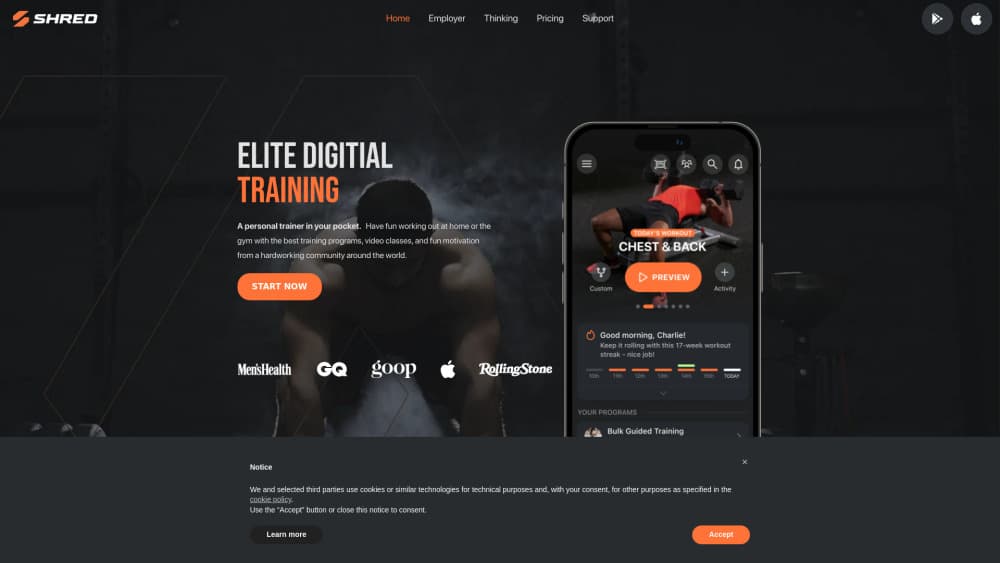
SHRED is an AI workout app for gym and home training. Coach-built programs adjust your sets, reps, and rest as you get stronger, and the free plan covers basic tracking.
About SHRED: Home & Gym Workouts App
What Is SHRED
SHRED is a strength training app from Shred Labs, a company that has been shipping coached programs since 2018. The pitch is simple: you pick a goal and tell the app what gear you have, and it hands you a plan that changes week to week instead of a fixed PDF you follow until you stall.
The app covers six coached programs, from Bulk for size to Lean-X for conditioning and Define for higher-rep sculpting work. Each one runs on the same adaptive engine, so the weight suggestions and rest times move with your logged performance. The company says more than 2.7 million people train on it and that users have logged 23.5 million workouts. It holds a 4.8 rating on the App Store across roughly 40,000 ratings.
Where it stops: SHRED plans and logs training, not your kitchen. There's no food database or calorie scanner, so anyone who wants one app for lifting and macros will still need a second tool. The free tier is also thin by design, with no personalized programming and no AI progression. Those two items are the product.
Getting Started
- Download the app on iOS or Android and sign in with Apple, Google, or email.
- Answer the setup questions: goal, training experience, days per week, and session length.
- Pick your equipment profile, from bodyweight only to a full commercial gym, and choose a program.
- Run the first session, log each set as you finish it, and check the stats screen after a week to see how the plan reacted.
Product Information
A quick look at SHRED: Home & Gym Workouts App's pricing, supported platforms, and performance.
Best for
The users, tasks, and scenarios where this tool fits best.
Users
- Lifters who want structure without hiring a coach
- Home trainees with limited gear
- People coming back after a long break
Tasks
- Running a hypertrophy or powerlifting block
- Training through a travel week
- Tracking volume and personal bests
- Breaking a plateau
Scenarios
- Three days a week at home with a pair of adjustable dumbbells
- A four-day barbell split at a commercial gym
- Staying accountable with friends
Key features
Adaptive AI Progression
The engine reads your logged sets and changes next week's weight, rep targets, rest, and tempo. If you miss reps on a main lift, it trims volume instead of repeating the same session. This is the feature that separates an AI workout app from a static plan.
Coach-Built Programs
Six programs cover size, strength, conditioning, and sculpting, each split into men's and women's tracks. The structure comes from human coaches, and the company says the cycles were refined using data from millions of logged workouts. You can switch programs without losing your history.
Equipment Profiles That Rebuild the Session
You pick from large gym, medium gym, small gym, home gym, hotel gym, or bodyweight only. Change the profile and every upcoming workout reconfigures to exercises you can actually do. For a home workout app, that's the difference between a plan you follow and one you abandon on vacation.
Voice Coach With Two-Way Control
Premium unlocks a spoken coach that cues form, pacing, and intensity during the set, then takes voice commands to swap an exercise or change a program. It behaves like a lightweight AI personal trainer rather than a timer with a nice voice.
Apple Watch and Health Sync
The watch app logs reps, shows heart rate, and controls music without pulling out your phone. Finished sessions sync to Apple Health, so activity rings and recovery data stay in one place. Android users get the phone app but not the watch experience.
Studio Classes and Social Challenges
Beyond lifting, the app carries studio-style sessions in HIIT, yoga, and boxing led by coaches. Leaderboards, cheers, and buddy workouts add pressure if you want it, and a privacy switch hides you from the social feed if you don't.
Pros and cons
Pros
- Programming quality is high for the price, with real coach input behind each cycle instead of random circuits.
- The equipment switch works instantly, which makes it one of the few gym workout apps that also handles hotel rooms and small apartments.
- Logging is fast, and the charts surface volume trends and PRs without exporting anything.
- The Apple Watch app is a full logging surface, not a remote control for the phone.
- A free tier and a 7-day trial let you test the coaching before paying.
Cons
- Personalization sits behind the paywall, so the free version is closer to a demo than a workout planner you can live with.
- No nutrition or calorie tracking, which means a second app for anyone watching intake.
- The voice coach is Premium only, and it works best with headphones in a quiet room.
- Android lacks the watch integration, so the two platforms don't feel equal.
Frequently asked questions
Yes, there's a free plan with a limited workout library and basic tracking. Personalized programming and AI progression require Premium, so most people hit the paywall within the first week.
Related content
Explore related tools, skills, and articles for SHRED: Home & Gym Workouts App.
SHRED: Home & Gym Workouts App Alternatives

HireKey
HireKey · Voice & Language · Productivity · LeaningHireKey is an AI job search copilot built by a former tech recruiter. It checks role fit, tailors resumes, runs interview practice and tracks every application.

Lune
Retrograde Labs · Productivity · LeaningLune is a research search engine for scientific AI agents. It runs as an MCP server that lets Claude, ChatGPT and Cursor search peer-reviewed computer science papers and cite them.
Coddy
Coddy · Coding · LeaningCoddy is a gamified platform to learn to code through short interactive lessons in 20+ languages, with a browser editor, an AI tutor and free certificates.