

Sigma AI Browser
SigmaBrowser OÜ · Productivity
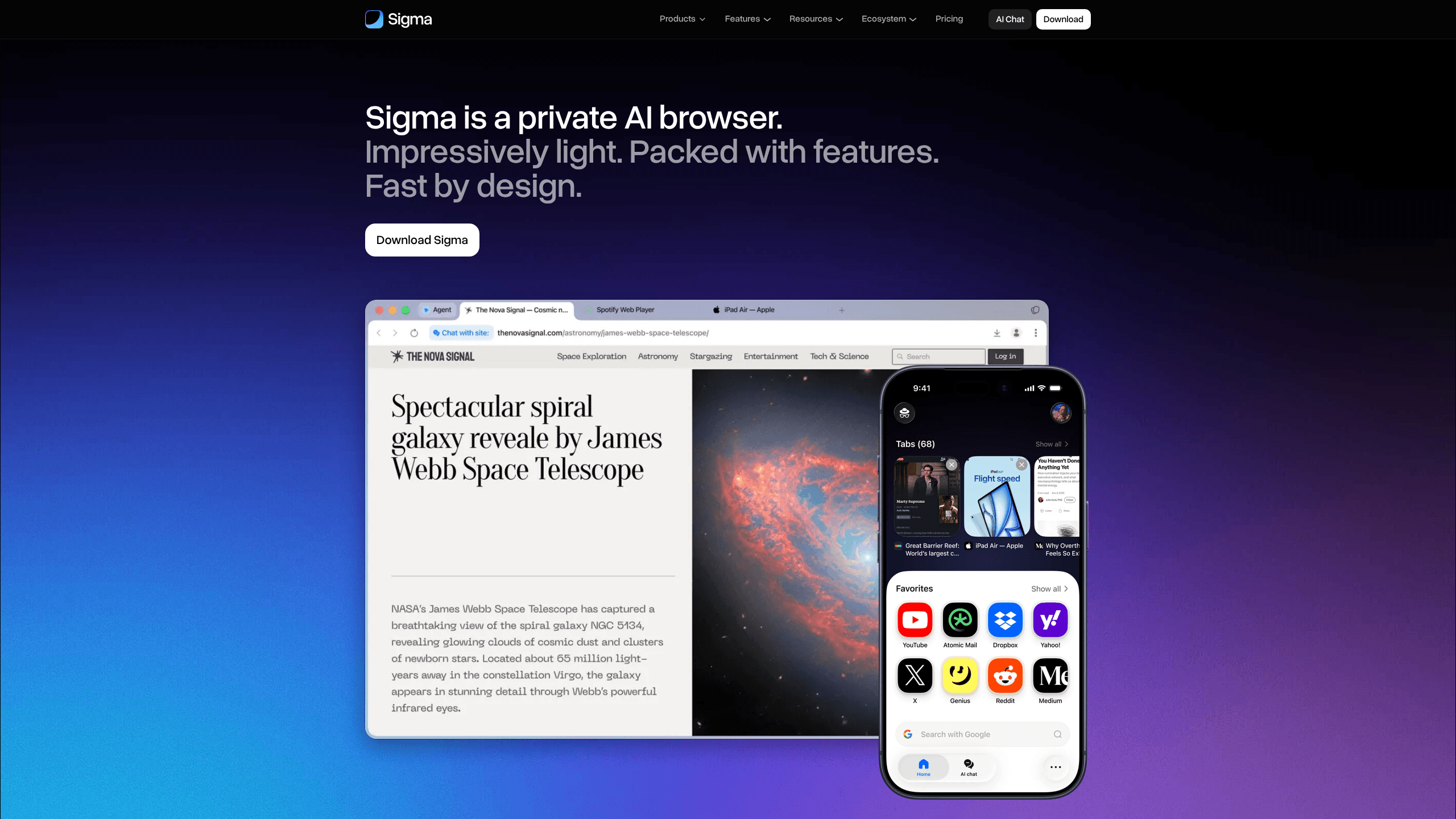
Sigma AI Browser is a free private AI browser that ships with a built-in AI agent, an on-device language model called Eclipse, and an ad blocker turned on from the start. It runs on Chromium, so pages load the way you expect, and it's available on Windows, iOS, and Android. The pitch is simple: you get AI help inside the browser instead of in a separate tab, and your conversations and browsing habits stay on your own machine rather than on a server you can't see or control.
About Sigma AI Browser
What Is Sigma AI Browser
Sigma AI Browser is an AI browser built by SigmaBrowser OÜ. Instead of bolting a chatbot onto a normal browser, it puts an AI agent and an AI chat window into the core of the product. You can ask questions, research a topic, generate images, draft text, or hand off tasks like filling forms and navigating pages. There's also a page chat feature that turns whatever you're reading into a conversation, so you can ask about the content instead of scanning it.
The part that separates it from most rivals is Eclipse, a local large language model that runs on your device. That choice matters for anyone who doesn't want their chats and page content shipped off to a remote server. The browser also blocks ads and trackers out of the box, separates your private data, and encrypts connections with TLS 1.3, HTTPS, and DNS-over-HTTPS.
It isn't a finished story. The product launched its mobile and desktop builds recently, the Linux version is still listed as coming, and the Web3 tools (wallet management, connecting to decentralized apps) won't matter to most casual users. If you want a browser with decades of extension support or a huge, familiar library of add-ons, Chromium-based newcomers like this one are still catching up.
Getting Started
- Go to the official site and download the build for your device. Sigma offers Windows, iOS, and Android versions.
- Install it and set it as your default browser if you want the ad blocker and AI tools to follow you around the web.
- Open the AI chat or the AI agent panel and ask a question or describe a task in plain language.
- Use the page chat on any article when you'd rather ask about the content than scroll through it.
- Adjust privacy and ad-block settings from the menu, then browse as usual.
Product Information
A quick look at Sigma AI Browser's pricing, supported platforms, and performance.
Best for
The users, tasks, and scenarios where this tool fits best.
Users
- Privacy-conscious users
- Casual AI users
- Android and iOS users
- People planning to try Web3
Tasks
- Summarizing long articles
- Filling forms and navigating sites
- Translating foreign pages
- Drafting text and generating images
Scenarios
- Reading research across multiple tabs and wanting short answers instead of full documents.
- Browsing on a phone where juggling separate AI apps is a hassle.
- Working somewhere with aggressive ad tracking and wanting a browser that blocks it by default.
- Trying out a newer, lighter alternative to Chrome or Edge without giving up Chromium compatibility.
Key features
Built-In AI Agent
The agent is the centerpiece. You describe a task in plain language, and it carries out the steps inside the browser. Think filling out a form, or moving through a site. It's aimed at the boring, repetitive parts of browsing rather than deep automation. It keeps you in the loop too. No running off on its own.
Eclipse Local AI Model
Eclipse is a large language model that runs locally on your device. That's the feature that earns Sigma its "private" label: your prompts and page content are processed on your hardware, not on a remote server. The trade-off is real. On-device models tend to be smaller than cloud ones, so expect sensible answers rather than frontier reasoning.
AI Chat and Page Chat
AI chat handles questions, research, image generation, and writing. Page chat takes the site you're on and turns it into a conversation, so you can ask "what does this say about pricing?" instead of hunting for the paragraph. Both save you from copying text into a separate chatbot tab.
Ad Blocker and Privacy Protections
Ads and trackers are blocked by default, with no extension to install. The browser separates private data, checks links against phishing detection, and encrypts every connection using TLS 1.3, HTTPS, and DNS-over-HTTPS as you browse. It states compliance with GDPR and CCPA. That matters if you're in Europe or California. Why bother with a local model at all? Simple. Nothing leaves the device.
Web3 Support
Sigma connects to decentralized apps, manages crypto wallets, and talks to blockchain networks. It also uses a blockchain-based identity system called a memory profile, backed up with a 12-word phrase. Useful if you already live in Web3, ignorable if you don't.
Chromium Compatibility
It's built on Chromium. Sites render normally, and the look and feel is familiar. Speedometer 3.0 tests run on a MacBook Pro M4 put it in line with mainstream browsers. You're not sacrificing speed for the AI features.
Pros and cons
Pros
- Free to use. No subscription is needed for the core AI browser and ad blocker.
- Local AI model keeps prompts and page content on your device.
- AI chat, page chat, translation, and ad blocking are all built in, so there's less to set up.
- Available on Windows, iOS, and Android, covering the devices most people actually use.
- Chromium base means normal page rendering. Nothing new to learn.
Cons
- A locally run model won't match the raw reasoning power of large cloud models, so complex prompts may disappoint.
- Linux users are still waiting; only Windows, iOS, and Android are available right now.
- The Web3 identity system adds a 12-word recovery phrase to manage, which most users don't want.
- There's no sign of a public API, so you can't plug the browser or its AI into your own tools yet.
Frequently asked questions
Yes. The browser, the built-in AI agent, the ad blocker, and the local Eclipse model all ship in the free product. There's no paid tier required for normal use.
Related content
Explore related tools, skills, and articles for Sigma AI Browser.
Sigma AI Browser Alternatives

Base Code
Base44 (Wix) · Coding · ProductivityBase Code is a shared cloud development environment from Base44. Teammates describe changes to an existing GitHub codebase in chat, preview them live and send them back as pull requests.

Knocket
Knocket (Tencent RTC team) · Productivity · Business · ChatbotKnocket is a free live chat and contact page tool that lets visitors message you from your website, app, or a shareable link, with every reply handled from Telegram or one inbox.

FloorGen
Vinit Kumar (FloorGen) · Productivity · China AIFloorGen is a browser-based floor plan maker that turns a sentence or a sketch into an editable 2D plan and a 3D walkthrough. Export to PDF, DXF or video, and draw without an account.