
SketchMe.App
Gibberish Lab Ltd. · Image
SketchMe.App turns a handful of selfies into illustrated profile pictures. You choose a style and a color theme, then get eight sketches in a few minutes for a one-time credit pack.
About SketchMe.App
What Is SketchMe.App
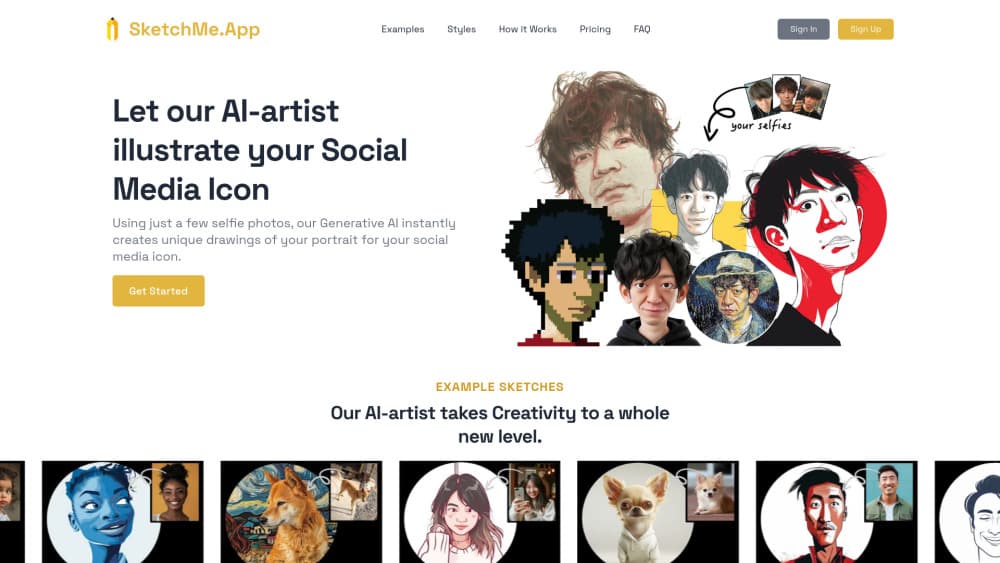
SketchMe.App is a browser-based AI profile picture generator from Gibberish Lab Ltd., a small studio in Tokyo. The selfie to sketch step is the only input it takes: you upload up to five photos, pick one of six illustration styles and a theme color, and the service draws a set of portraits built around your face. The results are meant to be used as social media avatars, not as reference art for a painter.
What the tool really sells is time and money. Commissioning an illustrator for a single portrait costs far more than a credit pack here, and waiting on revisions takes days. SketchMe.App returns a batch while you make coffee. The site puts the gap at roughly ten times cheaper than a custom commission.
The limits show up as soon as you want control. Styles are fixed presets with no prompt box, no sliders, and no way to ask for a specific pose or background. Every generated sketch spends a credit, so testing six styles against four color themes eats through a pack fast. There's no free tier and no mobile app, which means you pay before you see your own face in a given style.
Getting Started
- Create an account at sketchme.app and buy a credit pack. Small is $9 for 24 sketches, and credits can be topped up later.
- Upload up to five selfie photos. Clear shots of your face work best, and group photos with several faces tend to confuse the model.
- Pick a style and a theme color. Each combination produces four sketches, so six styles and colors fit inside the smallest pack.
- Hit Generate and wait a few minutes. Eight images land in the gallery, four at a time.
- Download the ones you like. The SketchMe.App watermark is removed on every package, so the file is ready for your profile.
Product Information
A quick look at SketchMe.App's pricing, supported platforms, and performance.
Best for
The users, tasks, and scenarios where this tool fits best.
Users
- Social media regulars who change avatars often
- Pet owners
- Families and couples who want a matching set
Tasks
- Replacing a phone snapshot with a custom profile picture
- Building a small set of brand-consistent avatars
- Mocking up artwork for a T-shirt
Scenarios
- Launching a new social account and needing art on day one
- Refreshing a profile for a season or a rebrand
- Making a gift print for a birthday
Key features
Six Illustration Styles
The style list runs from Pencil Sketch and Flat Design to Pixar Animation, Pixel Art, Caricature, and Gogh Style. Each one is a trained look, so a pencil sketch avatar and a Pixar style avatar of the same face come out as genuinely different images rather than filter variants. That range is the main reason to pick this tool over a one-effect photo app. As an AI avatar generator it stays narrow on purpose: the style list is the product.
Theme Colors Per Style
Every style can be paired with a theme color, and the color carries through the whole set. Four sketches come out of each style and color combination, which keeps a batch looking like a series instead of a pile of random attempts. If you plan to use several avatars across accounts, this is the setting that holds them together.
Five-Selfie Input
You can upload up to five photos of the same face, which gives the model more angles to work from than a single shot. The site asks for photos where the face is the main subject, and that instruction matters: wide shots or crowded group photos tend to produce weak likenesses. Pets work too, which is unusual for this category.
Batches of Eight
One generation returns eight sketches, delivered four at a time over a few minutes. You see progress in the gallery instead of waiting blind, and you can start judging the first four while the rest render. For a quick decision that pacing is fine. For side-by-side comparison of styles, plan two runs.
Watermark-Free Downloads
All three packages include removal of the SketchMe.App logo from generated images. That sounds minor until you try to use a watermarked avatar on a professional account. Paid output is clean, and the terms allow both personal and commercial use of the images you create.
AI Designed T-Shirts
A second service on the same site turns the same kind of portrait into a printed T-shirt design, sold through a dedicated page for pet lovers and families. It's a separate purchase from the credit packs, with its own shipping and return rules. Useful if the avatar idea works and you want it on something you can wear.
Pros and cons
Pros
- Six distinct styles give real variety, so one pack can cover a work account, a hobby account, and a gift.
- Pricing is one-time per credit pack, with no subscription to cancel after the first month.
- The terms allow commercial use of generated images, which most cheap avatar apps don't state clearly.
- Theme colors keep a set of avatars visually consistent without any design work.
- Output arrives in minutes and needs no software beyond a browser.
Cons
- There's no free trial, so your first impression of the style list comes only after paying.
- Each sketch spends a credit, and a full sweep of six styles and four colors costs most of the smallest pack.
- Credits are non-refundable once bought, and the terms exclude AI generation credits from the cooling-off period.
- No prompt box and no detail sliders, so a likeness that misses can't be corrected beyond trying another style.
Frequently asked questions
It generates illustrated profile pictures from your selfies. You upload photos, choose from six styles, and download a set of cartoon or painted portraits sized for social avatars.
Related content
Explore related tools, skills, and articles for SketchMe.App.
SketchMe.App Alternatives

Google EmbeddingGemma 2
Google DeepMind · Writing · Image · CodingGoogle EmbeddingGemma 2 is a 740M-parameter open model that turns text, code, images, audio, and video frames into vectors in one 768-dimension space, running on phones and laptops.

Tractionwave
TractionWave · Image · MarketingTractionWave is an AI attention heatmap tool for static ads. Upload a PNG or JPG and it returns predicted attention, ranked hotspots, and fixes before you spend budget.

Imejis.io
Imejis.io · Image · MarketingImejis.io is an AI design studio for agents and marketing teams. Describe an image in plain words, and it writes the copy, builds the layout, reflows it to every size, then exports a finished file.