

sleek.design
140g Labs LLC · Image · Coding
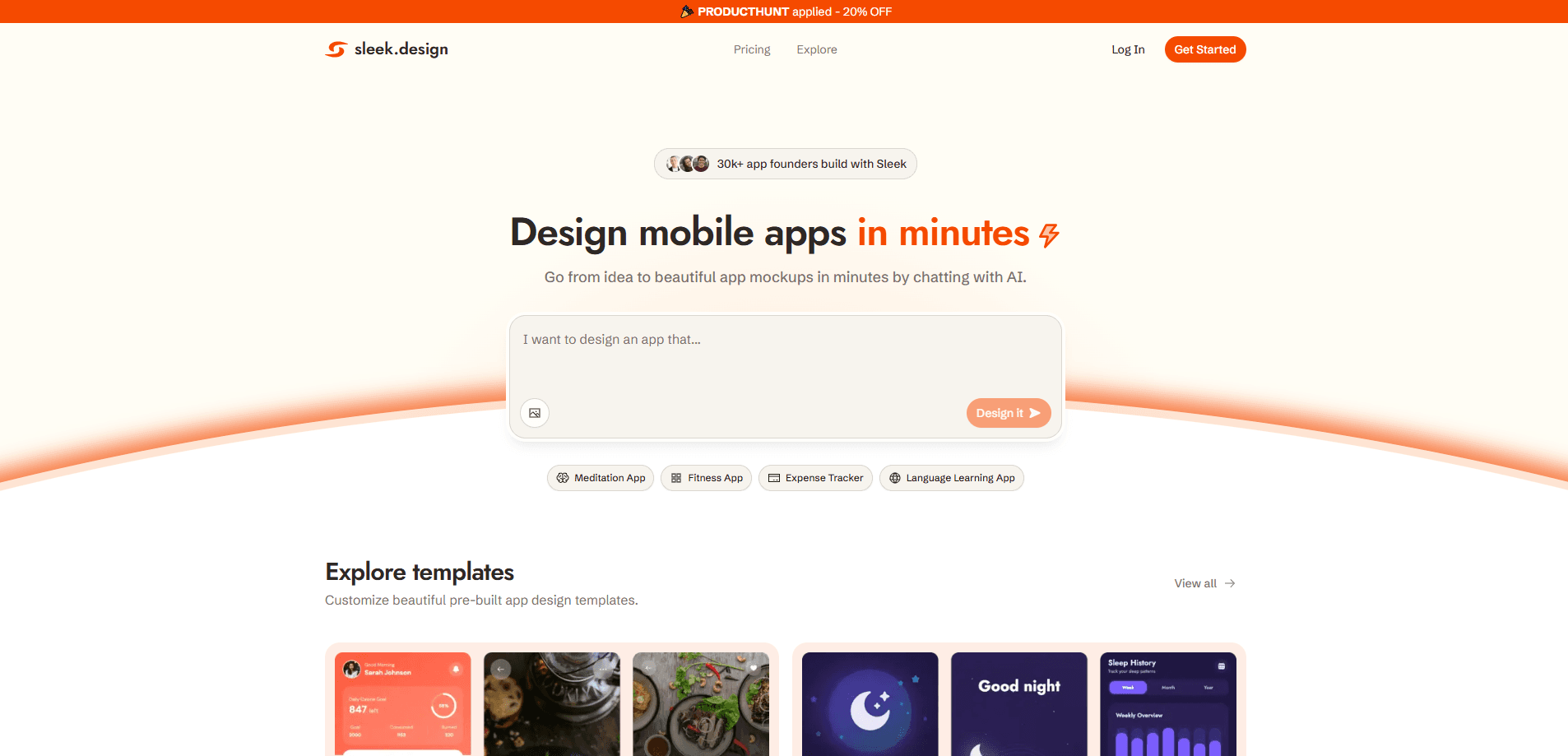
sleek.design is an AI mobile app designer that turns a written prompt or a reference image into complete iOS and Android screens. It handles layout, components, copy, and styling, then lets you edit everything visually and export the result to Figma or to HTML and React code. It's built for founders, product teams, and solo builders who need app designs fast without a design background.
About sleek.design
What Is sleek.design
sleek.design is a web-based AI app design tool from 140g Labs LLC. You describe the app you want, and the agent generates full mobile screens rather than loose wireframes. Every screen it produces is editable, so you can keep refining instead of starting from scratch. Most mobile app design tools make you assemble the pieces yourself, and this one skips that step.
The tool targets the gap between a rough idea and something you can show to users or investors. Instead of hiring a designer or grinding through Figma tutorials, you chat your way to a working interface. The output isn't a static picture either. It exports to Figma as native layers and to HTML or React with Tailwind CSS, so developers can pick it up directly.
The main limits are practical. Generation runs on AI credits, so heavy use costs more. The free tier caps you at one project and limited usage. And while the designs look polished, they're starting points that still need real product decisions behind them.
Getting Started
- Create a sleek.design account with Google, GitHub, or your email. No credit card is needed for the free plan.
- Start a project and describe your app in plain language, or attach a reference image for the AI to match.
- Watch the first screens generate, then refine them by editing elements visually or sending follow-up prompts.
- Export the finished screens to Figma as editable layers, or pull the code as HTML or React with Tailwind CSS.
- On Pro or Team plans, connect a coding agent like Claude Code, Cursor, or Codex through the API to generate designs programmatically.
Product Information
A quick look at sleek.design's pricing, supported platforms, and performance.
Best for
The users, tasks, and scenarios where this tool fits best.
Users
- Non-technical founders
- Startup product teams
- Solo developers
Tasks
- Turning a written app idea into complete mobile screens with layout, copy, and styling in one pass
- Producing App Store and Play Store preview assets from the same generated screens
- Letting a coding agent generate app designs autonomously through the REST API
Scenarios
- Validating an app concept with real users before committing budget to design work
- Rebuilding a screen in a new style to compare directions during early product research
- Handing editable Figma layers to a contract designer for final polish
Key features
AI app design from text or images
Type a description or upload a reference, and sleek.design generates full mobile screens instead of flat mockups. Each screen includes layout, components, placeholder copy, and styling, so you get something you can actually navigate. You can keep prompting to expand a flow from a single screen to a whole app.
Export to Figma as editable layers
Every plan includes one-click export to Figma. Designs paste in as native, fully editable layers, and you don't need a plugin to make it work. That matters when a human designer has to take over: nothing is flattened or locked, so the file slots into a normal Figma workflow.
Code export to HTML and React
Paid plans come with unlimited code exports. You can pull screens as HTML or React with Tailwind CSS, which shortens the handoff between design and build. It won't replace a production codebase, but it removes the manual rebuilding step that eats days on small teams.
API and agent access
Pro and Team plans include the Sleek REST API and an official agent skill. That skill is a set of instructions that teaches a coding agent how to drive Sleek, so Claude Code, Cursor, Codex, or a custom script can create a project and generate screens from a prompt without a human clicking through the interface.
Style matching and references
Sleek ships a library of hand-picked app designs you can fork or use as inspiration. You can also attach a reference image so the AI matches an existing look, which is faster than describing a visual style in words. What does "bold dark health dashboard" get you? A screen that already looks the part, before you touch anything.
Visual editing without code
Not everything needs a new prompt. You can edit individual elements on a generated screen visually, which keeps momentum when you just want to nudge spacing or swap copy. Developers and founders can fix details directly instead of regenerating and hoping for a better result. Sometimes that's the whole job. Move a button. Fix a label. Done.
Team collaboration and shared billing
Team plans add shared projects, priority support, and centralized billing at $99 per user per month. Members can add or remove seats at any time, and billing adjusts automatically on the next invoice. The 30,000 monthly credits apply per seat, so a team scales its design output as it grows.
Pros and cons
Pros
- Text-to-screen generation removes the blank-canvas problem that stalls early app projects
- Figma export keeps designs editable, so a real designer can step in without rework
- Code export to React and HTML with Tailwind CSS shortens design-to-development handoff
- API and agent skill let coding agents drive the tool for automated design workflows
- Free plan needs no credit card and lets you try the full flow before paying
Cons
- The free plan caps you at one project and limited AI usage, so nothing serious fits there
- Credits run out fast on heavy users, and topping up costs $15 per 5,000 credits
- Paid plans aren't cheap at $39 to $99 per month for someone testing occasionally
- All payments are final, with no refunds on subscriptions or unused credits
Frequently asked questions
It's an AI mobile app designer. You describe an app idea or attach a reference image, and it generates complete iOS and Android screens you can edit and export. It's aimed at people who need app designs quickly and don't want to start from scratch in a traditional design tool.
Related content
Explore related tools, skills, and articles for sleek.design.
sleek.design Alternatives

X Ray Interpreter
X-ray Interpreter · ImageX Ray Interpreter is a web-based AI radiology tool that turns X-rays, CT scans, MRI, ultrasound, and PET images into plain-language reports. You upload a scan, get a preliminary X-ray interpretation in moments, then ask follow-up questions if something needs explaining. It works as a second opinion and a learning aid, not as a medical diagnosis.

Aieasypic
AIEasyPic · ImageAIEasyPic is an AI image generator that turns plain text prompts into finished artwork in seconds. You can also train custom models on your own photos, swap faces in existing images, and create short video clips from text, all from a browser. It suits casual creators who want quick visuals and hobbyists who want to build a personal model without touching any code.

Chargen
Chargen · ImageChargen is an AI character generator and worldbuilding toolkit built for Dungeons & Dragons and other tabletop RPGs. It turns a one-line idea into a painted character portrait, spins up NPCs, monsters, maps and encounters from the same session, and keeps every creature's details close at hand. The tabletop RPG art side runs on a credit system called Gold, while the text generators stay free for everyone.