

Slice Knowledge
Slice Knowledge · Leaning
Slice Knowledge turns company documents, recordings and wikis into SCORM-compliant courses, then delivers them through a private AI agent built for onboarding training and role-based learning paths.
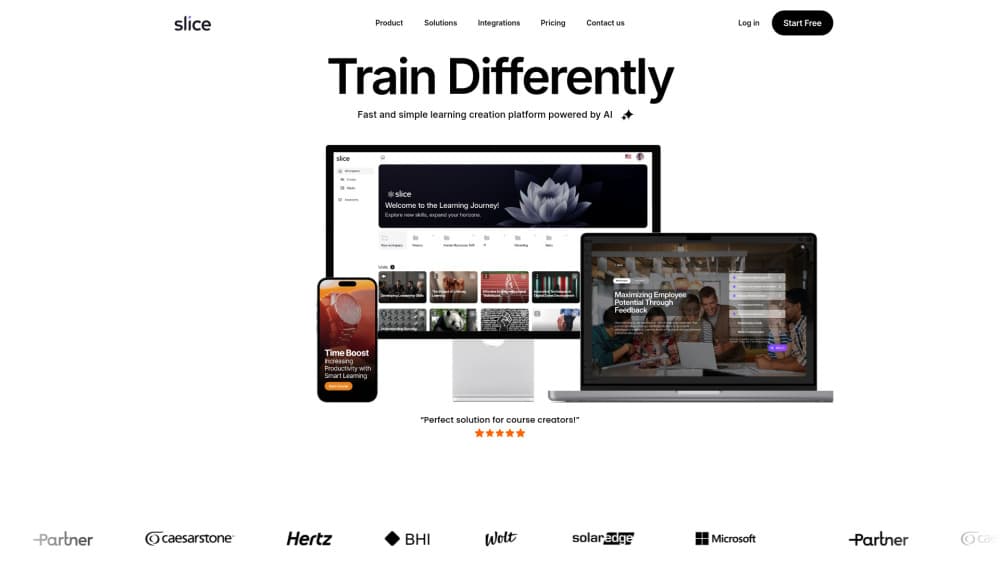
About Slice Knowledge
What Is Slice Knowledge
Slice Knowledge is a private AI platform for turning what a company already knows into training material. Upload a policy PDF, a recorded sales call, a Confluence page or a webinar, and it drafts a multi-chapter course with quizzes and images, exports the result as a SCORM package, and keeps the source material searchable in a chat assistant.
The product began as an in-house tool at an Israeli training content agency, which explains the bias toward production work over course theory. Course creators get an editor. L&D teams get analytics. Subject matter experts get a place to talk instead of write. The vendor reports customers cutting content creation time by about 80 percent, a self-reported number that deserves a pilot before anyone signs a purchase order.
Two things decide fit. The platform runs on your own infrastructure, on-premise or in a private cloud, and the vendor says no external API calls leave the environment. Companies with strict data rules care about that detail. The other side is pricing: custom, sales-led, and aimed at organizations with a real training budget. A five-person startup shopping for a $20 monthly tool won't find a checkout page here.
Getting Started
- Book a demo or open the 30-day pilot. The pilot covers up to 100 users with limited content sources, enough for one department to test the workflow.
- Connect a source. Slice ingests SharePoint, OneDrive, Google Drive, Notion, Confluence, CRM records, databases or plain uploads, then builds a knowledge base from them.
- Point the generator at a document or describe what you want taught. It returns a chapter outline with text, quiz questions and images for review.
- Edit in the browser. Swap images, fix quiz answers, add a voice-over, then export SCORM for your LMS or publish to a website.
- Assign roles and check the analytics dashboard. Learning paths shift as learners answer questions, and the report shows where people stall.
Product Information
A quick look at Slice Knowledge's pricing, supported platforms, and performance.
Best for
The users, tasks, and scenarios where this tool fits best.
Users
- L&D managers at mid-size and large firms
- Subject matter experts with no design skills
- Instructional designers who inherit messy source material
- HR and enablement teams in regulated industries
Tasks
- Converting an onboarding pack into a structured course
- Capturing knowledge from people who are about to retire or resign
- Building compliance refreshers that change every year
- Training sales teams on new products
Scenarios
- A manufacturer needs machine-specific safety training across three plants
- A software company hires 40 people a quarter
- A training agency wants to double output without doubling headcount
Key features
Documents and Recordings Into Finished Courses
This is the core loop. You feed in PDFs, docs, recordings, wikis, webinars or website pages, and Slice returns a multi-chapter module with starter text, images and study questions. Export goes out as a SCORM package for any LMS, or as a standalone page for a website. The vendor puts the time saving at around 80 percent, measured against manual e-learning authoring.
Expert Knowledge Capture
Subject matter experts record themselves talking, and the platform transcribes, structures and indexes the result. The practical effect is a searchable knowledge management layer that outlives the person who built it. For teams where one engineer knows how the billing system really works, this turns a hiring risk into documentation.
Role-Based Learning Paths
Slice detects a learner's role and current knowledge level, then assembles a path around both. Answer a question wrong and the next module adjusts. Managers see the difference in onboarding time, which the vendor claims drops by 60 percent for customers who use the adaptive setup.
One Agent for Answers, Courses and Practice
A single chat assistant answers questions from company material, pulls a full course inline when someone asks for training, and runs simulated conversations for practice. Support teams use it to cut repeat tickets. Sales teams use it to rehearse calls. Same agent, different source documents.
Private AI Deployment With No External Calls
A private AI deployment means the platform runs on-premise or in a private cloud, and the company says data never leaves your control. It shows ISO 27001, ISO 27017 and Azure security documentation on its site. That setup is why banks, defense suppliers and hospitals can consider it at all, and it's also why deployment takes longer than a typical SaaS signup.
Integrations and Model Choice
Content connectors cover SharePoint, OneDrive, Google Drive, Notion, Confluence, Salesforce, CRM systems and databases. Under the hood, Slice connects to several model providers, including OpenAI, Gemini, Claude and Grok, so an organization can route work to the engine that clears its procurement rules.
Pros and cons
Pros
- Turns existing documents and recordings into SCORM-compliant courses, so old material stops being dead weight.
- Private deployment with on-premise or private cloud options gives regulated teams a path to adoption.
- Role-based learning paths adjust per learner, which cuts the time new hires spend on material they already know.
- Connectors for SharePoint, Notion, Confluence and Drive mean less manual copy and paste during setup.
- The same agent handles Q&A, course delivery and practice simulations, so employees learn one interface instead of three.
Cons
- Pricing is custom and sales-led, so you can't compare costs before a call. Budgeting starts with a conversation, not a page.
- The 30-day pilot caps users at 100 with limited content sources, which may not cover a full enterprise rollout test.
- Deployment on your own infrastructure takes IT time. Teams without cloud or server staff should plan for that.
- Public product documentation is thin on technical detail, and API availability isn't documented, which slows integration planning.
Frequently asked questions
It converts company material into training courses and delivers them through an AI agent. Documents, recordings and wikis go in, and SCORM-compliant modules, quizzes, simulations and a searchable knowledge base come out.
Related content
Explore related tools, skills, and articles for Slice Knowledge.
Slice Knowledge Alternatives

HireKey
HireKey · Voice & Language · Productivity · LeaningHireKey is an AI job search copilot built by a former tech recruiter. It checks role fit, tailors resumes, runs interview practice and tracks every application.

Lune
Retrograde Labs · Productivity · LeaningLune is a research search engine for scientific AI agents. It runs as an MCP server that lets Claude, ChatGPT and Cursor search peer-reviewed computer science papers and cite them.
Coddy
Coddy · Coding · LeaningCoddy is a gamified platform to learn to code through short interactive lessons in 20+ languages, with a browser editor, an AI tutor and free certificates.