

SlidesPilot: AI PPT Maker
Pilot AI · Productivity
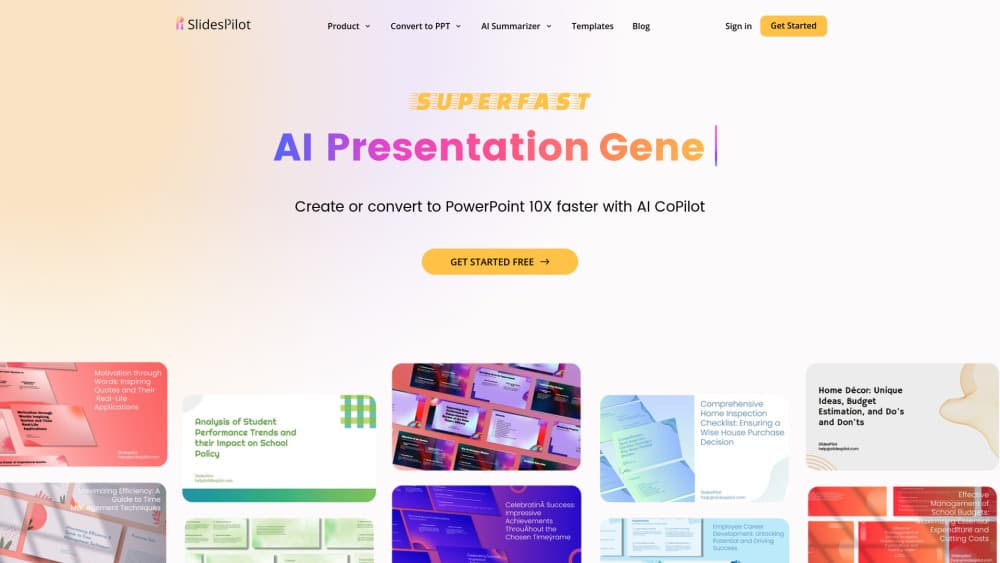
SlidesPilot is an AI PowerPoint generator that turns PDFs, Word files, links, YouTube videos, and notes into editable decks you can export as PPTX.
About SlidesPilot: AI PPT Maker
What Is SlidesPilot
SlidesPilot is a browser based AI presentation maker built by Pilot AI. You hand it a source file or a link, and it builds a slide deck around the ideas inside that material. PDFs, Word documents, existing PPTX files, web pages, YouTube videos, and pasted notes all work as inputs.
The source step is what sets it apart from tools that only take a text prompt. SlidesPilot reads the structure of a long document, pulls out the arguments worth presenting, and proposes an outline before it designs anything. That order matters. A 40 page report that has to become 12 slides usually fails at the cutting stage, not at the color scheme.
The tradeoffs are practical ones. Work runs on AI credits, so heavy redesign sessions cost more than plain generation. Decks cap at 200 slides. Scanned PDFs and dense tables still need a human pass, and there is no public API for wiring the tool into an internal pipeline.
Getting Started
- Sign in with a Google or Apple account, or request a code by email. No card is needed for the free plan.
- Upload a PDF, Word file, PPTX, or point the tool at a URL, a YouTube video, or a topic prompt.
- Review the outline, pick Standard or Beautify mode, then choose a theme or apply your own colors and fonts.
- Edit slides in the block editor and ask the AI agent to restructure, rewrite, or restyle specific slides.
- Export as PPTX, Google Slides, PDF, or PNG, or present straight from the browser.
Product Information
A quick look at SlidesPilot: AI PPT Maker's pricing, supported platforms, and performance.
Best for
The users, tasks, and scenarios where this tool fits best.
Users
- Students and researchers
- Lecturers and teachers
- Business analysts and consultants
- Sales and marketing teams
Tasks
- Turning a long report into a review deck
- Building a lecture from scattered notes
- Drafting a pitch from rough notes
- Converting product documentation into training slides
Scenarios
- Quarterly business review with a 60 page PDF
- Conference talk built from a paper
- Investor meeting with a messy research folder
Key features
Source Inputs Beyond a Text Prompt
SlidesPilot accepts PDFs, Word files, existing PPTX decks, web pages, YouTube videos, pasted text, and a plain topic prompt. PDF to PowerPoint and Word to PPT runs cover the usual starting points for a work presentation, where the content already exists somewhere and the job is reshaping it. A file upload stops at 50MB, which handles most reports and course packs.
Source-Aware Outlines Instead of Page Dumps
The AI PowerPoint generator reads for meaning rather than turning every paragraph into a slide. It picks the central claims, groups supporting evidence, and arranges the result into an opening, body sections, and a close. You see the outline before design starts, so a wrong structure costs a click instead of a rebuild.
Beautify Mode for Decks You Already Have
Beautify mode takes slides you wrote yourself and rebuilds the layout, typography, and visual treatment. It costs 4 credits per slide, against 1 credit per slide for standard generation. The mode is the reason people use SlidesPilot on old decks that look dated but still contain the right content.
Charts, Tables, and Diagrams From Your Material
Data relationships in the source can become tables, charts, and diagrams on the slide. This is where an AI slide generator earns its keep on financial or technical material, since a chart often explains a trend faster than a bullet list. Complex tables still need checking, especially when the source PDF uses merged cells.
Themes, Brand Controls, and 30+ System Themes
The free plan includes 30 or more system themes, and paid plans add custom themes with your own colors, fonts, images, and logo placement. Consistent branding across a deck matters for client work, and setting it once beats fixing fonts slide by slide.
AI Agent Edits and PPTX Export
A chat style agent edits the deck in place: reorganize a section, shorten the copy, restyle one slide. Finished work leaves as an editable PPTX, a Google Slides file, a PDF, or PNG images. PPTX export keeps text and shapes editable, so a team can finish the deck in PowerPoint with its normal review process.
Pros and cons
Pros
- Handles real source material instead of demanding a written prompt, which fits how work presentations actually start.
- The outline step gives you something to argue with before design work begins.
- Beautify mode cuts redesign time on decks that already have the right content.
- Exports stay editable in PowerPoint and Google Slides, so the deck isn't locked inside the tool.
- The free plan allows 3 creations with no card, and paid plans carry a 3-day money-back guarantee.
Cons
- Credits drain fast in Beautify mode at 4 credits per slide, so a 20 slide restyle burns 80 credits and the 2,500 credit Pro allowance covers roughly 31 such decks.
- Presentations cap at 200 slides, which rules out very large training libraries in a single file.
- Scanned PDFs and tables with merged cells come out wrong often enough that a manual pass is part of the job.
- No public API means you can't automate deck creation inside an internal tool or batch pipeline.
Frequently asked questions
It builds PowerPoint style presentations from material you already have: reports, Word documents, web pages, YouTube videos, or notes. The output is an editable deck rather than a fixed video or image set.
Related content
Explore related tools, skills, and articles for SlidesPilot: AI PPT Maker.
SlidesPilot: AI PPT Maker Alternatives

Base Code
Base44 (Wix) · Coding · ProductivityBase Code is a shared cloud development environment from Base44. Teammates describe changes to an existing GitHub codebase in chat, preview them live and send them back as pull requests.

Knocket
Knocket (Tencent RTC team) · Productivity · Business · ChatbotKnocket is a free live chat and contact page tool that lets visitors message you from your website, app, or a shareable link, with every reply handled from Telegram or one inbox.

FloorGen
Vinit Kumar (FloorGen) · Productivity · China AIFloorGen is a browser-based floor plan maker that turns a sentence or a sketch into an editable 2D plan and a 3D walkthrough. Export to PDF, DXF or video, and draw without an account.