

SnapXam
SnapXam Inc. · Leaning
SnapXam is an AI math tutor that solves problems from arithmetic to calculus, showing each step so students learn how to reach the answer on their own.
About SnapXam
What Is SnapXam
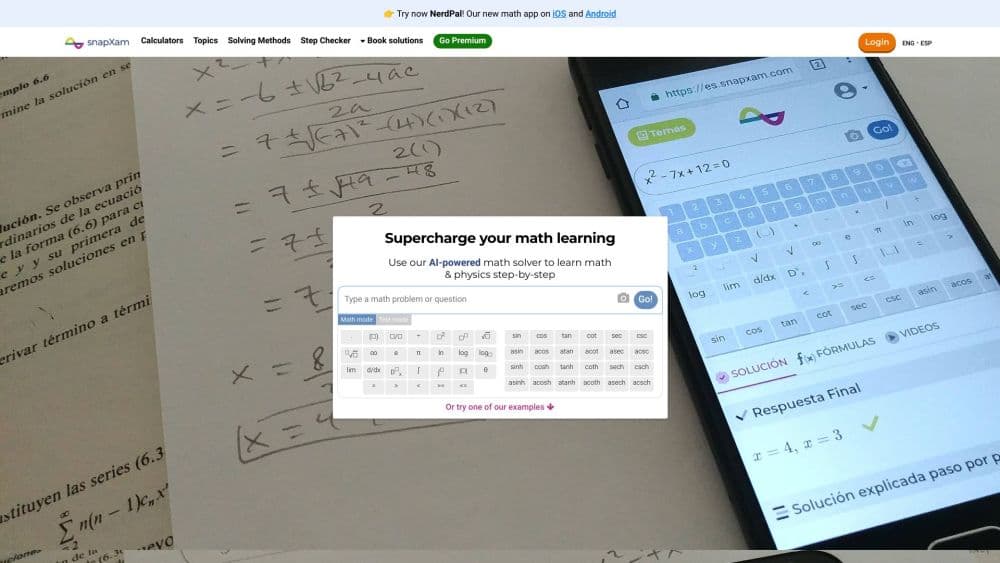
SnapXam is an AI math solver built around the idea that a correct answer alone does not teach you much. It takes a problem you type or photograph and returns a full worked solution, one step at a time, with the reasoning spelled out along the way. The service covers arithmetic, algebra, trigonometry, limits, derivatives, integrals, and differential equations.
The company behind it, SnapXam Inc., was founded in 2018 and is based in Panama. Its stated audience is students who get stuck, and its mission is to offer instant math help around the clock. Across the platform, SnapXam reports more than 5 million solved problems and over 500,000 students using it in more than 100 countries.
The AI math tutor tagline fits here: the main constraint is accuracy. Independent reviewers have flagged that some complex solutions come back wrong, so the step-by-step output works best as a study companion you check, not a source of truth you submit blind. The free tier also trims the depth of explanations and adds ads, which pushes heavy users toward a paid plan.
Getting Started
- Open snapxam.com and type your problem into the on-screen calculator, or install the app and snap a photo of it.
- Use additional symbols from the tools panel if the expression needs them.
- Hit Go to generate the solution and read the steps as they unfold.
- Sign up for a free account to save your questions and review them later.
- Upgrade to Premium if you want deeper explanations, no ads, and PDF downloads of the worked steps.
Product Information
A quick look at SnapXam's pricing, supported platforms, and performance.
Best for
The users, tasks, and scenarios where this tool fits best.
Users
- Students
- Self-learners
- Teachers
Tasks
- Checking homework
- Practicing a weak topic
- Converting math images to text
Scenarios
- Late-night study sessions
- Exam prep on a phone
- Building an EdTech feature
Key features
Topic Calculators
SnapXam splits its solving engine into dedicated calculators for arithmetic, algebra, precalculus, trigonometry, calculus, and differential equations. You pick the one that matches your math problem, and it applies the right rules for that branch, whether you need a calculus or an algebra tool. Separate tools also handle equations, inequalities, and solving for an unknown.
Photo Scanning
Instead of typing a long expression, you can take a picture of it in the app and let SnapXam read it. The feature is meant for problems on paper, in textbooks, or on a whiteboard. Independent reviewers note that handwriting recognition is the weak spot, so clean, printed text gives the most reliable results.
Step-by-Step Explanations
Every solution is broken into step-by-step explanations, each with a short note on what is being done and why. The idea is to show the method, not just the result, so you can apply the same approach to a different problem later. The deepest explanations sit behind the paid plan, while the free tier shows a lighter version.
AI Whiteboard
The whiteboard is an interactive space for working through a problem on your own and having SnapXam review the steps. It doubles as an answer assistant, letting you double-check work before submitting it. It suits learners who solve first and then want confirmation they used the right method.
Worksheet and Diagram Generators
The worksheet generator produces custom practice sets on a topic you choose, which saves the effort of hunting for problems. A separate diagram generator draws figures for geometry and related topics, useful for classroom material and visual explanations.
Explanatory Videos
Alongside the written steps, SnapXam links to videos that walk through concepts it covers. They give a second way to understand a topic when the text steps do not click. The library is a supplement to the solver rather than a full course.
Math APIs
Developers can call SnapXam's symbolic engine through REST endpoints for OCR, solving, simplifying, and factoring expressions. Pricing runs per request, and all APIs except the OCR endpoint return step-by-step explanations. Signing up for an API key includes $10 in free credits to test with.
Pros and cons
Pros
- Covers everything from basic arithmetic to differential equations in one place, so you rarely need a second solver.
- Steps are explained rather than just listed, which supports learning and not only answer-checking.
- Free account saves your history, so past problems and their solutions stay available for review.
- Photo input cuts the effort of typing long expressions, especially on a phone.
- Mobile apps run on both iOS and Android, and the site works across devices.
Cons
- Independent reviews report that some complex solutions are inaccurate, so results need cross-checking before you rely on them.
- The free version limits how detailed explanations get, which can leave harder problems only partly explained.
- Handwriting recognition struggles with messy input, so the photo feature works best on printed text.
Frequently asked questions
It handles arithmetic, algebra, trigonometry, precalculus, limits, derivatives, integrals, and differential equations. The problem is routed to the calculator that matches its topic.
Related content
Explore related tools, skills, and articles for SnapXam.
SnapXam Alternatives

HireKey
HireKey · Voice & Language · Productivity · LeaningHireKey is an AI job search copilot built by a former tech recruiter. It checks role fit, tailors resumes, runs interview practice and tracks every application.

Lune
Retrograde Labs · Productivity · LeaningLune is a research search engine for scientific AI agents. It runs as an MCP server that lets Claude, ChatGPT and Cursor search peer-reviewed computer science papers and cite them.
Coddy
Coddy · Coding · LeaningCoddy is a gamified platform to learn to code through short interactive lessons in 20+ languages, with a browser editor, an AI tutor and free certificates.