
Snipcast
Snipcast · Productivity
Snipcast turns a podcast episode link into an AI summary with key takeaways, sent to your inbox in minutes. It works with the player you already use, so there's no new app to learn.
About Snipcast
What Is Snipcast
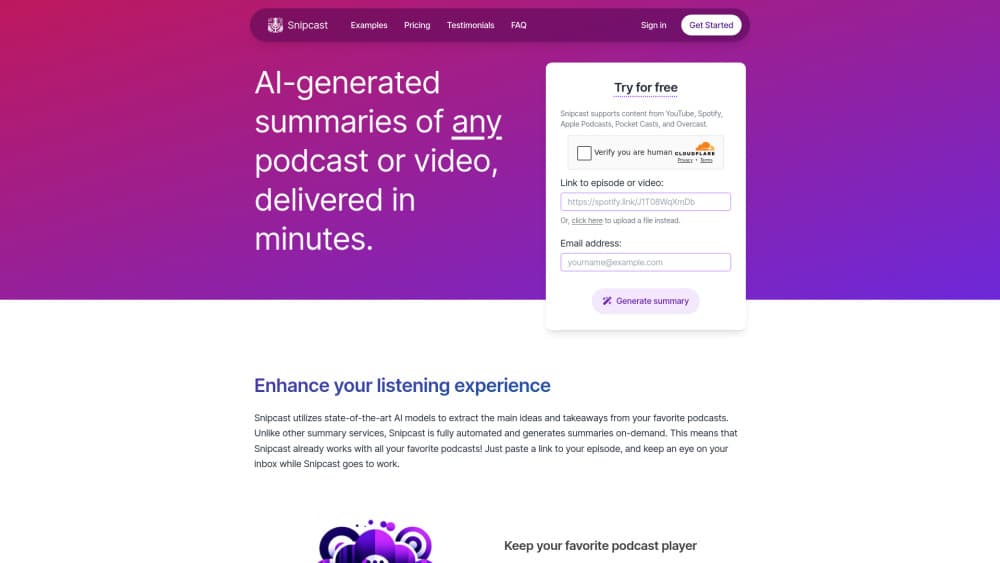
Snipcast is a web tool that turns a podcast episode into a short written summary, a job people usually hand to a podcast summarizer. You paste a link from Spotify, Apple Podcasts, Pocket Casts, Overcast, or Castro, and the notes arrive by email a few minutes later. No new player, no feed to migrate, no library to rebuild.
The design choice behind it is on-demand processing. Most summary services ask you to submit a show and wait for someone to add it to a catalog. Snipcast runs the audio through speech recognition and a language model each time you ask, so any public episode is fair game from the first paste. According to Snipcast, the job takes about two minutes per hour of audio, which means a two-hour interview is ready in roughly four.
Two limits decide whether it fits your week. The free plan allows 2 summaries a month, so it behaves like a trial more than a habit. Spotify-exclusive shows such as The Joe Rogan Experience can't be summarized at all, because there's no accessible audio file to process.
Getting Started
- Open snipcast.io and paste the link of an episode you want summarized. You can pull the link from the share menu of nearly any podcast player.
- Enter your email address. The free plan doesn't require registration, so the summary goes straight to your inbox.
- Wait a few minutes. Snipcast transcribes the audio, extracts the main ideas, and emails the summary with key takeaways.
- Open the summary in your browser. Paid plans add a full transcript and a chat box at the bottom of the page, so you can chat with the podcast about what was said.
- Add shows you follow under subscriptions if you want every new episode summarized without pasting links again.
Product Information
A quick look at Snipcast's pricing, supported platforms, and performance.
Best for
The users, tasks, and scenarios where this tool fits best.
Users
- Podcast listeners who treat episodes as research material
- Students and researchers
- Newsletter writers and content curators
Tasks
- Vetting an episode before you commit an hour
- Recovering notes from a long interview
- Writing show notes for your own podcast
- Asking a specific question about an episode
Scenarios
- Clearing a commute backlog
- A research sprint with a deadline
- Listening across languages
Key features
Summaries From Any Podcast Link
Snipcast takes a standard episode URL and returns a summary with key takeaways, no catalog submission involved. That means shows from Spotify, Apple Podcasts, Pocket Casts, Overcast, and Castro all work the same way. The one exception is Spotify-exclusive content, which has no accessible audio file.
Automatic Episode Subscriptions
You can follow a show inside Snipcast and receive a summary whenever a new episode drops. The free plan includes 1 subscription, Premium raises it to 10, and Patron allows 30. This turns the tool from a one-off lookup into a standing feed of notes.
Chat With the Episode
After a summary is generated, a chat box appears at the bottom of the page. You can ask what the guest said about a specific company, or request a list of every book mentioned. Answers come from the episode transcript, so they stay tied to the recording instead of drifting into general knowledge.
Full Transcripts on Paid Plans
Premium and Patron users can copy the complete podcast transcript of an episode, not just the summary. The option sits behind an "Open in browser" link in the summary email. It's useful when you need an exact quote rather than a paraphrase.
Upload Your Own Audio or Video
Snipcast isn't limited to public feeds. You can upload an audio or video file and get the same summary treatment, which covers conference talks, internal recordings, and raw interview footage. This is the feature podcasters use to draft show notes.
Summaries in More Than 50 Languages
The service handles episodes in most major languages and can produce output in the same range, from Arabic and Japanese to Welsh and Swahili. The practical effect is that a foreign-language interview becomes readable in your own language without a separate translation step, which is rare in an AI podcast app built around English-first shows.
Pros and cons
Pros
- No player migration: it works with the app you already listen in, which removes the biggest reason people abandon podcast tools.
- The free plan needs no account, so you can test the output quality on a real episode before paying anything.
- Transcripts and API access arrive at $7.99/mo, a low entry point compared with transcription suites.
- Chat answers stay grounded in the episode transcript, which makes fact-checking faster than scrubbing audio.
- Turnaround is quick: roughly two minutes of processing per hour of audio, delivered by email.
Cons
- The free plan caps you at 2 summaries a month, so anyone who listens daily will need Premium within a week.
- Spotify-exclusive shows can't be processed at all, which rules out some of the most popular interviews.
- Notes arrive as emails and browser pages rather than a searchable library, so finding an old summary means digging through your inbox.
- Chat messages are metered separately from summaries, 10 on Free and 100 on Premium, so follow-up questions run out before the monthly summary quota does.
Frequently asked questions
Any show with a public episode link works, including Spotify, Apple Podcasts, Pocket Casts, Overcast, and Castro. Spotify-exclusive podcasts are the exception, since Snipcast can't reach their audio files.
Related content
Explore related tools, skills, and articles for Snipcast.
Snipcast Alternatives

Udon
Udon · Coding · ProductivityUdon turns an Apple Silicon Mac into a home server you run from a browser, with container controls, file shares, and an optional AI sysadmin.

offstage
offstage cloud · Coding · Productivityoffstage gives AI coding agents and CI jobs a real Mac: a fresh macOS account on Apple silicon, driven over an API and billed by the second.

BotBus
Chengdu Tuyang Tusen Technology Co., Ltd. · Coding · ProductivityBotBus lets you control AI coding agents from your phone and watch: approve commands, start tasks and read results while the code stays on your desktop.