

Somna
Ben Howdle · Productivity · AI Assistant
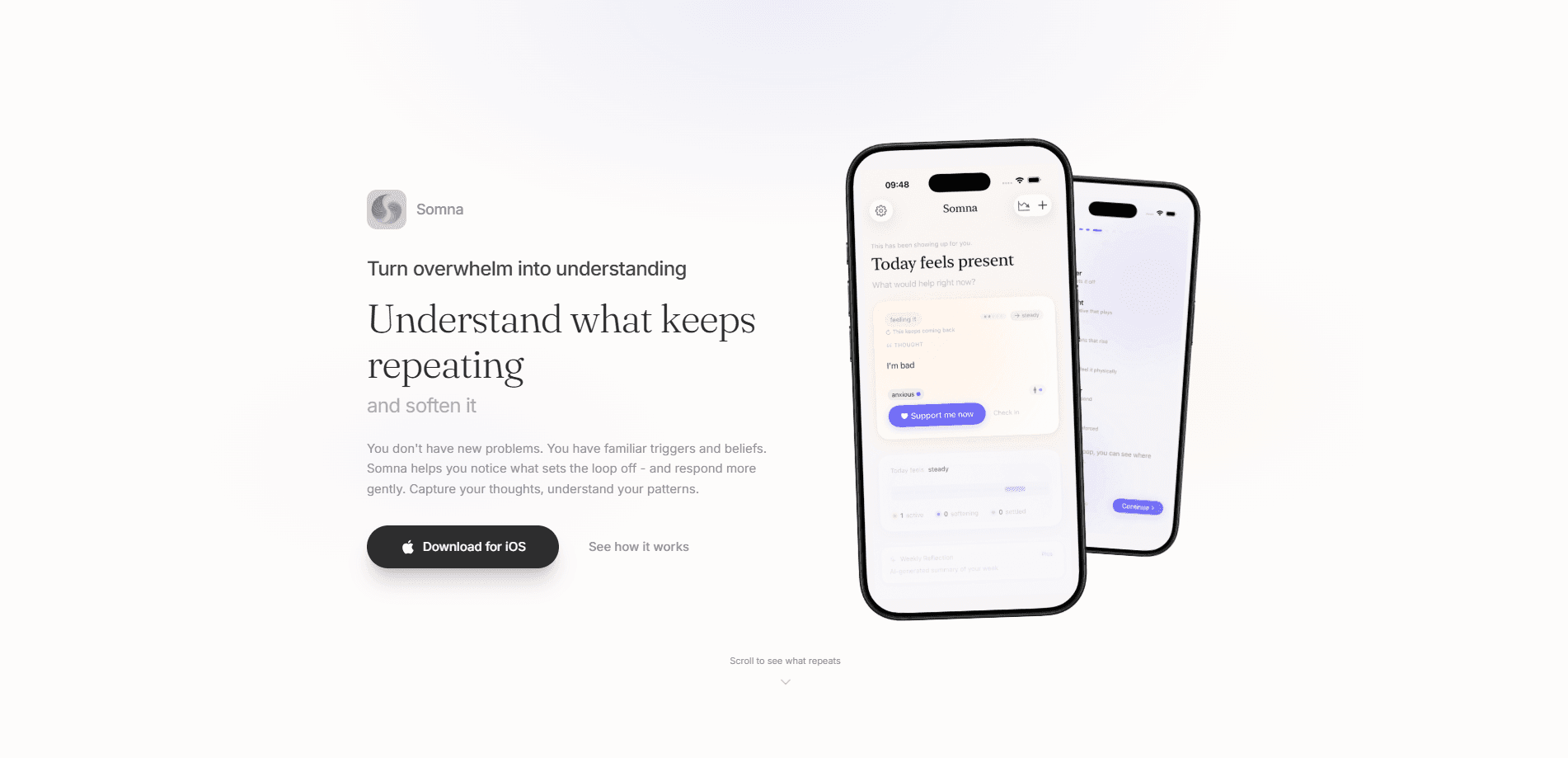
Somna is a private journaling app for iOS that helps you understand what keeps repeating in your inner life. Think of it as an AI journaling app with a narrow focus. Instead of asking you to write endless diary entries, it maps the cycle of trigger, belief, and loop, then offers simple nervous system tools to meet each pattern gently. It doubles as an emotional trigger tracker. You capture thoughts, see the beliefs underneath them, and track how a loop shifts over time. The core app is free, and Somna is built local-first, so your raw reflections stay on your device.
About Somna
What Is Somna
Somna is a wellness journaling app built around a single idea: you don't have new problems, you have familiar triggers and beliefs. The app walks you through a framework it calls Trigger → Belief → Loop, the cycle where something sets you off, a quiet belief gets reinforced, and your body reacts before your mind catches up. Somna helps you notice that cycle instead of fighting it.
The app treats your inner world as private by default. Your cognitive chains, meaning the linked thoughts, emotions, and body sensations you log, stay on your device. Only optional AI features send short, redacted summaries to the cloud, and even then your raw journal text never leaves the phone.
The main limits are worth knowing up front. Somna only runs on iOS, so Android users can't use it yet. Much of what makes it interesting, like cloud coaching and weekly pattern summaries, sits behind the Somna Plus subscription. And the app says plainly that it isn't a replacement for professional care.
Getting Started
- Download Somna from the App Store and open it, then sign in with Apple if you want your data tied to your account.
- Work through the onboarding, which explains the Trigger → Belief → Loop model and asks what tends to set you off.
- Log your first cognitive chain by naming the thought, the emotion, and the body sensation you noticed.
- When a loop activates, open Support Mode and pick a tool such as Breathe, Ground, or Soften to settle your nervous system.
- Check back across the week to see which patterns are active, softening, or rewired.
Product Information
A quick look at Somna's pricing, supported platforms, and performance.
Best for
The users, tasks, and scenarios where this tool fits best.
Users
- People who notice the same worry, argument, or spiral coming back and want to understand why it repeats
- Anyone who has tried journaling but found open-ended prompts too vague, and prefers a guided Trigger → Belief → Loop structure
- Privacy-conscious users who want an emotional awareness tool that keeps raw reflections on the device
- iOS users who want a lighter, calmer option than a full mental health platform
Tasks
- Naming a recurring emotional trigger and tracing the belief underneath it
- Logging cognitive chains that link a thought, a feeling, and a body sensation in one entry
- Settling a nervous system spike in the moment with a grounding or breathing exercise
- Reviewing which loops are active versus softening across a week
Scenarios
- A tense moment at work or home when you want to respond more gently instead of snapping
- A late-night spiral when a familiar worry resurfaces and you'd rather witness it than fight it
- A weekly check-in where you look back at what kept repeating and whether anything loosened
- A therapy break between sessions when you want to keep tracking your patterns on your own
Key features
The Trigger → Belief → Loop Map
This is the backbone of Somna. The app frames emotional patterns as a three-part cycle, and each part gets its own explanation inside the app. A trigger is anything that sets the loop off, big or small. A belief is the quiet truth you protect underneath. The loop is what follows when feelings rise and your body reacts before you decide anything. Three labels, one cycle. Seeing the three steps next to each other makes the pattern easier to spot the next time it runs.
Support Mode With Nervous System Tools
When a loop activates, Somna doesn't hand you a distraction. It offers simple regulation instead, grouped under a Support Mode with tools like Breathe, Ground, and Soften. Breathe walks you through inhale, hold, and exhale. That rhythm slows you down. Ground runs a 5-4-3-2-1 exercise that pulls you back to the present. Soften is a somatic release meant to help you let go of what your body is holding. The point isn't to stop the feeling, it's to return to a steady enough place to observe it.
Cognitive Chain Tracking
Somna asks you to log more than a mood. A cognitive chain links the thought, the emotion, and the body sensation together, so a single entry captures the whole reaction rather than just the headline feeling. That structure is what lets the app point at beliefs later. If every stressful entry carries a tight chest and a clenched jaw, that's a signal the same belief is doing the work each time.
Loop Status Over Time
Each pattern carries a status that moves as you keep meeting it. A loop can read as active, softening, or rewired, and the language in the app reflects that shift honestly. Somna is upfront that loops don't break on command. That's the honest part. They lose a little power each time you notice, name, and meet them with safety, more like well-worn paths growing over than a switch being flipped.
Coach Mode
Coach Mode is the app's cloud AI feature, and it sits behind Somna Plus. It reads the patterns you've logged and offers deeper insight into what might be driving them, acting as a reflective companion rather than a therapist. Because it needs AI processing, this is the one place where Somna sends data off the device, and it does so as short redacted summaries with thought content capped at 140 characters.
Weekly Reflections
Also part of Somna Plus, Weekly Reflections generate AI-written summaries of your patterns across the week. Instead of scrolling back through every entry, you get a short read on which loops showed up, which ones loosened, and what your balanced truth reframes look like over time. It turns a pile of entries into a story you can actually use.
Local-First Privacy
Somna is built so your inner world belongs to you. Your inner world stays yours. By default, your personal content, meaning your reflections and journal entries, stays on your device and the developers never see the raw text. The app doesn't require an account for core features, shows no ads, and doesn't track you across other apps. It collects anonymous usage events to learn which features help, but your reflections themselves are never recorded.
Pros and cons
Pros
- The Trigger → Belief → Loop framework gives structure to reflection that open-ended journaling often lacks
- Local-first design keeps raw journal entries on your device, which matters for anyone logging sensitive material
- Support Mode puts nervous system regulation tools like breathing and grounding right where a loop activates
- Free to use at the core, with paid features clearly separated instead of locked behind a hard paywall
- Honest framing about progress, treating loops as things that soften rather than problems that get fixed
Cons
- iOS only, so there's no Android version and no web app to fall back on
- Coach Mode and Weekly Reflections, arguably the most interesting features, require the Somna Plus subscription
- No API and no third-party integrations, so it can't plug into a wider journaling or health workflow
- Someone wanting a long-form, freeform diary may find the guided structure more constraining than helpful
Frequently asked questions
Somna is a private journaling app for understanding recurring emotional patterns. It helps you notice the triggers, beliefs, and loops behind reactions you keep repeating, then offers nervous system tools to meet them gently. It's a wellness and self-reflection tool, not a clinical treatment. Why does the same feeling keep showing up? That's the question it's built to sit with.
Related content
Explore related tools, skills, and articles for Somna.
Somna Alternatives

Swms
Swms AI · Writing · Productivity · BusinessSwms is an AI safety compliance tool that turns a plain description of a job into ready-to-use safety documents. Describe your project, trade, and known hazards, and it writes a safe work method statement, job hazard analysis, safe work procedure, RAMS, or safety data sheet in seconds. It also ships with Oscar, a chat assistant that answers workplace safety questions in any language. Teams in construction, mining, transport, and warehousing use it to cut the paperwork that usually eats into a workday.

Wordly AI Translation
Wordly · Voice & Language · ProductivityWordly AI Translation is a real-time AI translation and captioning platform built for meetings, conferences, and events. It delivers live translation, captions, transcripts, and summaries in more than 60 languages, and attendees join by scanning a QR code or opening a link instead of using dedicated headsets. The platform works with Zoom, Microsoft Teams, Google Meet, and Webex, and it's designed for organizations that want multilingual access without hiring human interpreters for every session. Simple as that.

Rows
Rows (Superhuman) · Productivity · BusinessRows is an AI spreadsheet and data analysis tool that imports live data from more than 50 sources, then lets you work with it using plain language instead of SQL queries or nested formulas. You can pull numbers out of PDFs, connect ad platforms, databases, and bank accounts, and ask the AI to build reports, merge datasets, or set up models that recalculate themselves. It runs in the browser, works like a spreadsheet, and now sits under the Superhuman umbrella.