
Sono - Sleep Tracker for Apple Watch
Tiago Martinho LTD · AI Assistant
Sono - Sleep Tracker for Apple Watch is an automatic sleep tracking app that turns Apple Health data into clear charts and insights for anyone who wants to sleep better.
About Sono - Sleep Tracker for Apple Watch
What Is Sono - Sleep Tracker for Apple Watch
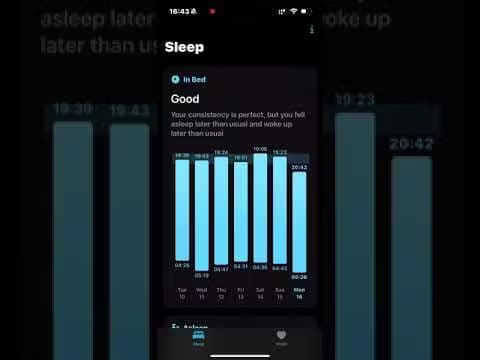
Sono is an automatic sleep tracking app built for Apple Watch and iPhone. It runs in the background while you sleep, pulls the data already collected by Apple Health, and turns it into charts you can actually read the next morning. No manual input, no tapping "start" before bed. The app answers a simple question most sleep trackers skip: what changed, and does it matter? Instead of burying you in raw numbers, Sono highlights sleep consistency, total duration, sleep efficiency, and time spent in restorative phases like REM and deep sleep. It also folds in vitals such as heart rate and respiratory rate, so you can see how your body behaves across a full night.
The main limit is scope. Sono is a tracking and insight tool, not a medical device, and the developer says it plainly. Its readings can be influenced by conditions outside your control, so the data is a general guide rather than a diagnosis. It also leans entirely on Apple Watch and Apple Health. If you wear a different wearable, there's nothing here for you. That's a hard wall.
Getting Started
- Download Sono from the App Store and open it on your iPhone.
- Grant the app permission to read your sleep and vitals data from Apple Health.
- Wear your Apple Watch to bed so it can record your sleep automatically.
- Wake up, open Sono, and check the daily snapshot of your last night.
- Review the weekly and monthly charts to spot patterns worth changing.
Product Information
A quick look at Sono - Sleep Tracker for Apple Watch's pricing, supported platforms, and performance.
Best for
The users, tasks, and scenarios where this tool fits best.
Users
- Apple Watch owners
- People new to sleep tracking
- Data-curious sleepers
- iPhone users
Tasks
- Spotting an inconsistent bedtime
- Understanding restorative sleep
- Tracking how habits affect rest
Scenarios
- Waking up groggy and unsure why
- Reviewing a rough week
- Building a better wind-down routine
Key features
Automatic sleep tracking
Sono records your sleep on its own once your Apple Watch is on your wrist at night. There's no start button and no morning data entry, which means the app keeps working even on nights you forget about it. The data comes from Apple Health, so Sono builds on readings your watch is already collecting. Set it up once. That's it.
Daily sleep snapshot
Each morning Sono shows a single snapshot of how well you slept. It's the fastest way to get a read on last night without opening a dashboard full of numbers. For people who just want a quick sense check, this is the feature they'll use most. One glance, done.
Restorative sleep breakdown
The app separates total sleep from the time you spend in REM and deep sleep. That distinction matters, because eight hours of light sleep isn't the same as eight hours that includes real restorative phases. You can see where your night went and whether your body got the recovery it needed. Not all sleep is equal.
Vitals during sleep
Sono folds heart rate and respiratory rate into the same view as your sleep stages. Seeing the two side by side helps you connect how your body behaved with how well you rested. Anyone tracking recovery or training load will find this useful. Worth a look.
Clear visualizations
Charts and graphs carry the sleep analysis instead of walls of text. The design keeps trends readable at a glance, so you can compare nights and weeks without exporting anything. If you like seeing data rather than reading about it, this is the core appeal.
Apple Health integration
Sono reads from Apple Health rather than asking you to maintain a second data source. Everything stays within the Apple apps you already use on your iPhone and watch. That keeps setup short and avoids duplicate tracking. Nothing extra to install.
Pros and cons
Pros
- Fully automatic tracking, so it works on nights you'd never bother to log manually.
- Builds on Apple Health data instead of demanding a separate account or wearable.
- Visualizations are clean and easy to read at a glance.
- Includes vitals like heart rate and respiratory rate alongside sleep stages.
- Lightweight design that focuses on sleep rather than bundling unrelated features.
Cons
- Only works with Apple Watch and Apple Health, so Android and other wearables are out.
- Not a medical device, so it can't diagnose conditions and its readings can be affected by outside factors.
- The developer doesn't offer a public API, which rules out custom integrations or exporting data into your own tools.
Frequently asked questions
It tracks your sleep automatically through Apple Watch and turns the data into charts and insights, covering duration, consistency, sleep efficiency, and time in REM and deep sleep, plus vitals like heart rate and respiratory rate.
Related content
Explore related tools, skills, and articles for Sono - Sleep Tracker for Apple Watch.
Sono - Sleep Tracker for Apple Watch Alternatives
Agibot
Agibot · Productivity · AI Assistant · ChatbotAgibot is a personal AI agent for Mac that keeps running after you close the window, runs routines on a schedule, and works from Telegram or Slack with your own API keys.

Foley
Hanamori Labs, LLC · Voice & Language · Productivity · AI AssistantFoley is a voice to-do list that turns a spoken sentence into a filed task, complete with project, date and time, then helps you plan the day around what is already there.

Ghost Core
Ghost · Productivity · AI AssistantGhost Core is a $3,499 screenless personal AI computer that runs local AI models on its own hardware, builds context from your apps and devices, and acts without waiting for a prompt.