

Sortio
CMG Labs · Productivity
Sortio is an AI file sorter and organizer for Mac, Windows and Linux that renames files automatically and files them by content after you approve the plan.
About Sortio
What Is Sortio
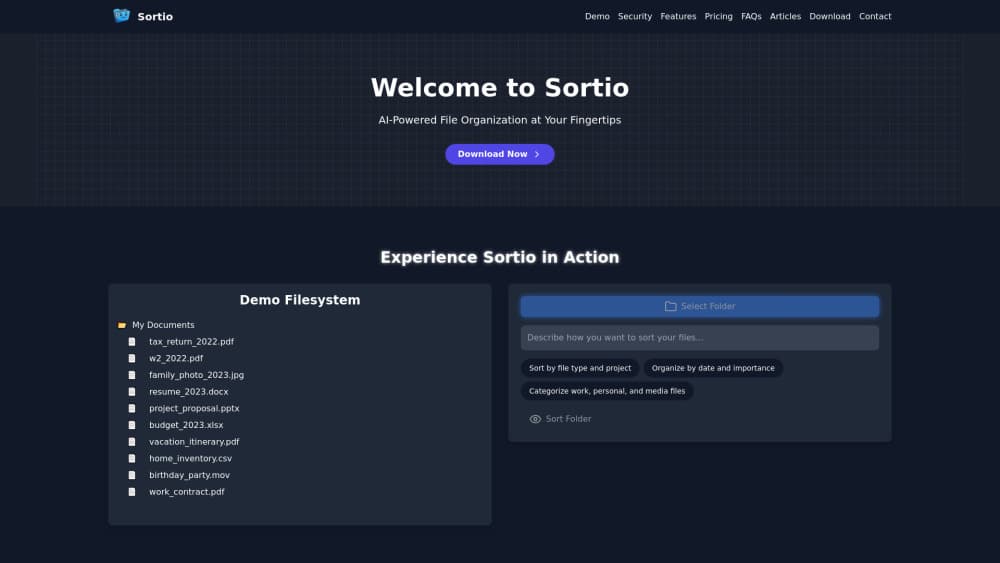
Sortio is a piece of desktop AI file management software that handles automatic file organization by reading contents instead of sorting on names and dates alone. You drop a folder on it, describe how you want things filed, and it builds a plan that shows where every file will land. Nothing moves until you approve it.
The product targets people with a real backlog: lawyers with client matter folders, realtors with hundreds of listing photos, bookkeepers with years of invoices, and households with decades of loose documents. It runs natively on macOS, Windows and Linux, and it can sit and watch a folder so new arrivals get filed as they show up.
The main limits are the AI allowance and the moving parts. Free users get a one-time AI trial, and heavy sorting runs on a monthly cap unless you bring your own model key. Cloud sorting also sends filenames and metadata to Sortio's cloud unless you switch to local mode.
Getting Started
- Download the app for macOS (11.0+), Windows 10/11 or Linux. No credit card or account is needed to install.
- Sign in with a magic email link, then pick a folder and add it as a Space.
- Describe the sort in plain language, or build IF/THEN rules for exact, repeatable filing.
- Review the plan, approve it, and undo the whole batch from History if a folder lands wrong.
Product Information
A quick look at Sortio's pricing, supported platforms, and performance.
Best for
The users, tasks, and scenarios where this tool fits best.
Users
- Solo lawyers and attorneys
- Realtors and property managers
- Bookkeepers and small back offices
- Everyday home archivists
Tasks
- Renaming files from content
- Routing documents to client or project folders
- Clearing a Downloads folder
- Filing a one-time backlog
Scenarios
- Tax season
- Client onboarding at a firm
- Photo library cleanup
- Keeping a synced folder tidy
Key features
Content-based sorting
Most file organizers look at names and dates. Sortio opens each file, understands what it is, and decides where it belongs from that. A scan becomes a dated statement, and a random screenshot becomes a named image, which is the difference between a tidy folder and one you still cannot search.
Prompt sorting with a preview plan
You describe the sort in plain language, and Sortio builds a full plan before anything moves. The plan shows the target folder and new name for every file, so you can approve the whole batch or back out. If a local model leaves files out, it asks again for just those files instead of dropping them.
IF/THEN rules engine
For repeatable work, the rules engine applies exact conditions rather than AI guesses. You build IF/THEN rules for predictable, repeatable filing, and the same rule runs the same way every time. This suits folders where a rough guess would be worse than a fixed rule.
Spaces and watch automations
A Space is a folder Sortio watches. You can set a Space to file new arrivals on its own, so a Downloads or Dropbox archive stays organized without you opening the app. Pro lifts the cap to unlimited Spaces and automations.
Automatic renaming
Sortio renames from content, not from the old filename. It can apply patterns like date plus vendor plus amount, or last name plus first name, so it can rename files automatically from what is inside them and you can spot one by glance. Renaming is unlimited on paid plans.
Local and bring-your-own-key AI
Cloud sorting uses Sortio's own model and sees filenames and metadata. Switch to local AI with Ollama or LM Studio, or plug in your own API key, and the work stays on your machine. Every plan supports local-only and bring-your-own-key, which matters for regulated work.
History and one-click undo
Every sort leaves a row in History, and a sort that moved a file can be reversed. "Put everything back" reverses every sort Sortio has made, newest first, and states what it will do before it moves anything. Nothing is deleted, files are only moved back.
Pros and cons
Pros
- Reads file contents, so naming and routing go by what a document actually is instead of its messy original name.
- Preview-before-apply and full undo cover the main fear of handing a folder to an AI, which is a file landing somewhere you cannot find.
- Runs on macOS, Windows and Linux, and works with folders synced from OneDrive, SharePoint, Google Drive, Dropbox, iCloud Drive and Box without integration setup.
- Local AI and bring-your-own-key options let regulated users keep client data from leaving the machine.
- Free tier includes unlimited rule-based sorting, previews, history and undo, so you can test it on a real folder before paying.
Cons
- The free plan has a one-time AI trial, so ongoing AI sorting needs Pro at $99 a year; heavy users get a monthly cap unless they bring their own key.
- Cloud sorting sends filenames and metadata to Sortio's servers, so confidentiality-sensitive work needs local mode set up first.
- AI sorting suits messy, mixed folders; a tidy folder that just needs moving files by extension is faster with simple rules.
- Some reviewers on Reddit note that results still need a once-over, because a model can still misread an ambiguous document.
Frequently asked questions
Sortio is an AI file organizer that reads the contents of your files, gives them sensible names and moves them into the right folders. It can sort files by content across whole folders at once, shows you the plan before anything moves, and lets you undo the batch.
Related content
Explore related tools, skills, and articles for Sortio.
Sortio Alternatives

Base Code
Base44 (Wix) · Coding · ProductivityBase Code is a shared cloud development environment from Base44. Teammates describe changes to an existing GitHub codebase in chat, preview them live and send them back as pull requests.

Knocket
Knocket (Tencent RTC team) · Productivity · Business · ChatbotKnocket is a free live chat and contact page tool that lets visitors message you from your website, app, or a shareable link, with every reply handled from Telegram or one inbox.

FloorGen
Vinit Kumar (FloorGen) · Productivity · China AIFloorGen is a browser-based floor plan maker that turns a sentence or a sketch into an editable 2D plan and a 3D walkthrough. Export to PDF, DXF or video, and draw without an account.