

SoWork
Sophya, Inc. · Productivity
SoWork is a virtual office for remote teams that combines spatial video, team chat, and AI meeting notes in one shared workspace, so people can walk up and talk in a click.
About SoWork
What Is SoWork
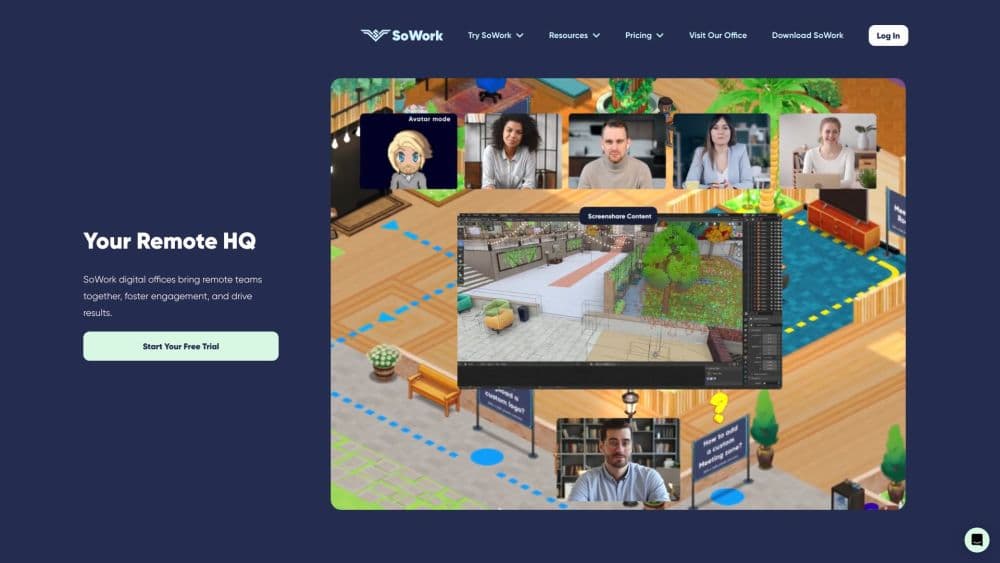
SoWork is a cloud-based virtual office built by Sophya, Inc., a Boston company that started the product after its own team scattered during the 2020 lockdown. The idea is simple: give a distributed team a place, not another feed. Everyone gets an avatar, a desk, and a floor plan, and conversations start when two avatars get close enough to hear each other.
That design solves a narrow but expensive problem. Remote team collaboration loses the small exchanges that keep projects moving, so a two-minute question turns into a scheduled call or a message that sits unread for a day. SoWork replaces some of that scheduling with presence. You can see who is free, who is heads-down, and who is already in a meeting before you decide to interrupt anyone.
The platform also runs AI on top of the office. Meetings get recorded, transcribed, and summarized, and those notes stay searchable next to the room where the meeting happened. Since late 2025 the company has been extending the same idea to AI agents, which will get desks of their own and show up in the office like any other coworker.
The limits matter as much as the pitch. SoWork is a browser-first product with a mobile app, and the free plan caps meetings at 30 minutes and teams at 10 members. Recording, analytics, and AI summaries sit on the Premium plan, so a small team on a budget sees the office but not the memory.
Getting Started
- Create an account at app.sowork.com and pick a floor plan from the template library, or start from an empty room.
- Invite teammates by email or a share link. Each person gets an avatar and can claim a desk in the zone that fits their team.
- Set your availability, then walk your avatar over to a colleague to start a spatial video call. No link and no calendar invite.
- Open the chat panel for channels, threads, and direct messages, and connect Google Calendar or Outlook so meeting status updates on its own.
- Record a meeting on the Premium plan, then search the transcript or summary later from the meeting library.
Product Information
A quick look at SoWork's pricing, supported platforms, and performance.
Best for
The users, tasks, and scenarios where this tool fits best.
Users
- Remote-first startups with 5 to 50 people
- Distributed engineering teams
- People ops and HR leads
Tasks
- Quick unblocks and pair debugging
- Client and candidate calls
- Onboarding and culture work
Scenarios
- Hybrid teams that still want hallway conversations
- Teams drowning in Zoom and Slack tabs
- Companies testing AI agents at work
Key features
Spatial Video and Walk-Up Meetings
Avatars carry your audio and video, and a call starts the moment two avatars are close enough. That turns a quick question into a 90-second conversation instead of a calendar slot. Rooms support screensharing, drawing on a shared screen, and multiple simultaneous screenshares for group reviews.
AI Meeting Notes With a Searchable Library
On the Premium plan, meetings are recorded, transcribed, and summarized, and the summary pulls out action items. Everything lands in a meeting library you can search by topic later. The practical benefit shows up weeks later, when someone asks why a decision was made and the answer is sitting in a transcript.
Slack-Style Team Chat With Channels and Threads
SoWork ships its own team chat, with channels by topic, threads, direct messages, emoji reactions, pinned messages, and voice notes. Keeping chat next to the rooms means the decision and the discussion that produced it stay in the same place. GitHub and other integrations push updates into channels so engineering work does not need a second tab.
Desks, Zones, and a Mapmaker for Your Office
The office builder borrows its logic from The Sims. Teams drag in walls, furniture, plants, and pets, then assign zones for focus work, standups, or social time. Desks can be assigned to specific people, which gives remote staff a fixed spot and makes the floor plan readable at a glance.
AI Agents With Their Own Desks
SoWork is positioning AI agents as office residents rather than hidden integrations. An agent gets a desk, appears in the room where it works, and leaves a visible trail of what it touched. The feature is rolling out, so treat current agent support as early rather than finished.
Presence Signals and Team Analytics
Status switches to "in a meeting" when a calendar event starts, and you can show which app you're working in next to your name. The Premium analytics suite reports on office activity, meeting patterns, and how teams connect, which helps managers spot isolation before it turns into attrition.
Pros and cons
Pros
- Presence does real work: seeing who's available removes most of the scheduling overhead from small questions.
- One bill instead of five: meetings, chat, recordings, and analytics sit in a single subscription that starts at $5.40 per member.
- The free tier is usable: 10 members and 30-minute meetings cover a pilot without a credit card.
- AI meeting notes are unlimited on Premium, with transcripts, summaries, and action items in one library.
- Setup is fast: a team can pick a floor plan and invite everyone in about two minutes.
Cons
- The free plan blocks recording, analytics, and AI entirely, so the trial shows the office without its main differentiator.
- Video quality and battery drain depend on the browser, and long sessions in World Mode are heavier than a plain call.
- Agent support is still rolling out, so teams that want AI coworkers today should not buy on that promise.
- Guest access is limited to passes, which gets awkward for agencies that meet outsiders every day.
Frequently asked questions
SoWork gives a remote team a shared virtual office with avatars, desks, and rooms. You see who's around, walk over to start a video call, and keep chat and meeting notes in the same place.
Related content
Explore related tools, skills, and articles for SoWork.
SoWork Alternatives

Base Code
Base44 (Wix) · Coding · ProductivityBase Code is a shared cloud development environment from Base44. Teammates describe changes to an existing GitHub codebase in chat, preview them live and send them back as pull requests.

Knocket
Knocket (Tencent RTC team) · Productivity · Business · ChatbotKnocket is a free live chat and contact page tool that lets visitors message you from your website, app, or a shareable link, with every reply handled from Telegram or one inbox.

FloorGen
Vinit Kumar (FloorGen) · Productivity · China AIFloorGen is a browser-based floor plan maker that turns a sentence or a sketch into an editable 2D plan and a 3D walkthrough. Export to PDF, DXF or video, and draw without an account.