
SpriteSheetMaker
SpriteSheetMaker · Image · Coding
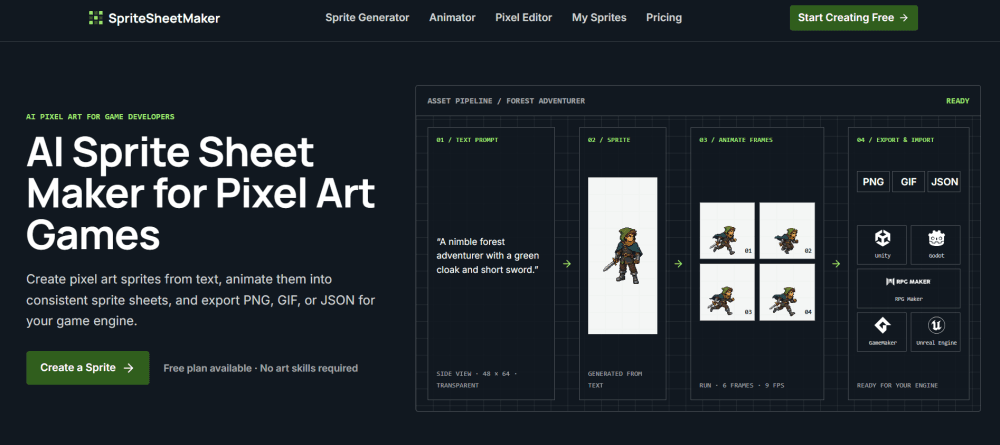
SpriteSheetMaker is an AI sprite generator built for 2D game developers who need pixel art characters, enemies, and props without waiting on an art queue. You describe a subject in text, generate a transparent pixel sprite, animate it into a consistent frame sequence, and export PNG, GIF, or JSON files. Think of it as a sprite sheet maker that skips the drawing. It fits indie prototyping, game jams, and 2D game assets planning where speed matters more than a finished art pipeline.
About SpriteSheetMaker
What Is SpriteSheetMaker
SpriteSheetMaker is a web-based AI sprite generator that turns a written description into pixel art game assets. Type a character, creature, or item idea, pick a perspective and palette, and the tool returns a transparent sprite you can drop into a build. No drawing. The pitch is simple: art bottlenecks stall projects, and this shortens the gap between an idea and something playable.
The workflow runs in one place. After generating a base sprite, you animate it into an action sequence, then push the frames through editing, splitting, resizing, and packaging tools before export. Sprite sheets come out as PNG, GIF, or JSON, and there are dedicated generators for formats that would otherwise take a chunk of manual cleanup, covering RPG Maker's grid, GameMaker strips, and Friday Night Funkin' XML atlases.
The main limit is what you'd expect from AI generation. Consistency can drift. Every frame needs review across a long sequence, so it works best for exploration and prototyping rather than final shipped art. Animation playback previews at a fixed 12 FPS, and the downloadable result is a PNG grid, not an engine-ready animation file.
Getting Started
- Sign in to the SpriteSheetMaker website and open the sprite generator workspace.
- Describe your subject in text, including style, camera view, facing direction, and color palette.
- Choose your settings, or add a reference image when composition needs tighter art direction.
- Generate the base sprite, then review silhouette, proportions, and readability at game size.
- Animate the sprite with an action and frame count, preview the loop, and export the PNG, GIF, or JSON.
Product Information
A quick look at SpriteSheetMaker's pricing, supported platforms, and performance.
Best for
The users, tasks, and scenarios where this tool fits best.
Users
- Indie game developers
- Solo hobbyists and students
- Game studios planning assets
Tasks
- Generating character sprites
- Creating walk and attack cycles
- Converting and packaging assets
Scenarios
- Game jams and rapid prototyping
- Early project planning
- Teaching and learning
Key features
Text-to-Sprite Generation
The core AI sprite generator takes a written description and returns a transparent pixel art sprite. You can set perspective (side, top-down, or isometric), facing direction, size, and outline, and it handles characters, items, creatures, tiles, scenery, and props. A reference-image option exists too, for when a sketch communicates the intended design better than a long written description ever could.
Sprite Animation Generator
Once a base sprite exists, the sprite animation generator turns it into a consistent frame sequence. You pick from presets like Idle, Walk, Run, Jump, Attack, Hurt, and Death, or describe a custom motion if none of the built-in presets quite match the specific move your character needs to perform during combat. Need a four-frame jab or a twelve-frame run? Set it and go. Standard mode maps your choice to 4, 6, 8, 9, or 12 output frames, while Advanced mode explores more continuous motion. Playback runs at a fixed 12 FPS for loop review.
One Workflow From Idea to Engine
SpriteSheetMaker keeps generation, animation, and editing in the same place rather than jumping between tools. You describe, generate, animate, export, then import into your engine. Simple. That single loop matters when you're testing five enemy ideas in an afternoon and don't want context switching between separate apps.
Game Asset Toolbox
A set of utilities covers the steps between generation and export. A pixel editor refines edges and colors. A splitter breaks a sheet into frames. A resizer scales pixel art while keeping hard edges, and a Gif-to-sprite-sheet converter goes the other way. An atlas builder packs sprites and frame data into a texture atlas for export.
Engine-Specific Export Formats
Export supports PNG, GIF, and JSON, and dedicated generators handle common engine conventions. RPG Maker sprites follow the 3 × 4 grid layout. GameMaker frames pack into a horizontal strip. The Friday Night Funkin' XML generator builds PNG and TextureAtlas files for character animations. That saves manual reformatting time on supported engines.
Pros and cons
Pros
- Turns a text prompt into a usable pixel sprite fast, which removes the artist bottleneck for prototyping.
- Handles animation from a single sprite, so linking frames to the same character takes less manual work.
- Engine-specific exporters (RPG Maker, GameMaker, FNF) cut out manual reformatting.
- The bundled editing, splitting, and resizing tools mean fewer separate apps to install.
- Free plan lets you test the core workflow before paying.
Cons
- Every generated frame needs review; consistency can drift across longer sequences, so it isn't a push-button final asset.
- Animation previews at a fixed 12 FPS, which limits how precisely you can judge timing.
- The sprite generator is a general starting point, so object-specific tools are still needed for polished results.
- No public API is documented, so it won't slot into an automated pipeline for now.
Frequently asked questions
It's an AI tool for making pixel art sprites and animation sheets for 2D games. You describe a character or object, generate a sprite, animate it into frames, and export the files your engine expects. Unity, Godot, GameMaker, and RPG Maker all get dedicated export paths, which means less manual reformatting and more time spent actually building and testing the game those sprites belong to. It suits prototyping and asset planning more than final production art.
Related content
Explore related tools, skills, and articles for SpriteSheetMaker.
SpriteSheetMaker Alternatives

X Ray Interpreter
X-ray Interpreter · ImageX Ray Interpreter is a web-based AI radiology tool that turns X-rays, CT scans, MRI, ultrasound, and PET images into plain-language reports. You upload a scan, get a preliminary X-ray interpretation in moments, then ask follow-up questions if something needs explaining. It works as a second opinion and a learning aid, not as a medical diagnosis.

Aieasypic
AIEasyPic · ImageAIEasyPic is an AI image generator that turns plain text prompts into finished artwork in seconds. You can also train custom models on your own photos, swap faces in existing images, and create short video clips from text, all from a browser. It suits casual creators who want quick visuals and hobbyists who want to build a personal model without touching any code.

Chargen
Chargen · ImageChargen is an AI character generator and worldbuilding toolkit built for Dungeons & Dragons and other tabletop RPGs. It turns a one-line idea into a painted character portrait, spins up NPCs, monsters, maps and encounters from the same session, and keeps every creature's details close at hand. The tabletop RPG art side runs on a credit system called Gold, while the text generators stay free for everyone.