

Stork
Stork Tech, Inc. · Productivity
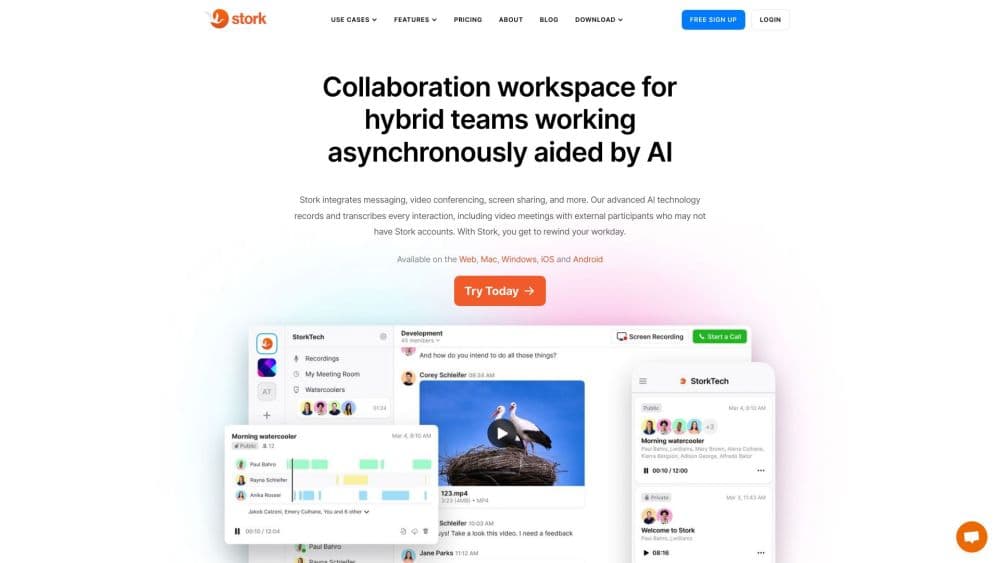
Stork is an AI collaboration workspace for hybrid and remote teams. It records and transcribes calls, sends video and voice notes, and turns every conversation into a searchable summary.
About Stork
What Is Stork
Stork is a collaboration workspace built for teams that don't share the same office or time zone. Instead of forcing everyone into a live call, it lets people record a quick screen video, drop a voice note, or send a video message that teammates open whenever they're free. Calls still happen, but Stork records and transcribes them so nobody has to take notes.
The product leans on AI to keep those recordings useful. It transcribes voice and video, writes a summary of what was said, and lets you search a past conversation for a specific phrase. Stork also ships a set of AI teammates it calls "AI Professionals," built on the ChatGPT API, that you can add to a channel for routine tasks.
The catch is that Stork is a paid team tool, not a free personal app. Most of the value shows up once a whole team moves its conversations inside the workspace, and the free plan is a starting point rather than a long-term option for large groups.
Getting Started
- Sign up for an account on the Stork website, then download the desktop app for Mac or Windows, or the mobile app for iOS or Android.
- Create or join a workspace, then set up public channels for shared work and private channels for smaller groups.
- Start a conversation with a screen recording, a voice note, or a live call. Stork records calls automatically.
- Invite teammates from Slack, Google Meet, or Microsoft Teams so they show up in the same workspace.
- Let the AI transcription and summary run, then search the transcript later when you need a detail.
Product Information
A quick look at Stork's pricing, supported platforms, and performance.
Best for
The users, tasks, and scenarios where this tool fits best.
Users
- Remote and hybrid teams
- Managers who run a lot of meetings
- Small startup teams
Tasks
- Sending async updates
- Reviewing designs and documents
- Catching up on missed calls
Scenarios
- A team working across several time zones
- Onboarding a new hire
- Documenting recurring decisions
Key features
Async Video and Voice Messaging
Stork lets you send video and voice messages inside any channel, so a teammate can explain an idea without booking a meeting. Recipients play the message back when they have time, fast forward, pause, or skip ahead. This is the core of the async workflow, and it's what sets Stork apart from plain chat tools.
Automatic Call Recording and Transcription
Calls and meetings record automatically, with no record button to press. Each one is transcribed, so anything said in a call stays searchable afterward. Users can join live or read the transcript later, which helps teams that can't all attend at once.
AI Summaries and Search
Stork uses AI to summarize video and audio meetings and to search across recorded conversations. You can look up a phrase and jump to the moment it was said instead of rewatching a full call. It also keeps read and playback receipts so you know whether a message was seen.
Channels and Watercoolers
Work is organized into public and private channels, each a dedicated space for a project, team, or topic. Alongside them, "watercoolers" are open spaces for casual talk, meant to recreate the hallway conversations remote teams usually miss. Any member can start a live or text discussion others can join.
AI Professionals
Every workspace can add AI teammates, which Stork calls AI Professionals and builds on the ChatGPT API. They cover routine tasks and everyday questions inside a channel, so a team doesn't have to switch to another assistant. The set of available personas has changed over time as the product has evolved.
Call My Link Video Conferencing
"Call My Link" is a browser-based video tool for hosting, capturing, searching, and summarizing calls from a single window. It produces AI summaries of the meeting, so a team can review what happened without replaying everything. It works alongside the recording and transcription features rather than replacing them.
Pros and cons
Pros
- Async video, voice notes, and screen recording cover most team communication in one workspace.
- Automatic recording and transcription mean no one has to take notes during a call.
- AI summaries and search make long conversations skimmable and easy to revisit.
- Channels and watercoolers give distributed teams a shared space without extra tools.
- Cross-platform apps cover web, desktop, and mobile, so teammates can use what they have.
Cons
- The free plan is limited, and the useful team features sit behind the paid tier, which matters for small budgets.
- Most of the value only appears once a whole team adopts it, so a single user gets less out of it.
- Automatic recording can raise privacy concerns, and teams need clear rules about what gets captured.
- The AI Professionals feature has shifted over time, so older reviews may not match what's live now.
Frequently asked questions
Stork is an AI collaboration workspace for hybrid and remote teams. It combines async video and voice messaging, screen recording, automatic call recording and transcription, and AI summaries in one place.
Related content
Explore related tools, skills, and articles for Stork.
Stork Alternatives

Base Code
Base44 (Wix) · Coding · ProductivityBase Code is a shared cloud development environment from Base44. Teammates describe changes to an existing GitHub codebase in chat, preview them live and send them back as pull requests.

Knocket
Knocket (Tencent RTC team) · Productivity · Business · ChatbotKnocket is a free live chat and contact page tool that lets visitors message you from your website, app, or a shareable link, with every reply handled from Telegram or one inbox.

FloorGen
Vinit Kumar (FloorGen) · Productivity · China AIFloorGen is a browser-based floor plan maker that turns a sentence or a sketch into an editable 2D plan and a 3D walkthrough. Export to PDF, DXF or video, and draw without an account.