
Study Buddy
studybuddy.gg · Leaning
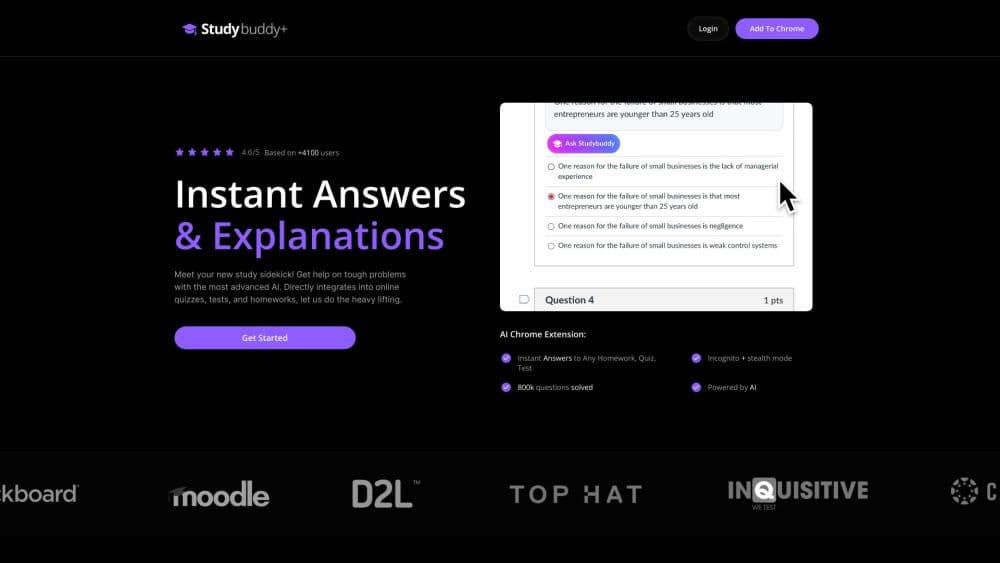
StudyBuddy is an AI homework helper and study companion that answers any question from a screenshot or highlight, then explains the steps behind the answer.
About Study Buddy
What Is StudyBuddy
StudyBuddy is a Chrome extension and AI study companion built for students who get stuck mid-task. You snap a screenshot of a question or highlight a line on the screen, and it returns an answer with a step-by-step explanation. Math, diagrams, and image-based questions all fall into the same flow, and there's no copy-pasting between tabs.
The point is speed. Searching for a solution or retyping a problem into a chatbot eats the minutes you should spend studying, and a plain answer without the working teaches you nothing. StudyBuddy keeps both the answer and the reasoning in one place, which matters when you're reviewing a concept rather than just filling a blank.
The catch is how it's meant to be used. It runs as a browser extension, so it fits homework and study sessions on a laptop, not printed worksheets or offline tests. It also leans on you to check the working, since a fast answer is only useful if you actually read the steps.
Getting Started
- Add the StudyBuddy extension to Google Chrome from the browser store.
- Create an account and start the $0.99 trial, which then renews at the weekly rate unless you cancel.
- Open the page or document with your question and take a screenshot, or highlight the part you want solved.
- Read the answer and the step-by-step explanation the tool returns.
- Use the built-in AI chat when you want to ask a follow-up or work through a topic in more depth.
Product Information
A quick look at Study Buddy's pricing, supported platforms, and performance.
Best for
The users, tasks, and scenarios where this tool fits best.
Users
- High school students
- College students
- Self-taught learners
- Parents helping with homework
Tasks
- Solving a math problem from a photo
- Understanding a diagram or figure
- Checking an answer before you commit
- Working through a topic in depth
Scenarios
- A late-night problem set with no one to ask
- Revising a subject across many tabs and documents
- Studying in a second language
Key features
Screenshot Any Question
Take a screenshot of a question and StudyBuddy returns an answer with a clear explanation. It works on what's on your screen, so lengthy problems or formatted worksheets do not need to be retyped by hand. The tool reports handling math, diagrams, and image-based questions through the same flow.
Highlight and Solve
Highlight a specific part of a question and get an immediate answer without capturing the whole page. This is useful when you only need one line cleared up, or when a long passage buries the part you're actually stuck on. It keeps the response focused instead of solving things you already understand.
Personal AI Chat
A built-in AI chat handles the questions a single answer cannot. You ask follow-ups, dig into a topic, or request a different explanation when the first one doesn't click. It behaves like a study companion you can keep talking to rather than a one-shot lookup.
Step by Step Explanations
Answers come with the reasoning behind them, not just the final result. Seeing the steps is what turns a solved problem into a learned one, especially in math where the method matters more than the number. It also gives you something to check your own work against.
Multiple Advanced AI Models
StudyBuddy says it draws on more than one AI technology rather than a single model. In practice that means different question types can route to whichever engine handles them best, and the tool isn't limited to the strengths of one system. The exact models are not published, so treat this as a design claim rather than a spec.
Built Into Google Chrome
The extension runs inside Chrome, so there's no separate app to open and nothing to copy between windows. You highlight or screenshot on the page you're already on and get the answer there. It fits the browser-based study session, which is where most online coursework happens.
Multi Language Support
Questions and explanations work in English, Spanish, and Portuguese. For students studying in a language that isn't their first, that means getting help in the language they read most comfortably. The team says more languages are in progress.
Pros and cons
Pros
- Screenshot and highlight flows skip the typing, so long or formatted questions go in as they appear on screen.
- Step-by-step explanations turn a quick answer into something you can actually learn from and check your work against.
- Running as a Chrome extension keeps help inside the browser where online studying already happens.
- Supports English, Spanish, and Portuguese, which helps learners studying in a second language.
- Cancel anytime with a satisfaction guarantee and 24/7 customer support, so trying it carries little risk.
Cons
- No free plan, so you pay the weekly rate after the $0.99 trial if the tool is not a fit.
- It only works inside Google Chrome, so students on other browsers or on paper homework cannot use it.
- Because it solves what's on screen quickly, it can encourage copying answers instead of working through the steps if you skip the explanation.
Frequently asked questions
It answers questions you screenshot or highlight in Google Chrome and returns a step-by-step explanation. It's built as an AI study companion for homework, revision, and any moment you get stuck.
Related content
Explore related tools, skills, and articles for Study Buddy.
Study Buddy Alternatives

HireKey
HireKey · Voice & Language · Productivity · LeaningHireKey is an AI job search copilot built by a former tech recruiter. It checks role fit, tailors resumes, runs interview practice and tracks every application.

Lune
Retrograde Labs · Productivity · LeaningLune is a research search engine for scientific AI agents. It runs as an MCP server that lets Claude, ChatGPT and Cursor search peer-reviewed computer science papers and cite them.
Coddy
Coddy · Coding · LeaningCoddy is a gamified platform to learn to code through short interactive lessons in 20+ languages, with a browser editor, an AI tutor and free certificates.