

SummarAIze
Summarize Inc. · Productivity · Marketing
SummarAIze turns podcast, webinar, and interview recordings into social posts, blog drafts, newsletters, clips, and transcripts. Upload once, apply a brand kit, and download publish-ready assets.
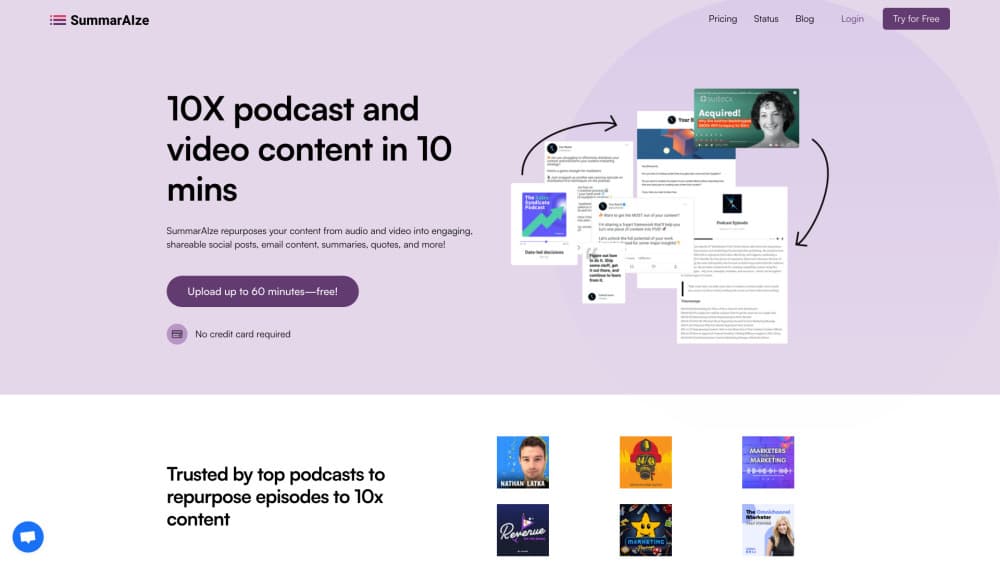
About SummarAIze
What Is SummarAIze
SummarAIze is an AI podcast repurposing tool for long recordings. You upload an audio or video file, and the platform produces the written and short-form assets a content team usually makes by hand: show notes, summaries, LinkedIn and X posts, YouTube titles and descriptions, newsletter drafts, blog posts, pull quotes, chapter timestamps, and captions for short clips.
The product is built around brand kits and templates. A brand kit stores your tone, target audience, recurring keywords, speaker names, and writing rules, so every asset drafted from a recording follows the same voice without you repeating instructions. Templates decide which assets get generated; you can install ready-made ones for podcasts, webinars, or interviews, or write your own.
Two limits matter before you buy. Everything runs on credits, and one credit equals either one minute of transcription or one generated asset, so long recordings cost proportionally more. The output is a first draft that needs an editor, not a finished campaign. Teams that want hands-off publishing will still spend time reviewing copy and choosing clips. It fits creators and small marketing teams who already publish regularly and want the post-production writing to take less of the week.
Getting Started
- Sign up at summaraize.com. New accounts start with 75 free credits and no card required.
- Build a brand kit. Add your tone, audience, keywords, speaker names, and any writing rules the drafts should follow.
- Install the templates you want. Each template defines what a single upload produces, from one blog post to a batch of social captions.
- Upload a recording from your computer, Google Drive, Dropbox, Zoom, or a YouTube link. Files up to 10GB are accepted.
- Review the generated assets in the dashboard, refine them with Ask SummarAIze, then export or share them by link.
Product Information
A quick look at SummarAIze's pricing, supported platforms, and performance.
Best for
The users, tasks, and scenarios where this tool fits best.
Users
- Podcast hosts
- Content marketers
- Small agencies
Tasks
- Turning an episode into show notes and chapter timestamps
- Writing platform-specific social copy
- Drafting SEO titles and YouTube descriptions
- Producing short clip candidates
Scenarios
- Weekly podcast post-production
- Launching a content campaign from a single webinar
- Reviving an old back catalog
Key features
Brand Kits
A brand kit stores your voice, tone, audience definition, keywords, speaker names, and writing rules. Every asset generated for that brand pulls from the same context, so a draft sounds like the same publication whether it is a LinkedIn post or a newsletter. You can keep unlimited kits, which is what makes multi-client work practical.
Installable Templates
Templates control the output rather than the input. Instead of one generic summary, you install a template that says a single upload should produce three social posts, one blog draft, and a set of clip timestamps. Ready-made templates cover podcasts, webinars, and interviews, and custom ones let a team encode its own format.
Ask SummarAIze
A chat layer sits on top of each project. Ask SummarAIze can rewrite a section, change the angle of a post, or generate an asset the templates did not include. Each message costs one credit, which is worth knowing before you hold a long back-and-forth with the model.
Transcription with Speaker Labels
Uploads are transcribed with timestamps and speaker labels, which is the base every other asset is built on. The podcast transcription is speaker-aware, so a two-host interview stays readable. The platform handles common audio and video formats and accepts recordings in multiple languages. Files up to 10GB are supported, so an unedited multi-hour session is not a problem.
Multi-File Context
One project can draw on several recordings at once. That matters for series, panel discussions, or a course built from separate sessions, where the useful material is spread across files and a summary of any single file would miss the point.
Asset Library and Sharing
Every generated asset stays in a dashboard where you can compare versions, edit copy, and send results to a collaborator through a link. Team members are unlimited on all plans, and there is no per-seat charge, so reviewers do not add to the bill.
Pros and cons
Pros
- One upload produces several asset types, so a podcast team replaces a transcription service, a copy tool, and a manual show-notes process with one account.
- Brand kits keep tone and keywords consistent across every asset without repeating instructions in each prompt.
- Unlimited team members with no per-seat fee makes it cheaper than most tools for a small team.
- The 75 free credits cover a short episode end to end, so you can judge output quality before paying.
- Uploads from Google Drive, Dropbox, Zoom, and YouTube remove the download step for most workflows.
Cons
- Credits meter both transcription minutes and generated assets, so a long weekly show can burn through a plan faster than the price suggests.
- Drafts need editing for accuracy and house style. The tool does not fact-check claims made in the recording.
- There is no documented public API, which rules it out for teams that want to automate repurposing inside their own systems.
- Clip output is timestamps and quotes rather than rendered video, so you still need an editor to produce the final cut.
Frequently asked questions
SummarAIze converts podcast, webinar, and interview recordings into written and short-form content: summaries, show notes, social posts, blog drafts, newsletters, transcripts, chapter timestamps, and clip suggestions. You upload a file and pick templates that define what gets generated.
Related content
Explore related tools, skills, and articles for SummarAIze.
SummarAIze Alternatives

Udon
Udon · Coding · ProductivityUdon turns an Apple Silicon Mac into a home server you run from a browser, with container controls, file shares, and an optional AI sysadmin.

offstage
offstage cloud · Coding · Productivityoffstage gives AI coding agents and CI jobs a real Mac: a fresh macOS account on Apple silicon, driven over an API and billed by the second.

BotBus
Chengdu Tuyang Tusen Technology Co., Ltd. · Coding · ProductivityBotBus lets you control AI coding agents from your phone and watch: approve commands, start tasks and read results while the code stays on your desktop.