

Super Time Travel
AE Studio · Image
Super Time Travel is a browser-based AI photo tool from AE Studio that restyles your pictures as they might look in any chosen year, past or future.
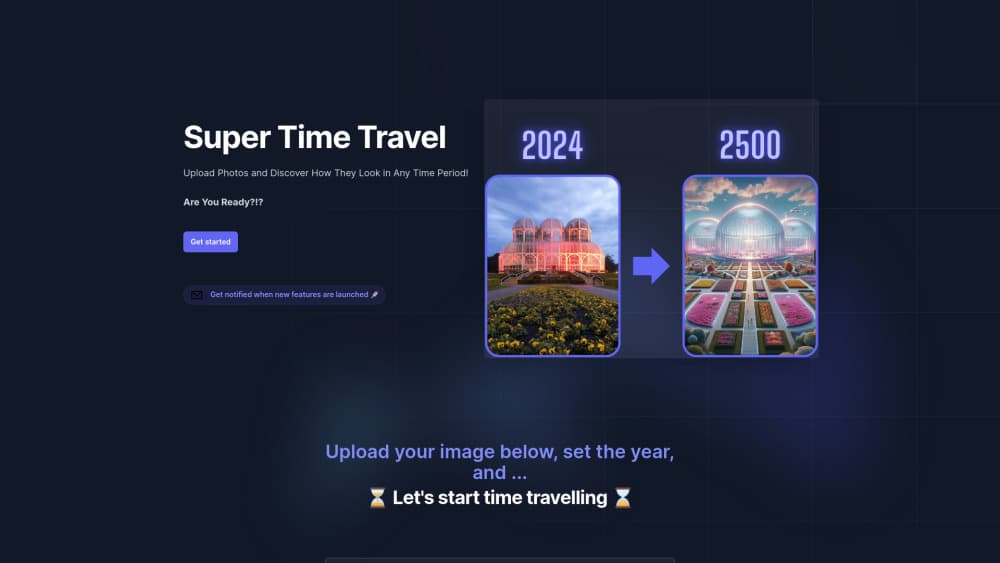
About Super Time Travel
What Is Super Time Travel
Super Time Travel is a small web app with one job: take a photo you already have and reimagine it in another era. You upload an image, type the year you want, and the AI rebuilds the scene with the clothes, colors, and atmosphere of that period. There's no editor to learn and nothing to install.
The appeal is curiosity rather than production work. People use it, or use it as an AI photo age changer, to see a family portrait as a Victorian studio shot, a selfie as a 1980s snapshot, or a city street as it might appear a century from now. AE Studio, the development and design shop behind the project, describes it as entertainment built around your own pictures, and that framing is accurate. It isn't a retouching suite.
The limits matter as much as the feature. You get one transformation per upload, the output quality tracks the photo you feed it, and the site publishes no pricing page, no API, and no bulk workflow. Treat it as a photo time machine for fun, not a tool for client work.
Getting Started
- Open supertimetravel.com in any modern browser. No account or download is required.
- Upload a photo from your device. Clear, well-lit pictures with visible faces tend to hold up better.
- Enter the year you want to visit, either in the past or the future.
- Start the generation and wait for the restyled image to appear.
- Save the result if you want to keep it, then repeat with another year or another photo.
Product Information
A quick look at Super Time Travel's pricing, supported platforms, and performance.
Best for
The users, tasks, and scenarios where this tool fits best.
Users
- Curious hobbyists
- History and sci-fi fans
- Social media posters
Tasks
- Aging or de-aging a portrait
- Restyling a travel photo
- Making a themed greeting
- Testing a concept visually
Scenarios
- A rainy afternoon with family photos
- Classroom icebreakers
- Party and event screens
Key features
Year Selection
The core control is a year field. You type the date you want and the model shifts the whole scene toward that period, so a 1890 setting brings heavier fabrics and muted tones while a 2150 setting leans into speculative design. It gives you a fast way to compare eras with the same source image.
Photo Upload and Restyling
You work from your own picture rather than a text prompt. The tool reads the subject, lighting, and composition, then rebuilds the frame in the target era. That makes the AI time travel photo effect feel personal, and it's what separates this time travel photo generator from prompt-only image tools, because the person in the image is someone you know.
Past and Future Directions
Most aging filters only push forward. This one accepts years on both sides of the present, which is why people also call it a future photo generator. You can send the same portrait backward to the 1920s and forward to the 2120s in two separate runs.
Browser-Only Access
Everything runs on the web page. There's no mobile app, no desktop client, and no plugin to install, so it works on a laptop, a tablet, or a phone with a modern browser. That keeps the barrier low for a one-off experiment.
Instant Single-Image Output
Each upload produces one restyled image, and the wait is short enough for casual use. The tradeoff is that you can't queue a folder of photos or fine-tune the result with masks and sliders.
Free Entry With No Signup Wall
The site opens straight into the upload box. You can try the historical photo generator without creating a profile, which suits a tool most people will use once or twice out of curiosity.
Pros and cons
Pros
- Zero setup: the upload box is the landing page, so the first result is a few clicks away.
- Personal output: your own photo, not a generic stock scene, which makes the result worth sharing.
- Two directions in one tool: past and future years both work, so one session covers several eras.
- No account required for a quick test, which removes the usual email verification step.
- Clear scope: it does one thing, and it doesn't pretend to be a full image editor.
Cons
- One image at a time, so a batch of family photos takes repeated manual uploads.
- Likeness drift: large year jumps can change facial features enough that the subject stops looking like themselves.
- No published pricing or feature roadmap, which makes it hard to plan around for regular use.
- No API or documented data policy on the main page, so teams with privacy requirements should check before uploading sensitive photos.
Frequently asked questions
It takes a photo you upload and regenerates it as if the scene belonged to a year you choose. The AI keeps the subject and composition roughly intact while changing clothing, color, and setting details to match the era.
Related content
Explore related tools, skills, and articles for Super Time Travel.
Super Time Travel Alternatives

Google EmbeddingGemma 2
Google DeepMind · Writing · Image · CodingGoogle EmbeddingGemma 2 is a 740M-parameter open model that turns text, code, images, audio, and video frames into vectors in one 768-dimension space, running on phones and laptops.

Tractionwave
TractionWave · Image · MarketingTractionWave is an AI attention heatmap tool for static ads. Upload a PNG or JPG and it returns predicted attention, ranked hotspots, and fixes before you spend budget.

Imejis.io
Imejis.io · Image · MarketingImejis.io is an AI design studio for agents and marketing teams. Describe an image in plain words, and it writes the copy, builds the layout, reflows it to every size, then exports a finished file.